
Antigua and Barbuda Social Security Board Sworn In

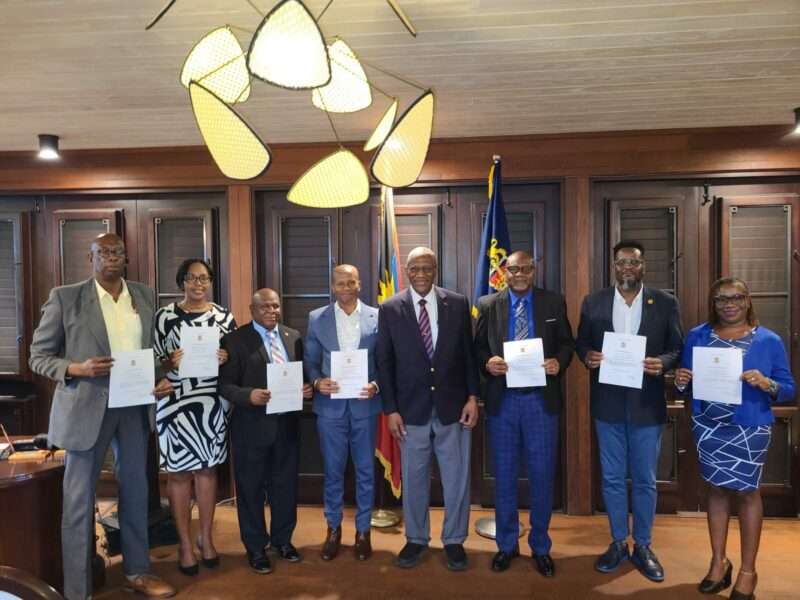
St. John’s, Antigua – The newly appointed members of the Antigua and Barbuda Social Security Board (ABSSB) were officially sworn in today at Government House. His Excellency Sir Rodney Williams, Governor General of Antigua and Barbuda, administered the oaths of office and secrecy in the presence of the Board’s leadership, government representatives, and esteemed guests.
In attendance at the ceremony (from left to right in the official photograph) were:
Mr. Martin Cave – Representative, Antigua and Barbuda Chamber of Commerce
Ms. Sherri-Ann Brazier – Representative, Antigua and Barbuda Employers’ Federation
Mr. Alrick Daniel – Representative, Antigua and Barbuda Trades and Labour Union (ABTLU)
Mr. Kem Tonge – Chairman, Social Security Board
His Excellency Sir Rodney Williams – Governor General of Antigua and Barbuda
Mr. Peter Abraham – Representative, Antigua and Barbuda Trades and Labour Union (ABTLU)
Mr. David Matthias – Director, Social Security
Ms. Phyllis Davis – Board Secretary
During brief remarks, His Excellency Sir Rodney Williams emphasized the importance of the Social Security Board in upholding the nation’s social protection framework. He urged the new Board members to act with integrity and a deep sense of public service, ensuring that the work of the Board supports the long-term welfare of Antiguan and Barbudan citizens.

Following the ceremony, Board Chairman Mr. Kem Tonge expressed gratitude for the confidence placed in the newly appointed members. He reaffirmed the Board’s commitment to delivering quality service, enhancing transparency, and strengthening governance practices within the Social Security system.
The Antigua and Barbuda Social Security Board is entrusted with overseeing and administering the Social Security system to ensure the financial protection and welfare of workers and pensioners. With broad representation from various stakeholder groups, the Board will continue to focus on the efficient collection of contributions, timely payment of benefits, and the prudent management of funds.
This story was first published by Antigua News on : antigua.news/2025/03/26/antigua-and-barbuda-social-security-board-sworn-in. © 2025 Antigua News. Republication without permission is not allowed.

About the author
The Editorial Staff refers to all reporters employed by Antigua.news. When an article is not an original creation of Antigua.news—such as when it is based on a press release, other media articles, letters to the editor, or court decisions—one of our staff members is responsible for overseeing its publication.
Read our editorial standards and corrections policy. Spotted an error? Contact the newsroom.
More from Antigua and Barbuda
View section
HIGH SCHOOL STUDENTS CONTINUE TO BENEFIT FROM SANDALS FOUNDATION’S CARE FOR KIDS SCHOLARSHIP PROGRAMME
Kyrah Edwards and Erwin Christopher receive third annual scholarship payments, supporting their education while encouraging community service.
By Shermain Bique-Charles

Chinese Embassy Welcomes Caribbean Youth Parliamentarians for Cultural Exchange
Ambassador Jiang Wei calls for greater understanding through dialogue, while House Speaker Osbert Frederick praises the young leaders.
By Shermain Bique-Charles

LETTER: A Safe Reunion Should Not End Questions About a Child’s Welfare
Delores Harris calls for greater accountability and child protection measures following the safe reunion of a young child found wandering alone.
By Editorial Staff

Browne Demands Climate Finance and Action to Protect Small Island States
Speaking in Australia, the Prime Minister urged major emitters and financial institutions to turn climate commitments into practical support for vulnerable nations.
By Shermain Bique-Charles
Comments
Be the first to comment.