
Titanic survivor’s letter sells for £300,000 at auction

by Mick the Ram
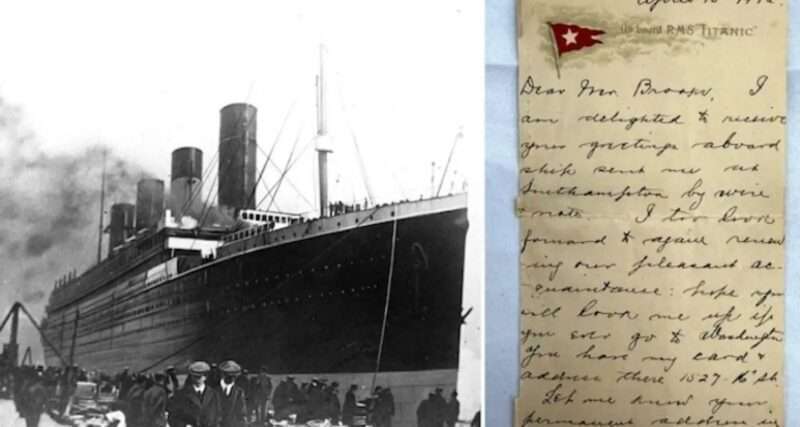
A letter written by a Titanic passenger in the days just before the famous liner tragically sank, has been sold for a record-breaking £300,000 ($400,000) at auction in the UK.
It was purchased by an anonymous buyer at the Henry Aldridge and Son auction house in Devizes Wiltshire for a price five times higher than the £60,000 it had been valued at.
The note belonged to Colonel Archibald Gracie and was dated 10 April 1912, the day he had stepped aboard the ship in Southampton, and five days before it hit an iceberg in the North Atlantic and ended up on the bottom of the ocean, killing more than 1,500 people.
He was one of more than 2,000 passengers and crew who were sailing to New York on its maiden voyage and survived the sinking, but his health was severely affected by the hypothermia and physical injuries he suffered at the time.
The Colonel fell into a coma on 2 December 1912, and died of complications from diabetes two days after that.
He wrote a book which was published in 1913 under the original title: The Truth about the Titanic.
The auctioneer who facilitated the sale said the letter had attracted the highest price of any correspondence written and recovered from the Titanic.
Incredibly rare
Henry Aldridge and Son auctioneers said: “It is impossible to overstate the rarity of this lot, it is written by one of the highest profile survivors, with excellent content and on the rarest of mediums a letter-card; it is a truly exceptional museum-grade piece.”
The £300,000 sale was tax inclusive and afterwards they said: “The record-breaking prices and global participation from collectors are a testament to the enduring interest in the Titanic the world over, the stories of those men, women and children are told through the memorabilia and their memories are kept alive through those items”.
Letter “prophetic”
The letter is believed to be the only example from Colonel Gracie in existence from his time on board the Titanic and has been described as being “prophetic”, as it records him telling an acquaintance over four sides of paper that he would “await my journey’s end” (in New York City) before passing judgement on the “fine ship”.
He was a first-class passenger and wrote the correspondence from cabin C51, before posting it when the ship docked in Queenstown, Ireland, on 11 April 1912. It was also postmarked “London” on 12 April.

Distressing account
His account of the sinking of the doomed liner is really harrowing and regarded as among the best known.
He recounted how he spent much of the voyage chaperoning various unaccompanied women, including three sisters – who did survive – and reading books from the first-class library.
Helped others to safety
On the night of the sinking Colonel Gracie had gone to bed early, intending to get up the next morning to play squash, but was woken by a sudden jolt, as the Titanic struck the iceberg shortly before midnight.
He helped women and children into lifeboats and fetched them blankets, before the ship dipped below the water.
Rescued several hours after sinking
He survived by scrambling onto an overturned lifeboat in the icy waters alongside a couple of dozen others, although more than half of them died from exhaustion or cold.
He also wrote how although there were swimmers around their boat and that they had paddled away from them through fear that the vessel could be overwhelmed: “In no instance, I am happy to say, did I hear any word of rebuke from a swimmer because of a refusal to grant assistance”.
As dawn broke, the Colonel returned to New York City aboard the rescue ship the Carpathia, where be began writing about all that he had been through.
This story was first published by Antigua News on : antigua.news/2025/05/01/titanic-survivors-letter-sells-for-300000-at-auction. © 2025 Antigua News. Republication without permission is not allowed.

About the author
The Editorial Staff refers to all reporters employed by Antigua.news. When an article is not an original creation of Antigua.news—such as when it is based on a press release, other media articles, letters to the editor, or court decisions—one of our staff members is responsible for overseeing its publication.
Read our editorial standards and corrections policy. Spotted an error? Contact the newsroom.
More from World
View section
Kenyan Preacher Paul Mackenzie Convicted of Murdering 191 People in Shakahola Massacre
Former church leader found guilty alongside 28 others in a case involving the deaths of 190 children and one adult who were allegedly subjected to deadly religious fasting.
By Cory Wayland

Priest Speaks About Life and Death in Final Sermon Before Falling Crucifix Kills Him During Mass
Father Patricio Sánchez urged worshippers to cherish their time with God and loved ones before a large wooden crucifix fell and fatally struck him during a church service in Ecuador.
By Cory Wayland

Florida Attorney General James Uthmeier Announces Arrest Warrant for Former Cuban Leader Raúl Castro Over 1996 Aircraft Shootdown
James Uthmeier confirms murder conspiracy charge against the 95-year-old former president over the 1996 shootdown of two civilian aircraft that killed four men.
By Cory Wayland

France and Italy Count the Cost as Protests Turn Violent Across Europe
Burned public buildings and looted shops have overshadowed demands for better schools and relief from living costs, as unrest takes different forms across Europe.
By Editorial Staff
Comments
Be the first to comment.