
Groundwork Begins for New High-Speed Fiber Optic Cable in Antigua and Barbuda

Press Statement
Antigua and Barbuda is set to play an important role in the CELIA (Caribbean ELIte Alliance) Submarine Cable System, a major regional initiative aimed at strengthening digital connectivity across the Caribbean.
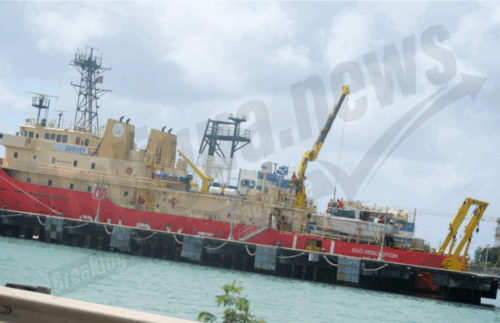
As part of the project’s early phase, representatives from Alcatel Submarine Networks (ASN) and EGS (Asia) Ltd. are currently in Antigua and Barbuda conducting a critical marine survey at Morris Bay, Old Road.
This survey focuses on the portion of the CELIA cable system that will pass through our territorial waters, connecting Antigua and several neighbouring islands to Boca Raton, Florida.
The purpose of the marine survey is to map the ocean floor and identify the most secure and efficient route for laying the submarine cable. The data collected will guide the cable’s design, installation, and long-term maintenance. All survey work is being carried out in accordance with international and industry best practices.

The CELIA system is being developed as a high-speed, high-capacity fiber optic network that will significantly improve digital connectivity across the region. For Antigua and Barbuda, this means faster internet, more reliable service, and greater resilience in our communications infrastructure.
It will also support our digital economy, help bridge the digital divide and strengthen our position in the growing global information economy.
APUA is a key partner in this initiative, working alongside Setar (Aruba), Telxius (Puerto Rico and USA), and Orange (France/Martinique). The consortium is also committed to collaborating with local NGOs and authorities to protect the environment and promote the well-being of communities throughout the project.
The CELIA cable system, including the landing point in Antigua and Barbuda, is expected to be fully operational by late 2027.
This story was first published by Antigua News on : antigua.news/2025/05/18/groundwork-begins-for-new-high-speed-fiber-optic-cable-in-antigua-and-barbuda. © 2025 Antigua News. Republication without permission is not allowed.

About the author
The Editorial Staff refers to all reporters employed by Antigua.news. When an article is not an original creation of Antigua.news—such as when it is based on a press release, other media articles, letters to the editor, or court decisions—one of our staff members is responsible for overseeing its publication.
Read our editorial standards and corrections policy. Spotted an error? Contact the newsroom.
More from Antigua and Barbuda
View section
Tourism Ministry and ABTA Working with Bert Kirchner on Proposed Louis Tomlinson Campaign
Minister Michael Freeland has held talks on the project, which aims to turn international exposure into visitor interest and bookings.
By Shermain Bique-Charles

Your Child Is Safe at Home, But Are They Safe Online?
Games, chats and social media are where our children play and make friends. Here is what every parent and guardian needs to know to keep them safe there.
By Editorial Staff

HIGH SCHOOL STUDENTS CONTINUE TO BENEFIT FROM SANDALS FOUNDATION’S CARE FOR KIDS SCHOLARSHIP PROGRAMME
Kyrah Edwards and Erwin Christopher receive third annual scholarship payments, supporting their education while encouraging community service.
By Shermain Bique-Charles

Chinese Embassy Welcomes Caribbean Youth Parliamentarians for Cultural Exchange
Ambassador Jiang Wei calls for greater understanding through dialogue, while House Speaker Osbert Frederick praises the young leaders.
By Shermain Bique-Charles
Comments (4)
Antigua Surf May 18, 2025, 10:10 PM
Unruly One May 19, 2025, 5:34 AM
Stone May 19, 2025, 5:50 AM
Juju Bee May 19, 2025, 10:16 AM
Who keeps the government feet to the fire?