
Sixteen Interns Begin Summer Internship Programme at APUA

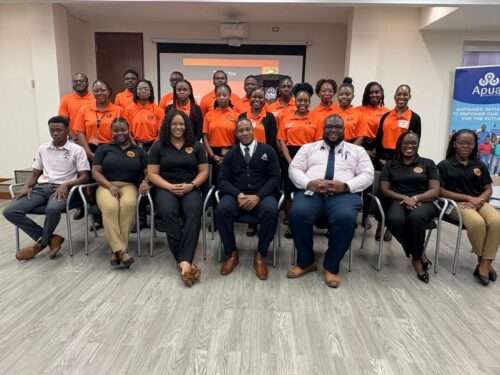
Sixteen interns have commenced a six-week internship programme within the Antigua Public Utilities Authority (APUA) as part of its Summer Internship Programme (SIP).
The interns were officially welcomed during a ceremony held at the Conference Centre in the Treasury Building on Independence Drive.
APUA’s Senior Management team, including Chief Executive Officer John Bradshaw and Chief Financial Officer Roger Tonge, was present to greet the interns and underline the significance of this opportunity.
Lyle Jackson, Chairman of the SIP, expressed his enthusiasm in welcoming the new interns, highlighting that they are now part of one of the most prestigious and sought-after internship programmes in the Caribbean.
He praised the hard work of the interns, noting that they have earned their positions out of hundreds of applicants and are joining a programme that has positively impacted lives and shaped futures for decades.

Jackson emphasized that APUA’s commitment to national development goes beyond the delivery of essential utilities. “It includes investing in our most valuable asset… our people,” he stated. He described the SIP as a cornerstone of this commitment, highlighting its role as a platform for professional growth, personal discovery, and leadership within the community.
Originally established with the goal of providing meaningful work experience for young Antiguans and Barbudans, the SIP has evolved since 2012 into a comprehensive developmental journey.
Human Resources Manager Rodney Simon also shared valuable insights with the interns as they embark on their assignments across various departments within APUA.
.
This story was first published by Antigua News on : antigua.news/2025/06/24/sixteen-interns-begin-summer-internship-programme-at-apua. © 2025 Antigua News. Republication without permission is not allowed.

About the author
The Editorial Staff refers to all reporters employed by Antigua.news. When an article is not an original creation of Antigua.news—such as when it is based on a press release, other media articles, letters to the editor, or court decisions—one of our staff members is responsible for overseeing its publication.
Read our editorial standards and corrections policy. Spotted an error? Contact the newsroom.
More from Antigua and Barbuda
View section
Baptist Academy Takes Two of Antigua and Barbuda’s Top Three CSEC Spots
Jhordyn Jacobs Jonas leads the 2026 rankings with 21 Grade I passes, followed by Kayden Lewis and Aliane Challenger.
By Cory Wayland

Antigua and Barbuda Uses CHOGM to Showcase Conference Tourism Potential
Tourism Minister Charles Fernandez welcomes Commonwealth delegates as Antigua and Barbuda showcases its conference facilities, culture and visitor experiences.
By Shermain Bique-Charles

Liat Air Urges Passengers To Arrive Three Hours Early As CHOGM Security Could Disrupt Travel
The airline warns that enhanced security, official movements and possible road restrictions could affect airport access and flight schedules from November 1 to 4.
By Cory Wayland

UPP To Host Town Hall On Environment Democracy And Women’s Rights Ahead Of CHOGM
The meeting, titled “The People’s Message to the CHOGM Delegates,” is scheduled for Friday at Freedom Hall.
By Cory Wayland
Comments (4)
Apex Jones June 24, 2025, 5:25 PM
Karen June 24, 2025, 8:25 PM
Bebe June 24, 2025, 8:26 PM
Informed citizen June 25, 2025, 7:28 PM