
Inet Retail Store Relocates to Market Street

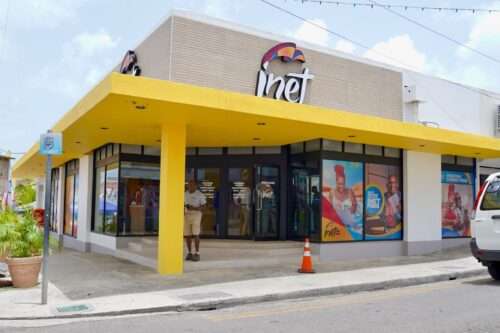
St. John’s, Antigua — Friday, 4th July 2025 — The Antigua Public Utilities Authority (APUA) is proud to announce the official opening of its new inet Retail Store, now located at the corner of Market and St. Mary’s Street, formerly the Cecil’s Building.
This relocation from Independence Avenue to a modern, centrally located facility reflects APUA’s ongoing commitment to enhancing customer service and improving accessibility. Situated in the heart of St. John’s, the new store has been designed to provide a more convenient, efficient, and comfortable customer experience.
As part of this transition, several service enhancements have been introduced at the new location. The inet Retail Store will now operate on Mondays from 8:00 a.m. to 5:00 p.m. and on Saturdays from 8:00 a.m. to 4:00 p.m. Customers can continue to access a full range of inet services, including new mobile and broadband sign-ups, handset purchases, and top-ups.

In addition, a dedicated APUA Quick Payment Center is now available for Electricity and Water bill payments. This cashier service will operate Mondays to Fridays from 8:00 a.m. to 3:30 p.m., with a limit of three transactions per customer.
Customers will also benefit from 24-hour access to bill payments and top-ups through user-friendly self-service kiosks located onsite.
The opening of the new inet Retail Store coincides with APUA’s 52nd Anniversary and reinforces the Authority’s dedication to innovation and continuous improvement.
APUA inet invites all customers to visit the new location and experience the enhanced services now available.
APUA inet thanks the public for their continued support as it continues Going Beyond Expectations.
This story was first published by Antigua News on : antigua.news/2025/07/04/inet-retail-store-relocates-to-market-street. © 2025 Antigua News. Republication without permission is not allowed.

About the author
The Editorial Staff refers to all reporters employed by Antigua.news. When an article is not an original creation of Antigua.news—such as when it is based on a press release, other media articles, letters to the editor, or court decisions—one of our staff members is responsible for overseeing its publication.
Read our editorial standards and corrections policy. Spotted an error? Contact the newsroom.
More from Antigua and Barbuda
View section
Royal Visit Ends After Week of Independence Celebrations and Commonwealth Engagements
King Charles III and Queen Camilla departed Antigua and Barbuda this morning following national, community and diplomatic events.
By Shermain Bique-Charles

Samoa Urges Climate Finance That Does Not Deepen Vulnerable Nations’ Debt
Outgoing Commonwealth chair calls for accessible and predictable support as climate losses mount.
By Shermain Bique-Charles

Missing Man Ackly Roberts, 92, Found Dead by Police
Roberts had been reported missing after he was last seen on November 2.
By Shermain Bique-Charles

Commonwealth Plans Trade and Investment Conference to Advance US$2 Trillion Goal
Botchwey says ministers and business leaders will meet next year to tackle barriers and support investment.
By Shermain Bique-Charles
Comments (8)
Inet July 4, 2025, 7:44 PM
informed Citizen July 4, 2025, 7:52 PM
Stone July 4, 2025, 9:16 PM
Hallelujah Amen July 5, 2025, 8:45 AM
Qurious July 5, 2025, 11:03 AM
Gretta July 5, 2025, 4:15 PM
Faithful national July 5, 2025, 8:30 AM
Aren’t you free to switch? Chuptz!
Apex Jones July 5, 2025, 12:26 PM