
Asa Banton: The Bouyon Boss and His Trusty Teddy Bear, Brownie



Asa Banton, commonly referred to as the Caribbean’s Bouyon Boss, has taken his affection to a whole new level—he’s found love in a teddy bear! Yes, you heard that right!
This isn’t just any teddy; it’s his trusty sidekick, Brownie. Asa insists on taking Brownie everywhere with him, even on flights. Talk about an emotional support animal!

Banton, hailing from Granbay, Dominica, has made his way over to Antigua and Barbuda for the Face-off show, and let me tell you, he is not just carrying luggage—he’s got Brownie nestled right where he can keep an eye on her. Forget having a band or backup dancers; he’s got a full-blown plush companion!
Asa treats Brownie like a VIP. Ever seen someone tuck a teddy bear into bed? Well, Asa does, and he shows affection like Brownie is his long-lost soulmate!

Who knew teddy bears could spark such romance? He naps with it, talks to it, and probably even shares his snacks (though I’d still advise against sharing the last slice of pizza).
When it comes to travel, Asa has a strict “No Brownie Left Behind” policy. I can just imagine him at the airport: “Sorry, folks, I can’t go through security without my bear!”
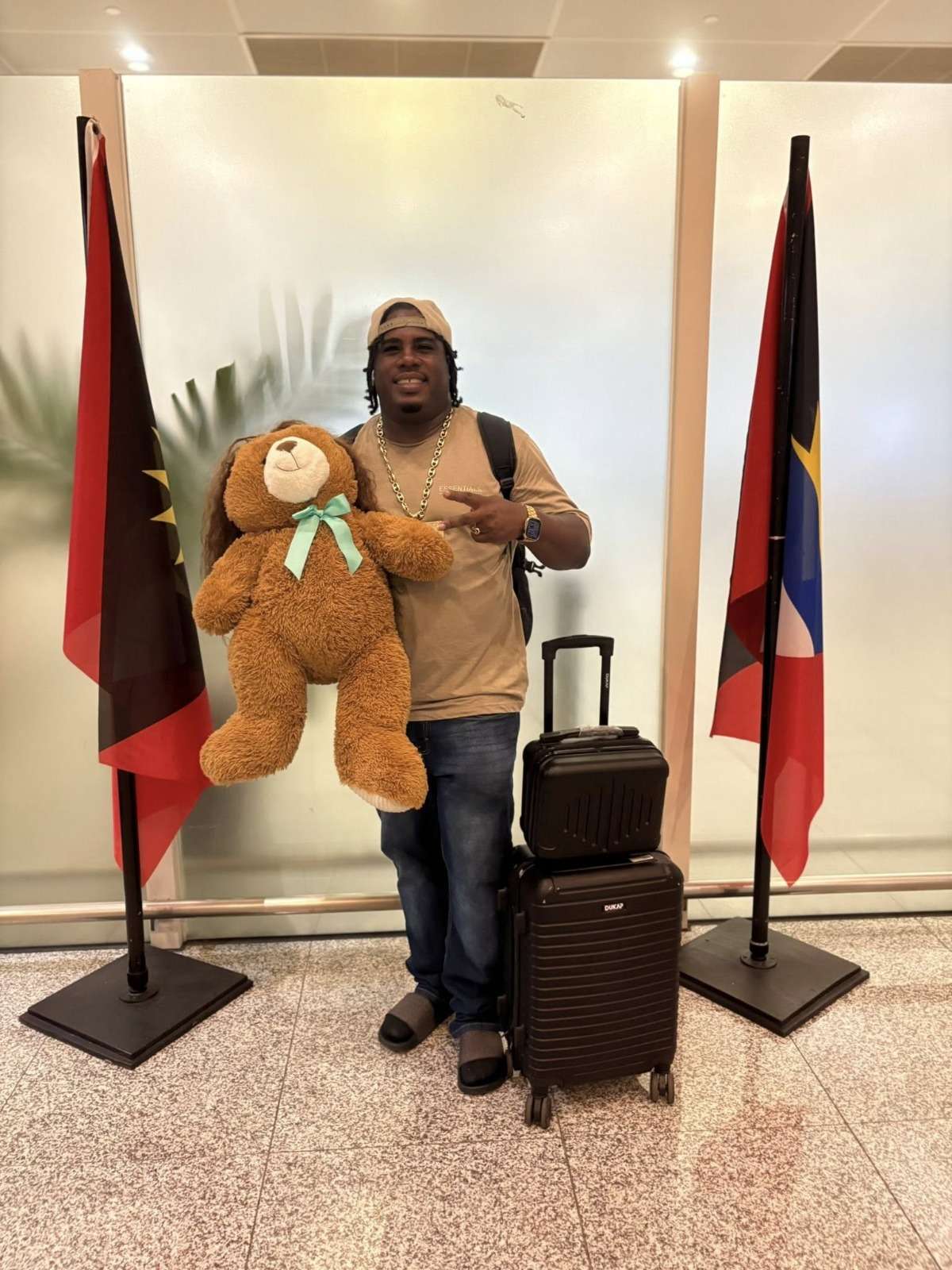
In the coming weeks, Asa is set to perform at many shows. Can you picture it? Asa on stage, belting out hits, with Brownie getting the best front-row seat in the house.
If you hear applause, it’s probably from fans…or perhaps just Brownie being super supportive!
This story was first published by Antigua News on : antigua.news/2025/07/27/asa-banton-the-bouyon-boss-and-his-trusty-teddy-bear-brownie. © 2025 Antigua News. Republication without permission is not allowed.

About the author
Shermain Bique-Charles is an accomplished journalist with over 24 years of dynamic experience in the industry. Renowned for her exceptional storytelling and investigative skills, she has garnered numerous awards that highlight her commitment to journalistic integrity and excellence. Her work not only informs but also inspires, making her a respected voice in the field.
Read our editorial standards and corrections policy. Spotted an error? Contact the newsroom.
More from Culture, Science and Tech
View section
VIDEO: As School Reopens, Simon Bolivar Pre-School’s Garden serves as a Model for teaching Agriculture in Early Childhood
By Editorial Staff

CUB Hells Gate Crowned 2026 Panorama Champions After Electrifying Carnival Showdown
By Cory Wayland
Five Female Chefs Wow Diners With Multi-Course Dinner at Hodges Bay Resort
By Shermain Bique-Charles

North Europe and the Arctic 2026: The Race for Power, Resources and New Trade Routes
By Dario Item
Comments (4)
Informed citizen July 27, 2025, 1:52 PM
Ben Simmons July 27, 2025, 2:08 PM
Juju Bee July 27, 2025, 5:24 PM
Sheesh July 27, 2025, 8:01 PM