
Tropical Storm Jerry Moves North After Drenching Antigua and Barbuda

By Cory Wayland
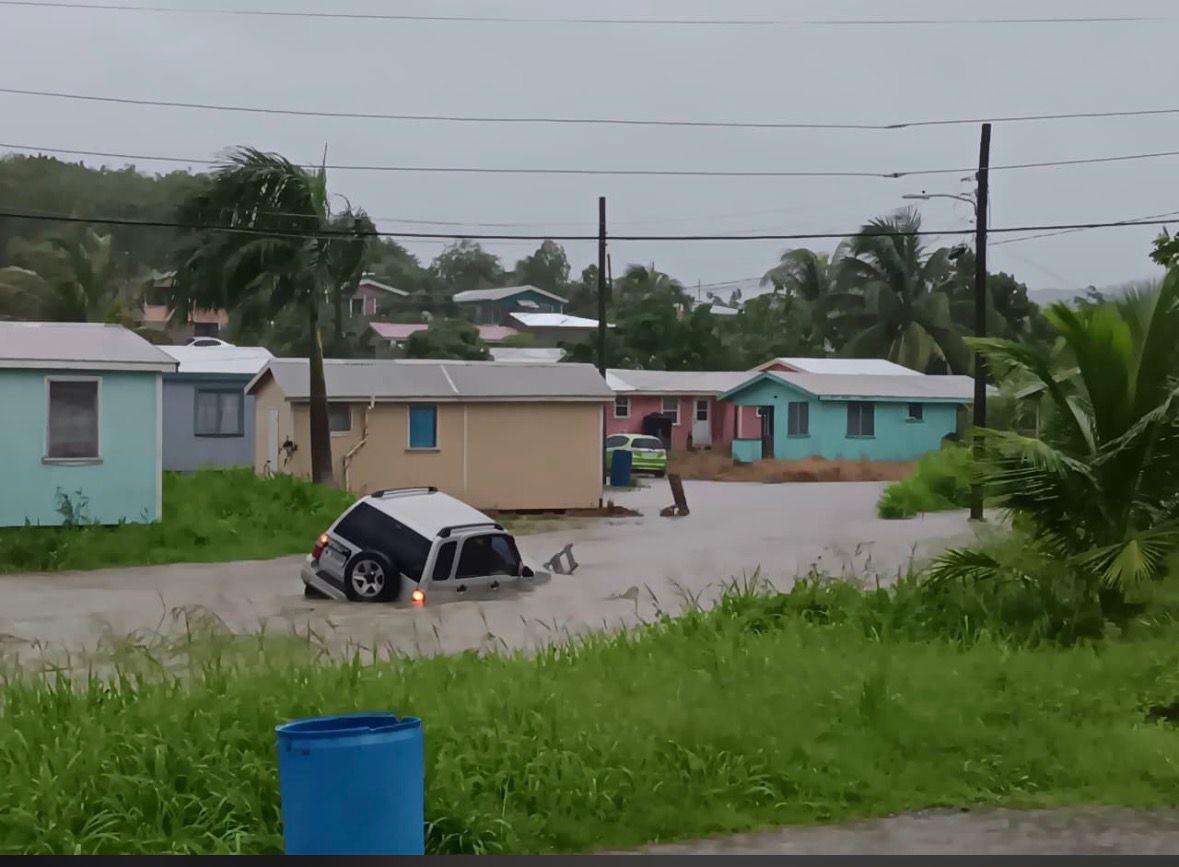
Tropical Storm Jerry has begun moving northward over the western Atlantic after lashing Antigua and Barbuda and other Leeward Islands with torrential rain and strong winds overnight.
According to the National Hurricane Center (NHC) in Miami, at 5:00 a.m. (AST), Jerry was located near latitude 24.5° North and longitude 63.4° West, about 435 miles north of the Leeward Islands and 545 miles south of Bermuda. The system is moving north at around 16 mph (26 km/h) with maximum sustained winds of 60 mph (95 km/h).
Forecasters expect Jerry to maintain its northward track through the weekend before turning toward the east on Monday, with gradual weakening predicted over the next few days.
Although there are no coastal watches or warnings currently in effect, the NHC cautioned that large swells generated by the storm continue to affect the Leeward and Windward Islands, the Virgin Islands, Puerto Rico, and the Dominican Republic. These swells could produce life-threatening surf and rip currents, with conditions expected to spread to the Bahamas later today.
In Antigua and Barbuda, Jerry delivered a significant deluge, with more than nine inches of rain recorded in some areas, much of it falling within just three hours. The heavy rainfall caused flash flooding and minor landslides in parts of the islands but no major damage was immediately reported.
Local authorities have urged residents to remain cautious, avoid flooded areas, and continue monitoring updates from the Antigua and Barbuda Meteorological Services and the National Office of Disaster Services (NODS).
Jerry, which caused widespread concern across the northeastern Caribbean, is expected to move away from the region as it continues north into open waters.
This story was first published by Antigua News on October 11, 2025: antigua.news/2025/10/11/tropical-storm-jerry-moves-north-after-drenching-antigua-and-barbuda. © 2025 Antigua News. Republication without permission is not allowed.

About the author
Cory Wayland is the Social Media Co-ordinator at Antigua.News, where he manages digital content strategy, audience engagement, and real-time news publications across social platforms. With a keen eye for trending topics and a commitment to factual storytelling, Cory plays a key role in shaping the online voice of Antigua.News.
Read our editorial standards and corrections policy. Spotted an error? Contact the newsroom.
More from Antigua and Barbuda
View section
Elderly Man Found Dead Inside Ovals Home
Police are investigating after an elderly man was discovered unresponsive at his home in Ovals on Wednesday morning, with no indication of foul play at this stage.
By Cory Wayland

WATCH: Taxi Operators Call for Proper Policing as Minister Freeland Reviews Concerns in St. John’s
Taxi association representatives say vehicles occupying designated spaces and soliciting cruise passengers are affecting operations around Heritage Quay.
By Shermain Bique-Charles

OPINION: The World Must Rise Up With A Single Voice Against All Forms Of Terrorism
Cuban Ambassador Sergio Martinez Gonzalez calls for a united global stand against terrorism as CARICOM and Cuba commemorate the victims of the 1976 Cubana Airlines bombing and reaffirm their opposition to terrorism in all its forms.
By Editorial Staff

SLBMC Cancer Symposium Expands to Include Community Discussions
The 2026 symposium added a dedicated community day, bringing patients, families and caregivers into wider discussions on cancer care.
By Shermain Bique-Charles
Comments (3)
Apex Jones October 11, 2025, 11:34 AM
Tromos October 11, 2025, 3:38 PM
Informed citizen October 11, 2025, 9:29 PM