
NSWMA Expands Fleet with Three New Heavy-Duty Trucks to Power National Clean-Up Efforts

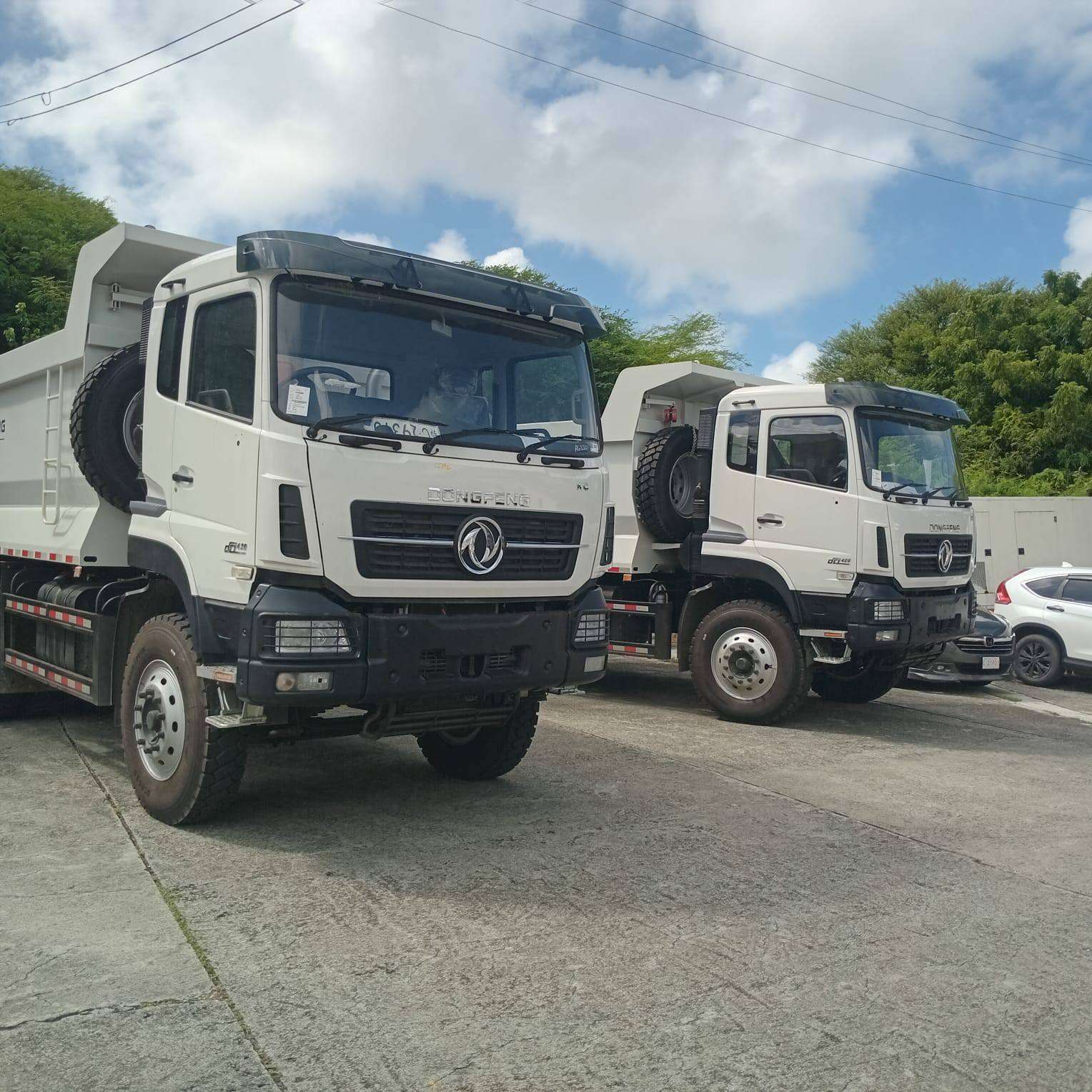
Antigua and Barbuda’s push for a cleaner, greener, and healthier environment has gained fresh momentum with the addition of three brand-new 20-ton trucks to the fleet of the National Solid Waste Management Authority (NSWMA).
The new vehicles, built for durability and efficiency, will play a central role in improving waste collection and landfill management across the twin-island state. Officials say the investment is part of the government’s broader commitment to strengthening national infrastructure for sustainable waste management.
According to the NSWMA, the trucks will be deployed primarily to bolster landfill operations, ensuring daily soil coverage and maintenance. This process is critical to controlling odours, reducing pest infestations, minimizing fire risks, and maintaining safer, more environmentally friendly landfill conditions.
“These additions are not just about trucks,” an NSWMA spokesperson explained. “They represent a renewed commitment to protecting public health, preserving the environment, and keeping Antigua and Barbuda clean for generations to come.”
The new equipment arrives as the 2025 National Clean-Up Campaign continues to mobilize communities under the theme “Love Where You Live!” The campaign encourages citizens to take pride in their surroundings and actively participate in maintaining cleaner neighbourhoods.
In addition to improving landfill operations, the trucks will assist in removing large debris and bulky waste collected during the ongoing island-wide clean-up drives—a major effort involving community groups, schools, and local businesses.
Officials describe the new fleet as a major investment in efficiency, sustainability, and civic pride. “Cleaner communities lead to healthier families,” the NSWMA statement read. “This is about building an Antigua and Barbuda where everyone can live, work, and thrive in a cleaner environment.”
The Authority also expressed gratitude to the Government of Antigua and Barbuda for its unwavering partnership and financial support in advancing national environmental goals.
The NSWMA reaffirmed that while new machinery strengthens their operations, lasting change ultimately depends on public cooperation. Their message to residents remains clear: “When we love where we live, we take care of it.”
This story was first published by Antigua News on : antigua.news/2025/10/23/nswma-expands-fleet-with-three-new-heavy-duty-trucks-to-power-national-clean-up-efforts. © 2025 Antigua News. Republication without permission is not allowed.

About the author
Shermain Bique-Charles is an accomplished journalist with over 24 years of dynamic experience in the industry. Renowned for her exceptional storytelling and investigative skills, she has garnered numerous awards that highlight her commitment to journalistic integrity and excellence. Her work not only informs but also inspires, making her a respected voice in the field.
Read our editorial standards and corrections policy. Spotted an error? Contact the newsroom.
More from Antigua and Barbuda
View section
Antigua and Barbuda First in Eastern Caribbean to Sign UN Development Framework for 2027–2031
The agreement will guide cooperation on economic diversification, climate resilience, social protection and other development priorities.
By Shermain Bique-Charles

Parker Defends Call for Age of Consent at 18 in Response to ASPIRE
Senator calls for stronger protection against sexual exploitation alongside adolescent healthcare, education and safeguards for relationships between young people close in age.
By Shermain Bique-Charles

Greene Says CHOGM Could Open Doors for UWI Five Islands
Foreign minister identifies international student recruitment and academic connections as potential longer-term opportunities. Meta description: Greene says CHOGM could help UWI Five Islands promote its programmes and build connections with Commonwealth countries.
By Shermain Bique-Charles

West Indies Oil Seeks Coordination on Fuel Deliveries During CHOGM
Police ask the company to provide delivery dates and times so movements can be coordinated with security arrangements.
By Cory Wayland
Comments (4)
Juju Bee October 23, 2025, 10:07 AM
Anya October 23, 2025, 1:58 PM
Informed citizen October 23, 2025, 9:23 PM
Tromos October 23, 2025, 9:51 PM