
Night Detour Announced for All Saints Road as Ministry Advances Infrastructure Works

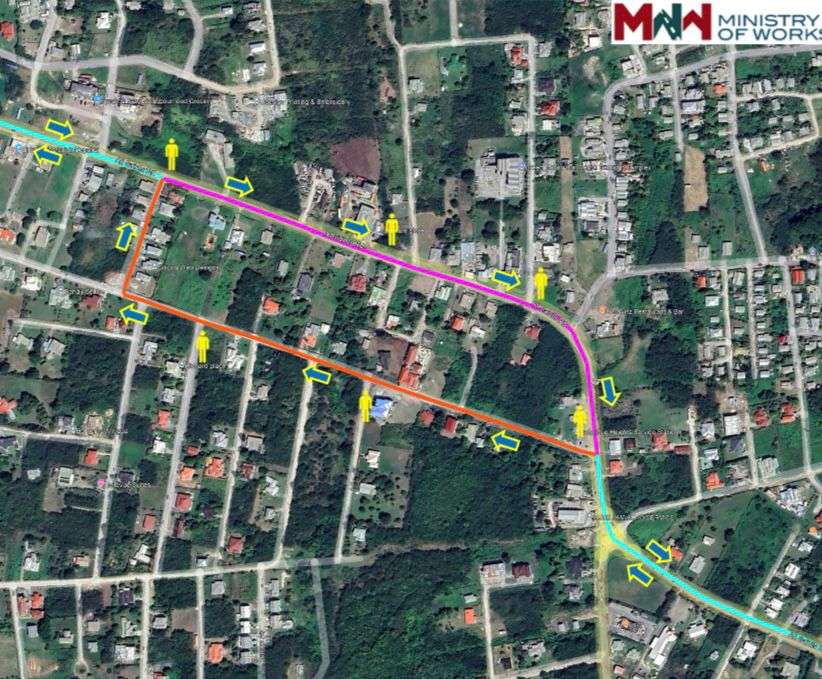
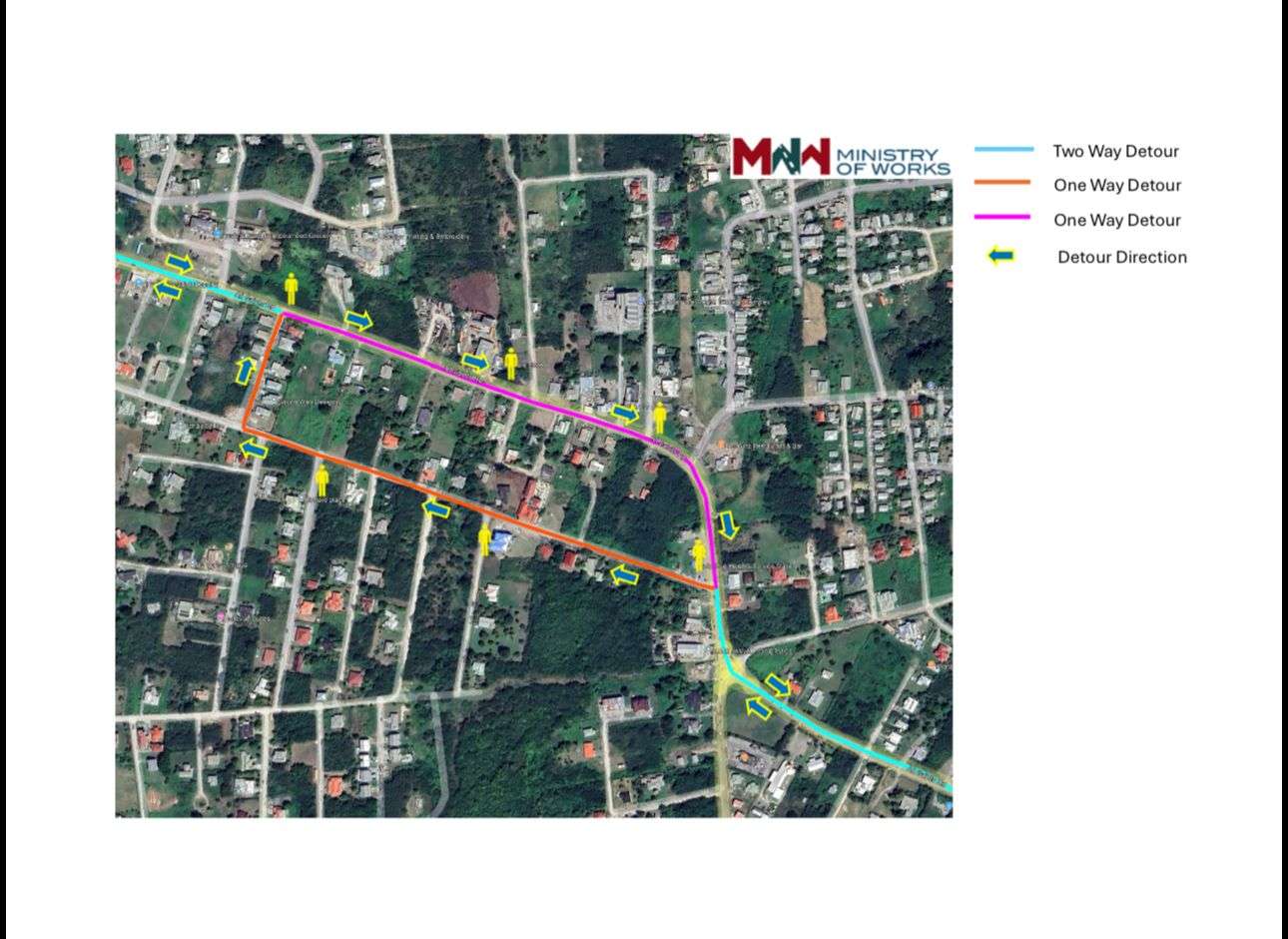
Motorists travelling along All Saints Road are being advised of a temporary nighttime detour as the Ministry of Works carries out major infrastructure works between the Belmont Clinic and the Bellevue Heights Service Station.
The works are scheduled to take place from 7:00 p.m. on Thursday, May 28, 2026, to 7:00 a.m. the following morning, during which traffic will be redirected to facilitate safe and efficient construction activity.
According to the Ministry, drivers heading out of town will proceed along All Saints Road in the vicinity of Belmont Clinic and the Bellevue Heights Service Station, following directions provided on-site.
Motorists travelling into town will be required to turn left at the Bellevue Heights Service Station and follow the designated route to rejoin All Saints Road.
Flag persons will be deployed along the corridor to assist with traffic management, while signage will guide commuters in both directions. Certain sections of the diversion will operate as one-way traffic zones to ensure the safety of road users and construction crews.
The Ministry emphasized that heavy-duty equipment will be operating in close proximity to the roadway and urged motorists to exercise caution and comply with all instructions. Despite the works, local access will be maintained for residents in the immediate area, and all businesses along the affected stretch will remain open.
The temporary disruption forms part of the ongoing All Saints Road Project, which is being undertaken by the Government of Antigua and Barbuda as part of wider efforts to improve road infrastructure and safety.
Commuters are being encouraged to plan ahead and allow extra travel time to avoid delays during the construction period.
For further information, the public may contact the Project Implementation Management Unit at 562-9173.
This story was first published by Antigua News on : antigua.news/2026/05/28/night-detour-announced-for-all-saints-road-as-ministry-advances-infrastructure-works. © 2026 Antigua News. Republication without permission is not allowed.

About the author
The Editorial Staff refers to all reporters employed by Antigua.news. When an article is not an original creation of Antigua.news—such as when it is based on a press release, other media articles, letters to the editor, or court decisions—one of our staff members is responsible for overseeing its publication.
Read our editorial standards and corrections policy. Spotted an error? Contact the newsroom.
More from Antigua and Barbuda
View section
P&O Cruises Secures Replacement Flights to Antigua After Norse Suspends Services
Two charter flights from the UK are scheduled to bring passengers to Antigua on Saturday to join Arvia.
By Shermain Bique-Charles

Social Protection Board Honours Seniors at Annual Tea Party
Under the theme “Ageing with Dignity, Living with Purpose,” the gathering celebrated the contributions of older citizens and called on younger generations to spend more time with them.
By Shermain Bique-Charles

Pastor Clement Joseph Urges Leaders to Put Wisdom and Humility Before Power
A reflection on Solomon’s request for discernment places fairness, consultation and service at the centre of leadership.
By Cory Wayland

Freeland Calls for More Business Backing as Antigua and Barbuda Misses Next Basketball Qualifier
The basketball association president says the cost of competing overseas and clashes with players’ school and club commitments continue to hold back national teams.
By Shermain Bique-Charles
Comments
Be the first to comment.