
Boris Johnson to remain as prime minister after tough no-confidence vote
By Tata
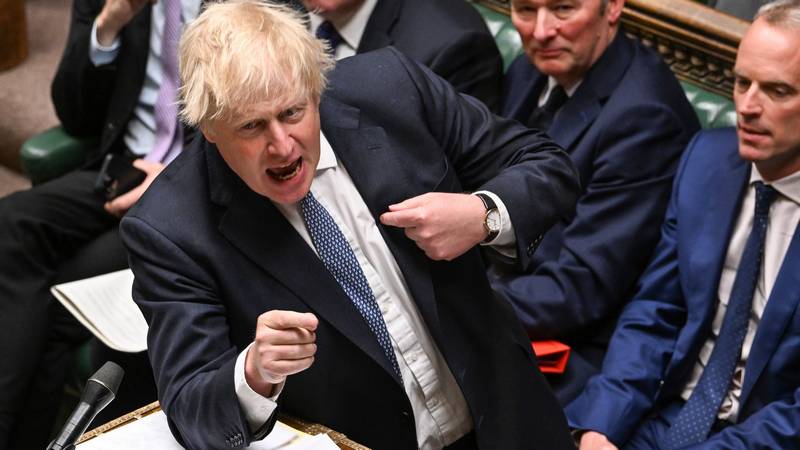
The multiple debates on the eligibility of the UK Prime Minister Boris Johnson to remain as prime minister was temporarily put on hold on Monday night when his party passed a confidence vote on him. At least 54 members of Parliament from the conservative party have previously informed the Conservative 1922 Committee about the confidence vote held on Monday night.
Boris Johnson needed 180 confidence votes to remain as Prime Minister, while 180 no-confidence votes were required to remove him from number 10. When it was time to vote, all the MPs cast their ballots, and as expected, Boris Johnson got a confidence vote.
Sir Graham Brady, chair of the Conservative 1922 Committee, announced the results moments after votes were cast. He confirmed that “359 votes were cast, and there were no spoilt ballots.”
“The votes in favour of having confidence in Johnson today were 211 votes, and the votes against are 148 votes. And therefore, I can announce that the parliamentary party does have confidence in him (Boris Johnson),” Sir Graham Brandy announced to the Tories.
With the result, Mr. Johnson has now won the confidence votes with a majority of 63, which means that about 41% of the MPs in the Prime Minister’s party want him to step down as their leader. Although the Prime Minister’s political career survived after the votes, the result was an indication that many MPs in his party were tired of Boris Johnson as their leader. That ought to be disturbing to him.
Reacting to the result, Boris Johnson called it conclusive and decisive.
“I think it is an extremely good, positive, conclusive, decisive result that enables us to move on, unite, and focus on delivering… and that is exactly what we are going to do,” Boris Johnson said soon after the announcement of the result.
How decisive is the result? The result is not as conclusive as Boris Johnson claimed. In December 2018, there was also a confidence vote on Theresa May, where she had 63% of the votes in during the confidence votes. She later resigned despite the support of as much as 63% of conservatives.
On Monday, Boris Johson got as little as 59% which means he did not get as much as Theresa May. Losing the trust of 41% of party members indicates that the fight is far from over. The Prime Minister has only saved his seat for one year. He will have to do more to hold his position longer.
Reacting to the results, conservative MP Sir Roja Gale said the outcome of the votes was “severely damaging to him (Johnson) and his reputation.”
Although the opposition was not part of the process, they were not left out. Liberal Democrats leader Sir Ed David blamed the conservatives for keeping Johnson as the prime minister. He said the conservatives are now “fully responsible for the prime minister’s behavior” He added that “they have narrowly voted to keep a lawbreaker and liar in No 10”
Before the votes, labor leader Keir Starmer said, “This evening, the conservative party has some decisions to make. To show some backbone or to back Boris Johnson. The British people are fed up with a prime minister who promises big but never delivers.” The conservative party has decided, and Johnson is still the Prime Minister.
Last week, Boris Johnson was booed with his wife when they arrived at the Queen’s Platinum jubilee. Members of his party are worried that keeping Johnson as leader of the party is too risky for the party, hence the vote of no-confidence.
Unlike Theresa May that resigned months after a vote of confidence, Johnson is unlikely to resign from his position as Prime Minister. Maybe he cannot be forced out either. But one sure thing is that the battle to remove him is far from over.
This story was first published by Antigua News on : antigua.news/2022/06/07/boris-johnson-to-remain-as-prime-minister-after-tough-no-confidence-vote. © 2022 Antigua News. Republication without permission is not allowed.
Read our editorial standards and corrections policy. Spotted an error? Contact the newsroom.
More from World
View section
Myanmar Says It Will Defy Parts of the Rohingya Genocide Ruling
The Gambia won an order for the safe return of Rohingya refugees. Myanmar’s president says he will choose which measures to accept, and an armed group controls most of the land they fled.
By Dario Item

Spain Votes After an Eviction Shook Its Government
An elderly tenant’s eviction helped trigger the November 29 snap election. Pedro Sánchez is recovering in some polls, but the right still has the clearer route to a governing majority.
By Dario Item

Dozens of KFC Restaurants Closing Across 10 U.S. States as Major Franchise Operator Files for Bankruptcy
Financial troubles, falling sales and millions in unpaid franchise fees have forced a major KFC operator into bankruptcy, with 72 restaurant locations affected and more closures possible.
By Cory Wayland

Robert Pattinson is the new James Bond
The Twilight and The Batman star succeeds Daniel Craig as 007 in the next James Bond film, directed by Denis Villeneuve and written by Steven Knight.
By Mick the Ram
Comments
Be the first to comment.