
U.K Prime Minister visits Ukraine again, promised military training for the ukrainian army
By Tata
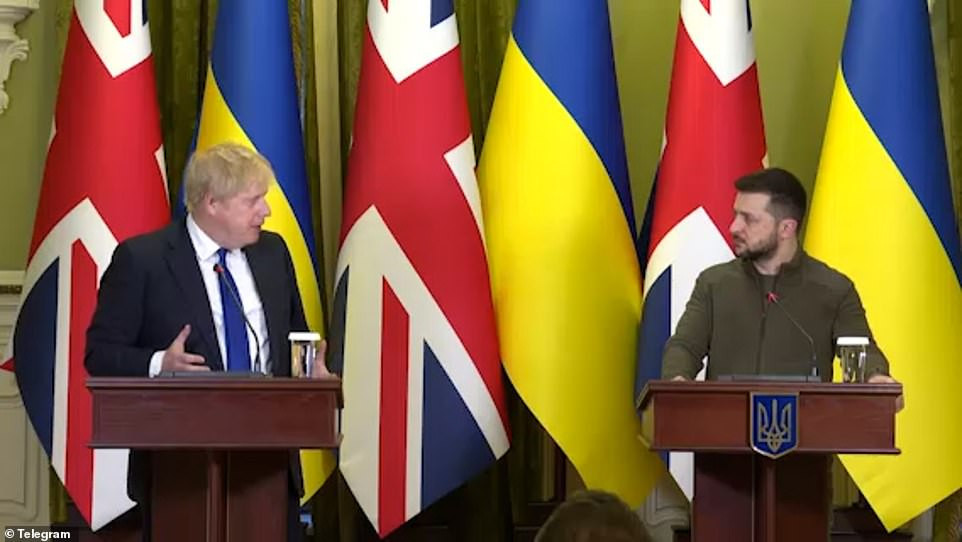
The Prime Minister of the United Kingdom paid a surprised visit to Kyiv on Friday, the second visit in about two months. The Prime Minister’s visit was kept secret until the eleventh hour for security reasons. That has caused a mixed reaction in the United Kingdom.
During the visit, the Prime Minister assured the government and people of Ukraine of the support of the U.K government.
“My visit today, in the depths of this war, is to send a clear and simple message to the Ukrainian people: the UK is with you, and we will be with you until you ultimately prevail,” Boris Johnson said.
The Prime Minister also announced a new military training program to help the Ukrainian soldiers conquer Russia.
“I have offered President Zelenskyy a major new military training program that could change the equation of this war – harnessing that most powerful of forces, the Ukrainian determination to win,” he said.
“Two months on from my last visit, the Ukrainian grit, determination, and resilience is stronger than ever, and I know that unbreakable resolve will long outlive the vain ambitions of President Putin,” he added.
This new training program could train about 10,000 soldiers every 120 days. The program would assist both new and existing soldiers. According to the proposal, a soldier could spend around three weeks on the course. Skills to be learned include cyber security, counter-explosive tactics, and basic medical training.
The Prime Minister that was supposed to speak to his MPs did not show up for the summit because of Ukraine’s visit. Some MPs only heard about the Prime Ministers’ trip on Friday morning. Some of them have expressed dissatisfaction, while others feel that the visit to Ukraine should be the priority of the Prime Minister.
While reacting to the negative comments on the Prime Minister’s visit to Ukraine, Defense Secretary Ben Wallace explained that the trip was not made public because of Russian missile strikes.
“Firstly these trips are organized in total secrecy. Very few, and I mean very few, people know the dates and arrangements. Russia is still launching missile strikes right across Ukraine,” he tweeted.
“Visits are sometimes necessary in person because not everything can be discussed securely over phones etc. Russia has aggressive electronic warfare and signal intelligence operation,” he added.
“In many ways however taking the opportunity to visit a country and ally at war to ensure we are doing everything we can to help is also important.”
The Prime Minister’s visit came a day after leaders of France, Germany, and Italy visited President Zelensky in Ukraine’s capital of Kyiv. He walked the stress of Kyiv with President Zelenskyy. Prime Minister Johnson promised to deliver more arsenals to Ukraine like his European counterparts that left the city on Wednesday.
The Prime Minister shared the visit on Twitter and commended President Zelensky for hosting him in Kyiv. He also assured the wartime president of his continuous support.
“The UK will work tirelessly with our allies to bring enduring peace to the people of Ukraine,” he tweeted
This story was first published by Antigua News on : antigua.news/2022/06/20/u-k-prime-minister-visits-ukraine-again-promised-military-training-for-the-ukrainian-army. © 2022 Antigua News. Republication without permission is not allowed.
Read our editorial standards and corrections policy. Spotted an error? Contact the newsroom.
More from World
View section
Powerful Earthquake Strikes China Leaving 16 Dead And Hundreds Of Homes Destroyed
Rescue teams race against time in Tibet after a magnitude 7 earthquake leaves dozens injured, displaces thousands and triggers widespread destruction.
By Cory Wayland

Kenyan Preacher Paul Mackenzie Convicted of Murdering 191 People in Shakahola Massacre
Former church leader found guilty alongside 28 others in a case involving the deaths of 190 children and one adult who were allegedly subjected to deadly religious fasting.
By Cory Wayland

Priest Speaks About Life and Death in Final Sermon Before Falling Crucifix Kills Him During Mass
Father Patricio Sánchez urged worshippers to cherish their time with God and loved ones before a large wooden crucifix fell and fatally struck him during a church service in Ecuador.
By Cory Wayland

Florida Attorney General James Uthmeier Announces Arrest Warrant for Former Cuban Leader Raúl Castro Over 1996 Aircraft Shootdown
James Uthmeier confirms murder conspiracy charge against the 95-year-old former president over the 1996 shootdown of two civilian aircraft that killed four men.
By Cory Wayland
Comments
Be the first to comment.