
Police Commissioner attends UNCOPS in New York

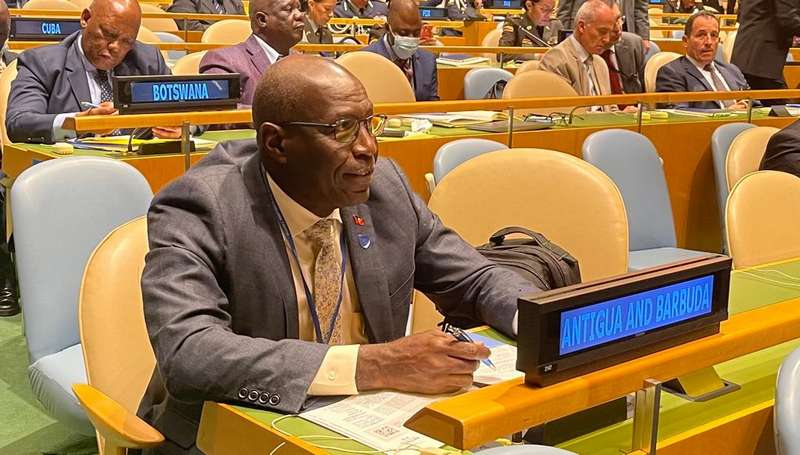
Antigua and Barbuda’s Police Commissioner Atlee Rodney is in the United States attending the third UN Chief of Police Summit dubbed UNCOPS 2022 in New York.
The Summit is bringing together Ministers, Chiefs of Police, and senior representatives of regional and professional policing organizations to United Nations Headquarters
They engaged in talks on strengthening international peace, security, and development for all through the unifying power and enabling role of national and United Nations policing.
UNCOPS 2022 will advance a common understanding among current and potential police and financial contributors, the United Nations Secretariat, and United Nations system entities of what the United Nations police require to achieve their diverse and complex mandate task.
These tasks include protecting civilians, rebuilding national police services, preventing crime and conflict, and sustaining peace.
e United Nations Police Division’s role as a system-wide service provider and focal point for United Nations policing and other law enforcement matters and to reinforce ongoing efforts to enhance the performance of United Nations Police by strengthening capacities, including the launch of the Voluntary Compact on Advancing Gender Parity within the United Nations Police.
UNCOPS 2022 also offered a unique opportunity for the world’s police executives and United Nations leadership to engage in discussions on how United Nations policing and national policing mutually reinforce one another when addressing current and emerging global security challenges, including man-made and natural crises and incidents.
Rodney also took time out of his schedule to visit the Antigua and Barbuda Mission in New York where he met with Antigua and Barbuda’s Deputy Permanent Representative to the United Nations Ambassador Conrod Hunte.
This story was first published by Antigua News on : antigua.news/2022/09/02/police-commissioner-attends-uncops-in-new-york. © 2022 Antigua News. Republication without permission is not allowed.

About the author
Shermain Bique-Charles is an accomplished journalist with over 24 years of dynamic experience in the industry. Renowned for her exceptional storytelling and investigative skills, she has garnered numerous awards that highlight her commitment to journalistic integrity and excellence. Her work not only informs but also inspires, making her a respected voice in the field.
Read our editorial standards and corrections policy. Spotted an error? Contact the newsroom.
More from Antigua and Barbuda
View section
Antigua and Barbuda First in Eastern Caribbean to Sign UN Development Framework for 2027–2031
The agreement will guide cooperation on economic diversification, climate resilience, social protection and other development priorities.
By Shermain Bique-Charles

Parker Defends Call for Age of Consent at 18 in Response to ASPIRE
Senator calls for stronger protection against sexual exploitation alongside adolescent healthcare, education and safeguards for relationships between young people close in age.
By Shermain Bique-Charles

Greene Says CHOGM Could Open Doors for UWI Five Islands
Foreign minister identifies international student recruitment and academic connections as potential longer-term opportunities. Meta description: Greene says CHOGM could help UWI Five Islands promote its programmes and build connections with Commonwealth countries.
By Shermain Bique-Charles

West Indies Oil Seeks Coordination on Fuel Deliveries During CHOGM
Police ask the company to provide delivery dates and times so movements can be coordinated with security arrangements.
By Cory Wayland
Comments
Be the first to comment.