
200 whales found dead in Australia, as officials battle to rescue 35 others
By Tata
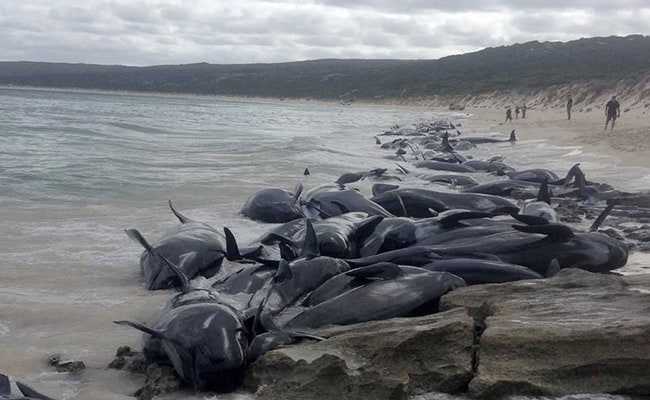
The Parks and Wildlife Service in Australia is working hard to the about 35 whales still alive after over 200 others died in a mass stranding this week. The pilot whales were found wandering on an exposed beach along the coast of Tasmania after they were stranded.
“We are primarily focused this morning on really getting into that rescue operation and getting [the whales] released,” Brendon Clark of the Tasmania Parks and Wildlife Service said Thursday morning.
“We are conscious that some of them may re-beach themselves and so we’ll be monitoring that,” he added.
As of yesterday, rescuers said about half of the whales were still alive, but the recent development means very few dozen only have the prospect of surviving as it is unlikely that all 35 remaining whales would be rescued alive.
Earlier this week, officials found 14 young sperm whales dead after they got stranded on the same Island. The environmental department said it was investigating the incident, as it was not unusual for sperm whales to be found on the Island of Tasmania.
“While further inquiries are yet to be carried out, it is possible the whales were part of the same bachelor pod -– a group of younger male sperm whales associating together after leaving the maternal group,” the Environment Department said after the death of the 14 whales.
In 2020, over 400 Whales got stranded in Tasmania, an Island off the Southern Coast of Australia. It was the largest stranding in the history of the region.
For decades, scientists are still baffled by the mass stranding of whales, especially when they are in hundreds.
This story was first published by Antigua News on : antigua.news/2022/09/22/200-whales-found-dead-in-australia-as-officials-battle-to-rescue-35-others. © 2022 Antigua News. Republication without permission is not allowed.
Read our editorial standards and corrections policy. Spotted an error? Contact the newsroom.
More from World
View section
Myanmar Says It Will Defy Parts of the Rohingya Genocide Ruling
The Gambia won an order for the safe return of Rohingya refugees. Myanmar’s president says he will choose which measures to accept, and an armed group controls most of the land they fled.
By Dario Item

Spain Votes After an Eviction Shook Its Government
An elderly tenant’s eviction helped trigger the November 29 snap election. Pedro Sánchez is recovering in some polls, but the right still has the clearer route to a governing majority.
By Dario Item

Dozens of KFC Restaurants Closing Across 10 U.S. States as Major Franchise Operator Files for Bankruptcy
Financial troubles, falling sales and millions in unpaid franchise fees have forced a major KFC operator into bankruptcy, with 72 restaurant locations affected and more closures possible.
By Cory Wayland

Robert Pattinson is the new James Bond
The Twilight and The Batman star succeeds Daniel Craig as 007 in the next James Bond film, directed by Denis Villeneuve and written by Steven Knight.
By Mick the Ram
Comments
Be the first to comment.