
British Prime Minister Liz Truss fires Kwasi Kwarteng as Chancellor
By Tata
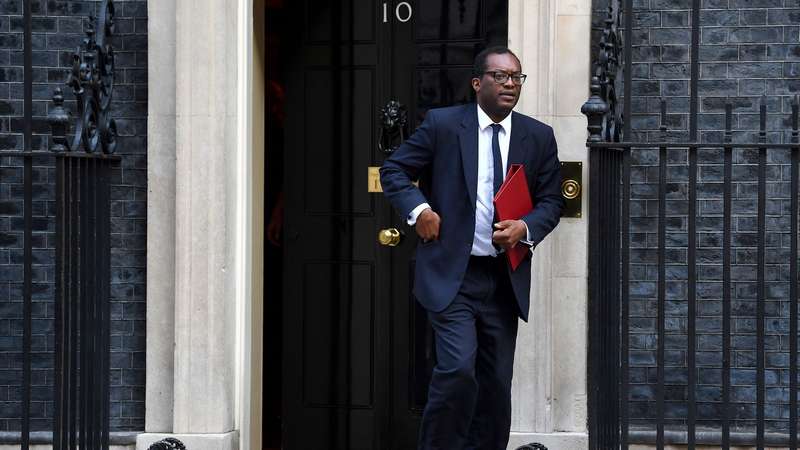
British Prime Minister, Liz Truss, has sacked finance minister Kwasi Kwarteng after the UK market dwindled significantly in response to the significant tax cut introduced by the government in its new economic plan.
Truss said she acted decisively to ensure the country’s economic stability but admitted that the decision was a difficult one to make.
“As prime minister, I will always act in the national interest,” Truss said. “I want to be honest: this is difficult.”
On September 23, Chancellor Kwasi Kwarteng, on behalf of the Truss government released a growth plan, which included massive tax cuts. The proposed policies created doubts in the minds of investors and sent the British pound to its lowest point in history, almost reaching parity with the US dollar.
Although Kwasi Kwarteng later made a U-turn on the tax cuts, that was not enough to bring stability to the country’s economy. To save the situation, Liz Truss has taken the tough decision of firing one of her most trusted allies.
Kwasi Kwarteng accepts the decision, says status still needs to change
Despite his short time as Chancellor, Kwasi Kwarteng said it was a privilege to serve as Truss’ first finance minister. In a letter shared on Twitter, he said his sack does not change the fact that the UK will need to change the status quo sooner or later.
“You have asked me to stand aside as your chancellor. I have accepted,” Kwarteng said, adding that he was aware of the difficulty of the job when he accepted to serve as Chancellor at a time when oil prices and global interest rates were on the high side
“As I have said many times in the past weeks, following the status quo was simply not an option. For too long this country has been dogged by low growth rates and high taxation – that must still change if this country is to succeed,” Kwasi Kwarteng said.
“It has been an honour to serve as your first chancellor,” he added, wishing the prime minister success.
Kwasi Kwarteng now holds the record for the second shortest-serving UK chancellor in British history. He held the job for 38 days. Iain Macleod, who died after 30 days as finance minister holds the record for the shortest-serving Chancellor.
Jeremy Hunt becomes new finance minister
Soon after Kwasi was fired, Liz Truss appointed Jeremy Hunt as the new Chancellor. Hunt, 55, supported Rishi Sunak in the just concluded leadership contest of the conservative party.
Mr Hunt previously served as foreign secretary and health secretary. He also contested to be Prime Minister but decided to support Truss’ opponent after losing his own bid.
The prime minister said her new Chancellor is “one of the most experienced and widely respected government ministers and parliamentarians.”
“Changing Chancellor doesn’t undo the damage”
Members of the opposition Labour Party have criticized Liz Truss for holding a brief press conference at a time when the country needs explanations.
Shadow Chancellor, Rachel Reeves, said: Changing the Chancellor doesn’t undo the damage that’s been done,” adding that the country needs a change in government and not just a change of Chancellor.
“We don’t just need a change in Chancellor, we need a change in government,” she said. “Only Labour offers the leadership and ideas Britain needs to secure the economy and get out of this mess.”
The leader of the Labour party, Keir Starmer, was on the same page with Rachel Reeves. He said: “Changing the Chancellor doesn’t undo the damage made in Downing Street.”
“Liz Truss’ reckless approach has crashed the economy, causing mortgages to skyrocket, and has undermined Britain’s standing on the world stage,” he added.
This story was first published by Antigua News on : antigua.news/2022/10/15/british-prime-minister-liz-truss-fires-kwasi-kwarteng-as-chancellor. © 2022 Antigua News. Republication without permission is not allowed.
Read our editorial standards and corrections policy. Spotted an error? Contact the newsroom.
More from World
View section
Spain Votes After an Eviction Shook Its Government
An elderly tenant’s eviction helped trigger the November 29 snap election. Pedro Sánchez is recovering in some polls, but the right still has the clearer route to a governing majority.
By Dario Item

Dozens of KFC Restaurants Closing Across 10 U.S. States as Major Franchise Operator Files for Bankruptcy
Financial troubles, falling sales and millions in unpaid franchise fees have forced a major KFC operator into bankruptcy, with 72 restaurant locations affected and more closures possible.
By Cory Wayland

Robert Pattinson is the new James Bond
The Twilight and The Batman star succeeds Daniel Craig as 007 in the next James Bond film, directed by Denis Villeneuve and written by Steven Knight.
By Mick the Ram

Microsoft Outage cripples millions globally
Outlook, Teams and Copilot users reported disruptions across 74 countries as Microsoft cited increased load on its infrastructure.
By Mick the Ram
Comments
Be the first to comment.