
Dominicans are paying more for fuel

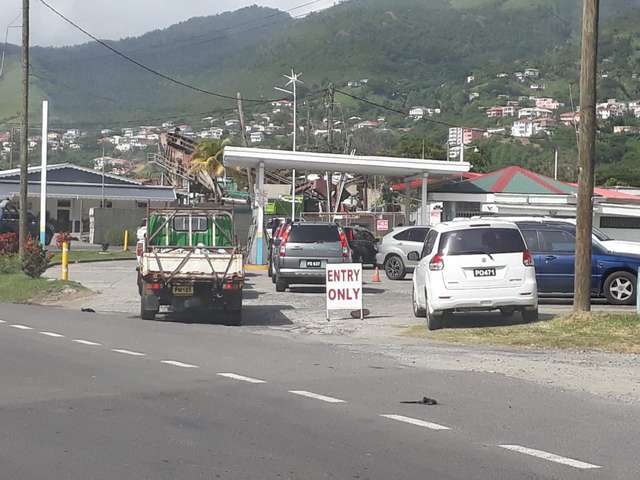
Fuel prices have gone up in Dominica, according to the Director of Trade Matthan Walker. The new changes took effect on Monday.
Residents will now pay $15.94 per gallon, up from $14.99, a 95 cents increase, while high Sulphur diesel increased from $15.57 to $16.72 per gallon, and kerosene from $14.88 per gallon to $15.04 per gallon, an increase of 16 cents.
“Those increases in the commodity prices stem from underproduction by the OPEC member-states, they have been producing below their usual daily rate of production. The ease of Covid restrictions in China, worries of recession, and course a stronger dollar and so we are experiencing the same in Dominica,” he stated.
Following Monday’s announcement, motorists were backed up miles to purchase gasoline, a situation Walter said was not necessary.
“Those long lines are triggered by social media reflections, which to my mind should not be the guide by which persons decide to rush to take certain actions,” Walter said.
He confirmed that despite common misconception, there will be no shortage of gasoline in Dominica
“So our main importer imports every 10 days and when there is a surging demand when there is unprecedented demand, such as the demand for mainly gasoline during the World Creole Music Festival and also now that we have an ongoing election when there is a lot of movement of vehicles on the ground, they are aware of it and import accordingly,” Walter explained.
Adding, “but, when you have a situation where persons read something on social media and then they share it very quickly with friends, without first touching base with the Ministry of Trade to find out what exactly is the situation on the ground because each importer that provides petroleum to their petrol station outlets, they know what happens in their own space.”
This story was first published by Antigua News on : antigua.news/2022/11/22/dominicans-are-paying-more-for-fuel. © 2022 Antigua News. Republication without permission is not allowed.

About the author
Shermain Bique-Charles is an accomplished journalist with over 24 years of dynamic experience in the industry. Renowned for her exceptional storytelling and investigative skills, she has garnered numerous awards that highlight her commitment to journalistic integrity and excellence. Her work not only informs but also inspires, making her a respected voice in the field.
Read our editorial standards and corrections policy. Spotted an error? Contact the newsroom.
More from Caribbean
View section
BREAKING | Dominica Heads to the Polls on December 16
Nomination Day is November 30 as Prime Minister Roosevelt Skerrit seeks a fresh mandate for the Dominica Labour Party.
By Shermain Bique-Charles

DOMINICA: Relief as Three Missing Men Are Found Alive at Sea Near Aves Islands
Davel Baron, Ryan Royer and a third man were rescued by a cargo vessel after being found drifting at sea, bringing relief following days of uncertainty over their whereabouts.
By Cory Wayland

Two Men Vanish at Sea in Dominica, Sparking Growing Fears for Their Safety
Police issue missing-person alerts for Davel Baron and Ryan Royer as concerns grow over their whereabouts.
By Cory Wayland

Saint Lucia Makes Decision on Citizenship by Investment Programme Amid EU Pressure
Prime Minister Philip J. Pierre confirms his government has formally responded to the European Union but says the decision will remain confidential until Brussels acknowledges receipt of the correspondence.
By Cory Wayland
Comments
Be the first to comment.