
BREAKING: FTX Founder Sam Bankman-Fried arrested in the Bahamas

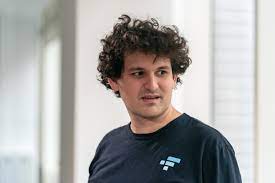
Source NPR
Sam Bankman-Fried, the notorious former CEO of crypto exchange FTX, has been arrested in the Bahamas, the office of the attorney general of The Bahamas said on Monday night.
The arrest was made at the request of the U.S. government, based on a sealed indictment filed by the Southern District of New York, U.S. Attorney Damian Williams said in a tweet also on Monday night.
Williams expects to unseal the indictment on Tuesday morning, and he “will have more to say at the time.”
The Bahamian attorney general said police made the arrest after officials received “formal notification from the United States that it… has filed criminal charges against” Bankman-Fried, and they learned that the U.S. is “likely to request his extradition.”
The office “intends to process” an extradition request “promptly,” when it is made.
In a statement, the prime minister of the Bahamas stressed the country is cooperating with law enforcement and regulators in the United States, but its own “regulatory and criminal investigations into the collapse of FTX continue.”
Just one month ago, FTX, a $32 billion behemoth in virtual currencies, filed for bankruptcy after suspicions rose that it was insolvent and also moving money around illegally.
Bankman-Fried resigned hours before the bankruptcy filing and has spent the last month on a charm campaign, painting himself as a guy who let things slide and didn’t intentionally commit fraud.
He was slated to testify virtually from The Bahamas before a congressional committee on Tuesday. NPR has not confirmed if the hearing will still happen.
Bankman-Fried has denied that he has avoided coming to the United States over the last month – where there are multiple government investigations into the FTX meltdown – for fear of being arrested.
This story was first published by Antigua News on : antigua.news/2022/12/12/breaking-ftx-founder-sam-bankman-fried-arrested-in-the-bahamas. © 2022 Antigua News. Republication without permission is not allowed.

About the author
The Editorial Staff refers to all reporters employed by Antigua.news. When an article is not an original creation of Antigua.news—such as when it is based on a press release, other media articles, letters to the editor, or court decisions—one of our staff members is responsible for overseeing its publication.
Read our editorial standards and corrections policy. Spotted an error? Contact the newsroom.
More from Antigua and Barbuda
View section
Dwayne George Demands Accountability in Management of New Arts Centre
The Creative Industries Minister says responsible spending, maintenance and professional management must protect the national investment.
By Shermain Bique-Charles

Maria Browne: Culture Deserves Infrastructure and Creatives Deserve Opportunity
The Housing and Works Minister says the new performing arts centre places artistic ambition firmly within national development.
By Shermain Bique-Charles

Turner Reveals Team Feared Arts Centre Could Not Be Completed in Time
The minister credits National Housing workers with overcoming setbacks and an imposing workload to deliver the cultural landmark.
By Shermain Bique-Charles

PM Announces Further Expansion as Performing Arts Centre Opens
Gaston Browne says adjoining properties will support creative training and studio facilities as government seeks to develop internationally competitive artists.
By Shermain Bique-Charles
Comments (1)
Nicky December 12, 2022, 9:06 PM