
Bahamas orders evacuation of diplomatic mission in Haiti

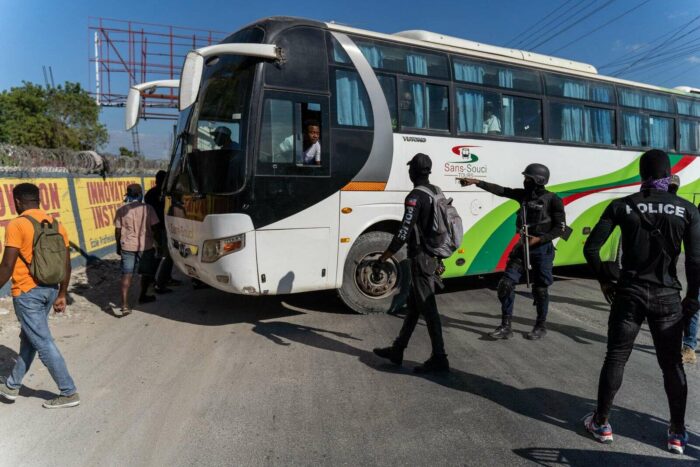
All diplomatic personnel will be pulled from Haiti, the Bahamian government has instructed
The head of the diplomatic mission in Port au Prince reported that they had been stopped by Haitian police and relieved of their vehicle and weapons.
The Ministry of Foreign Affairs said in a statement last night that there was a voluntary departure order in place and all staff at the embassy chose to stay.
“Per the new instructions, they are to leave for home as soon as conditions permit…This is only a temporary measure in light of recent developments which require a corporate security and intelligence assessment and restaging.”
“This is part of a protest by the Haitian National Police against their own authorities. All of our diplomats are personally safe. There also is a report of five Bahamians from Bahamasair who landed at Port Au Prince Airport and were unable to leave the environs of the airport. They are all safe and well,” the statement said further
The government said also that the situation in Hiati appears less stable over the past three days in the country, and we are taking steps out of an abundance of caution.
“The security forces in our country have been alerted to these developments. As soon as conditions permit a team will be sent back into Haiti without further announcement,” the Ministry of Foreign Affairs said.

All this comes following reports from Haiti that the police there blocked streets and forced their way into the main airport to protest the recent killing of officers by armed gangs.
Media reports out of that country revealed that “protesters in civilian clothes, who identified themselves as police, first attacked Prime Minister Ariel Henry’s official residence and then flooded the airport as he was arriving from a trip to Argentina where he attended the seventh summit of the Community of Latin American and Caribbean States (CELAC)”
This story was first published by Antigua News on : antigua.news/2023/01/27/bahamas-orders-evacuation-of-diplomatic-mission-in-haiti. © 2023 Antigua News. Republication without permission is not allowed.

About the author
The Editorial Staff refers to all reporters employed by Antigua.news. When an article is not an original creation of Antigua.news—such as when it is based on a press release, other media articles, letters to the editor, or court decisions—one of our staff members is responsible for overseeing its publication.
Read our editorial standards and corrections policy. Spotted an error? Contact the newsroom.
More from Caribbean
View section
BREAKING | Dominica Heads to the Polls on December 16
Nomination Day is November 30 as Prime Minister Roosevelt Skerrit seeks a fresh mandate for the Dominica Labour Party.
By Shermain Bique-Charles

DOMINICA: Relief as Three Missing Men Are Found Alive at Sea Near Aves Islands
Davel Baron, Ryan Royer and a third man were rescued by a cargo vessel after being found drifting at sea, bringing relief following days of uncertainty over their whereabouts.
By Cory Wayland

Two Men Vanish at Sea in Dominica, Sparking Growing Fears for Their Safety
Police issue missing-person alerts for Davel Baron and Ryan Royer as concerns grow over their whereabouts.
By Cory Wayland

Saint Lucia Makes Decision on Citizenship by Investment Programme Amid EU Pressure
Prime Minister Philip J. Pierre confirms his government has formally responded to the European Union but says the decision will remain confidential until Brussels acknowledges receipt of the correspondence.
By Cory Wayland
Comments
Be the first to comment.