
“Act now and act together to protect our ocean,” says Commonwealth Secretary-General

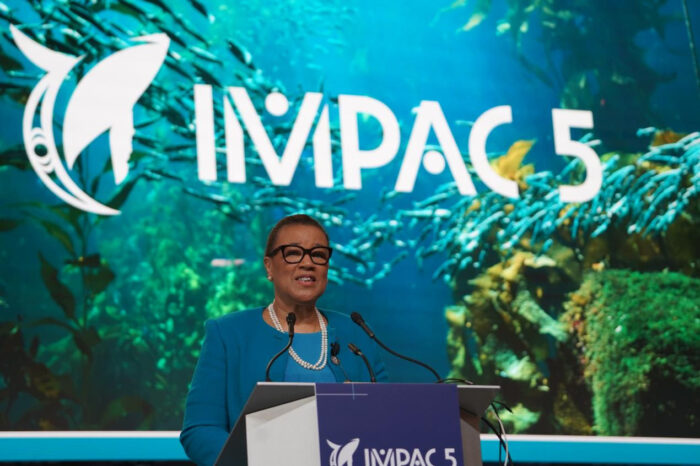
Commonwealth Secretary-General Patricia Scotland has urged Caribbean countries to work together to protect the ocean and build a sustainable blue economy.
Scotland who was speaking at the 5th International Marine Protected Areas Congress (IMPAC5) says the hallmark of the Commonwealth is “our unique combination of shared interests, practical advantages, common values and the willingness to tackle the problems of the world together. We all share, rely on and have a common responsibility for the ocean – and because the challenges of the ocean cannot be solved by any single country – multilateral action is essential”
She said through initiatives like the Commonwealth Blue Charter, “we can help individual countries to make tangible progress with the right assistance, and we can aggregate and scale up our achievements when we work together.”
Hosted by the government of Canada in Vancouver from 3-9 of February, IMPAC5 is a global forum that brings together top ocean conservation professionals and global decision-makers to act on marine protected areas.

The meeting comes just six weeks after the Convention on Biological Diversity, where achieving 30% marine protection by 2030 (30 by 30) was endorsed as a new target.
The Commonwealth Blue Charter is an agreement by all 56 Commonwealth countries to actively cooperate to address ocean-related challenges and meet commitments for sustainable ocean action.
The recently launched Commonwealth Blue Charter Project Incubator supports the development of governments’ projects under the Commonwealth Blue Charter and helps them to accelerate their transition to fair, sustainable and inclusive marine conservation and maritime development, while mitigating and adapting to climate change.
This story was first published by Antigua News on : antigua.news/2023/02/10/act-now-and-act-together-to-protect-our-ocean-says-commonwealth-secretary-general. © 2023 Antigua News. Republication without permission is not allowed.

About the author
The Editorial Staff refers to all reporters employed by Antigua.news. When an article is not an original creation of Antigua.news—such as when it is based on a press release, other media articles, letters to the editor, or court decisions—one of our staff members is responsible for overseeing its publication.
Read our editorial standards and corrections policy. Spotted an error? Contact the newsroom.
More from Caribbean
View section
BREAKING | Dominica Heads to the Polls on December 16
Nomination Day is November 30 as Prime Minister Roosevelt Skerrit seeks a fresh mandate for the Dominica Labour Party.
By Shermain Bique-Charles

DOMINICA: Relief as Three Missing Men Are Found Alive at Sea Near Aves Islands
Davel Baron, Ryan Royer and a third man were rescued by a cargo vessel after being found drifting at sea, bringing relief following days of uncertainty over their whereabouts.
By Cory Wayland

Two Men Vanish at Sea in Dominica, Sparking Growing Fears for Their Safety
Police issue missing-person alerts for Davel Baron and Ryan Royer as concerns grow over their whereabouts.
By Cory Wayland

Saint Lucia Makes Decision on Citizenship by Investment Programme Amid EU Pressure
Prime Minister Philip J. Pierre confirms his government has formally responded to the European Union but says the decision will remain confidential until Brussels acknowledges receipt of the correspondence.
By Cory Wayland
Comments
Be the first to comment.