
New promotion gives anyone an opportunity to experience Carnival

By Zaya Williams
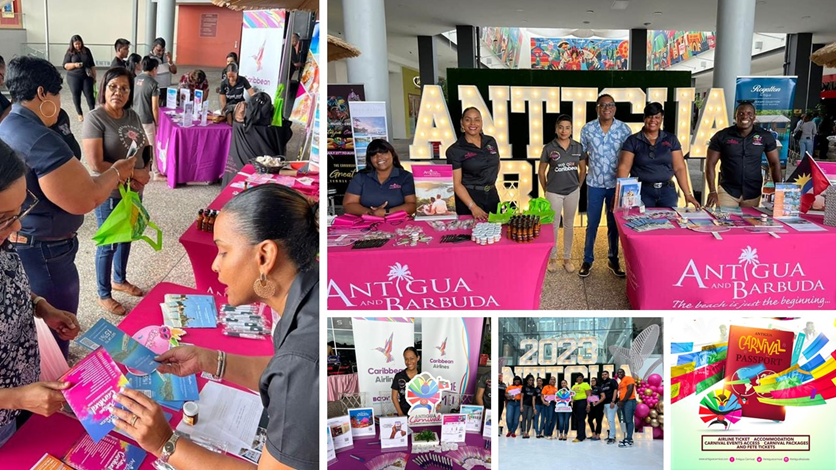
Coming to Antigua for Carnival at little to no cost could be as simple as entering a raffle with a new promotion started by the Antigua and Barbuda Tourism Authority (ABTA) and the Antigua and Barbuda Festivals Commission.
The promotion called the ‘Antigua Carnival Passport.’
The program showcases the twin island nation’s rich culture and provides carnival enthusiasts with the opportunity to win an all-access pass to Antigua’s Carnival.
The Carnival Passport provides lucky winners with a trip to participate in the thirteen exciting days from July 27 – August 8, 2023, with entry to official ‘Antigua Carnival’ events and destination attractions.
The first leg of the promotion took place in Trinidad, where over 600 entries were received over the two days of the promotion, with winners announced live on radio stations in that country at the end of each day.
Deputy Director of the Antigua and Barbuda Festivals commission, Cleofoster Harris, tells us how persons can win through raffles and other sweepstakes.
He said for example in Trinidad at a mall, “persons came to where we were they signed up, they were asked to spend more than $500, they would bring the receipt then we do our quick audit and they were entered into a nice looking glass bowl.”
Promotions in Trinidad and Tobago continue throughout the month of June.
Listeners to the stations will have a chance to win a trip for two to Antigua and Barbuda, with a three-night stay at the Royalton Antigua Resort, airport transfers and a complimentary tour.
Harris further explained that residents in St. Kitts may be next in line and revealed that, for the 2024 Carnival, the promotion may hit places Miami.
“They will continue throughout the year visiting all kinds of places and people will get a chance to win,” he shared.
This story was first published by Antigua News on : antigua.news/2023/06/12/new-promotion-gives-anyone-an-opportunity-to-experience-carnival. © 2023 Antigua News. Republication without permission is not allowed.

About the author
The Editorial Staff refers to all reporters employed by Antigua.news. When an article is not an original creation of Antigua.news—such as when it is based on a press release, other media articles, letters to the editor, or court decisions—one of our staff members is responsible for overseeing its publication.
Read our editorial standards and corrections policy. Spotted an error? Contact the newsroom.
More from Caribbean
View section
BREAKING | Dominica Heads to the Polls on December 16
Nomination Day is November 30 as Prime Minister Roosevelt Skerrit seeks a fresh mandate for the Dominica Labour Party.
By Shermain Bique-Charles

DOMINICA: Relief as Three Missing Men Are Found Alive at Sea Near Aves Islands
Davel Baron, Ryan Royer and a third man were rescued by a cargo vessel after being found drifting at sea, bringing relief following days of uncertainty over their whereabouts.
By Cory Wayland

Two Men Vanish at Sea in Dominica, Sparking Growing Fears for Their Safety
Police issue missing-person alerts for Davel Baron and Ryan Royer as concerns grow over their whereabouts.
By Cory Wayland

Saint Lucia Makes Decision on Citizenship by Investment Programme Amid EU Pressure
Prime Minister Philip J. Pierre confirms his government has formally responded to the European Union but says the decision will remain confidential until Brussels acknowledges receipt of the correspondence.
By Cory Wayland
Comments
Be the first to comment.