
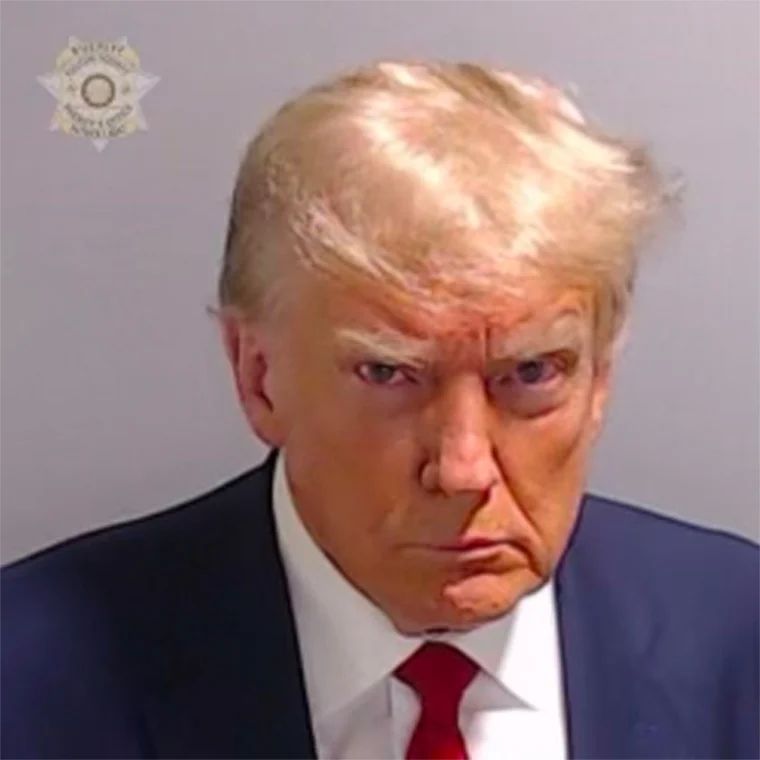
Trump becomes first former president ever to have mugshot taken

Source: Mirror
A highly anticipated mugshot of former US President Donald Trump has been released, showing the businessman scowling into the camera.
It came after he was booked at the Fulton County jail in Atlanta, Georgia, spending just shy of half an hour inside the jail where he had details taken, including fingerprints and, for the first time, a mugshot – as confirmed by the sheriff.
The former President arrived in a motorcade to the jail on Rice Street, using a rear entrance to arrive at and leave the jail, while supporters stood on the other side. It’s expected the highly anticipated photo will be publicly released later.
Trump’s private jet landed in Atlanta as the former President made his way to Fulton County jail to be booked.
Trump Force One touched down at Hartsfield-Jackson International Airport just after 7pm local time, with the businessman expected to make his way through rush hour traffic in a motorcade to the jail.
Stepping off the plane in a dark blue suite and red tie, Trump gave the reporters, aides, and others gathered on the tarmac a thumb’s up as he made his way down the steps.
Earlier he confirmed the time he will be arrested tonight, in his latest unhinged rant on his social media platform, Truth Social. The former President writes: “But please excuse me, I have to start getting ready to head down to Atlanta, Georgia, where Murder and other Violent Crimes have reached levels never seen before, to get ARRESTED by a Radical Left, Lowlife District Attorney, Fani Willis, for A PERFECT PHONE CALL, and having the audacity to challenge a RIGGED & STOLEN ELECTION. THE EVIDENCE IS IRREFUTABLE! ARREST TIME: 7:30 P.M.”

This story was first published by Antigua News on : antigua.news/2023/08/24/trump-becomes-first-former-president-ever-to-have-mugshot-taken. © 2023 Antigua News. Republication without permission is not allowed.

About the author
The Editorial Staff refers to all reporters employed by Antigua.news. When an article is not an original creation of Antigua.news—such as when it is based on a press release, other media articles, letters to the editor, or court decisions—one of our staff members is responsible for overseeing its publication.
Read our editorial standards and corrections policy. Spotted an error? Contact the newsroom.
More from Caribbean
View section
BREAKING | Dominica Heads to the Polls on December 16
Nomination Day is November 30 as Prime Minister Roosevelt Skerrit seeks a fresh mandate for the Dominica Labour Party.
By Shermain Bique-Charles

DOMINICA: Relief as Three Missing Men Are Found Alive at Sea Near Aves Islands
Davel Baron, Ryan Royer and a third man were rescued by a cargo vessel after being found drifting at sea, bringing relief following days of uncertainty over their whereabouts.
By Cory Wayland

Two Men Vanish at Sea in Dominica, Sparking Growing Fears for Their Safety
Police issue missing-person alerts for Davel Baron and Ryan Royer as concerns grow over their whereabouts.
By Cory Wayland

Saint Lucia Makes Decision on Citizenship by Investment Programme Amid EU Pressure
Prime Minister Philip J. Pierre confirms his government has formally responded to the European Union but says the decision will remain confidential until Brussels acknowledges receipt of the correspondence.
By Cory Wayland
Comments (1)
Anonymous National August 24, 2023, 9:17 PM