
Antigua and Barbuda is spearheading a global effort to improve eye and vision health.

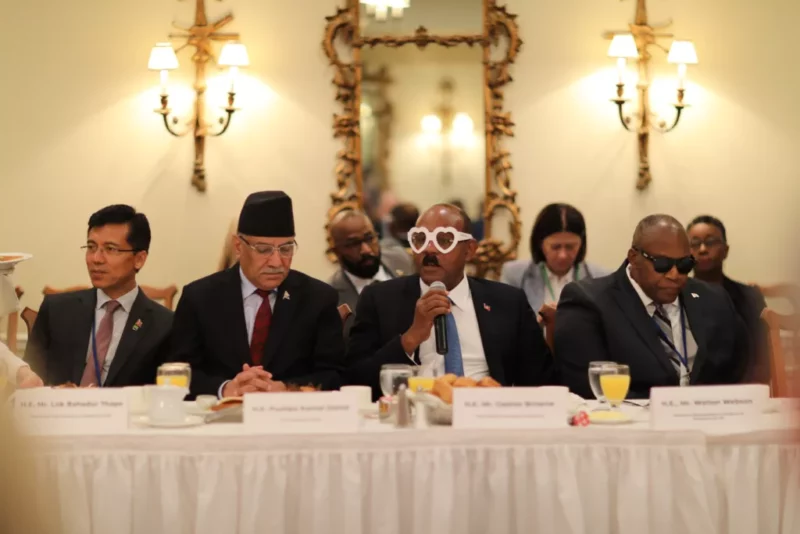
Antigua and Barbuda hosted a High-Level Breakfast meeting on the penultimate day of the United Nations General Assembly.
The meeting aimed to discuss the issue of vision and eye health, which is a major concern affecting countries worldwide.
The event was attended by global leaders, including Antigua and Barbuda’s Prime Minister, Gaston Browne, who wore Love Your Eyes glasses to symbolize his support for accessible, affordable and available eye care for all.
The Permanent Representative to the UN, Ambassador Walton Webson, was also present at the meeting as a leading advocate for the blind and visually impaired.
The Breakfast meeting identified the importance of global leadership in implementing the UN General Assembly Resolution Vision for Everyone.
The attendees, including other global leaders, recognized that improving access to eye health is a practical, achievable and cross-cutting sustainable development issue.
Therefore, supportive agencies at the United Nations and beyond are lending their support to the effort.
In his address to the forum, Prime Minister Browne emphasized the significance of healthy vision as a non-controversial issue, which can be solved this decade.
He further stated that eye health is more than a health issue; it’s a sustainable development issue.

Prime Minister Pushpa Kamal Dahal of Nepal noted that improving eye health is a crucial step towards building a more equitable, inclusive, sustainable, and resilient future.
Meanwhile, St. Kitts Prime Minister Terrance Drew expressed his gratitude to Antigua and Barbuda and Prime Minister Browne for their leadership role in founding the Friends of Vision group at the UN.
Together with the governments of Bangladesh and Ireland, they have led the way in ensuring that vision is firmly placed within the SDG Agenda.
This story was first published by Antigua News on : antigua.news/2023/09/23/antigua-and-barbuda-is-spearheading-a-global-effort-to-improve-eye-and-vision-health. © 2023 Antigua News. Republication without permission is not allowed.

About the author
The Editorial Staff refers to all reporters employed by Antigua.news. When an article is not an original creation of Antigua.news—such as when it is based on a press release, other media articles, letters to the editor, or court decisions—one of our staff members is responsible for overseeing its publication.
Read our editorial standards and corrections policy. Spotted an error? Contact the newsroom.
More from Antigua and Barbuda
View section
Chase Supermarket to Host Two-Day Job Fair for Full-Time Positions
Applicants are invited to explore vacancies across several departments on October 31 and November 1 at the supermarket’s Herbert’s location.
By Editorial Staff

Dwayne George Demands Accountability in Management of New Arts Centre
The Creative Industries Minister says responsible spending, maintenance and professional management must protect the national investment.
By Shermain Bique-Charles

Maria Browne: Culture Deserves Infrastructure and Creatives Deserve Opportunity
The Housing and Works Minister says the new performing arts centre places artistic ambition firmly within national development.
By Shermain Bique-Charles

Turner Reveals Team Feared Arts Centre Could Not Be Completed in Time
The minister credits National Housing workers with overcoming setbacks and an imposing workload to deliver the cultural landmark.
By Shermain Bique-Charles
Comments
Be the first to comment.