
Antigua and Barbuda Teachers’ Union Issues Urgent Warning Amid Global Teacher Exodus

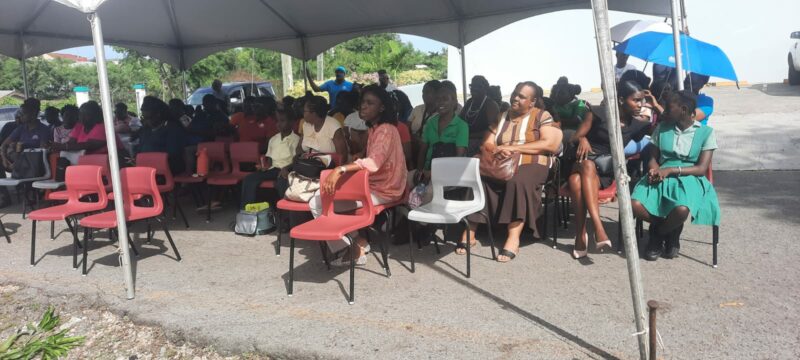
During a Teachers Union Rally held on World Teachers Day in 2023, the Antigua and Barbuda Union of Teachers (A&BUT) delivered a serious message.
The Union warned about the growing trend of teachers leaving their positions all around the world, and how this trend could lead to a similar crisis within the education system of Antigua.
The event had a theme of “The Teachers We Need for the Education We Want: The Global Imperative to Address the Teacher Shortage,” and educators and union leaders spoke about their concerns over various challenges within the working environment.
These challenges included insufficient classroom resources, inadequate compensation, the need for professional development opportunities, and security concerns across various school campuses.
Sharon Kelsick, the General Secretary of the Union, emphasized the importance of addressing the chronic shortage of teachers and urged education officials not to ignore the worldwide trend of teacher migration, which poses a significant threat to Antigua’s educational landscape.
“The day will come when there will be a mass exodus of teachers out of this system if we continue to take this profession for granted. Our society has evolved as have the demands on our teachers and the wider sector, it cannot be business as usual,” Kelsick said.
Another vibrant speaker, 1st Vice President Robyn Joseph Nathaniel also issued a similar caution.
“Statistics out of the United States show that approximately 51,000 teachers resigned in August of 2023 an me no ole people say, wen yu neighba house pan fire went dun fu you,” Nathaniel said.
Another message that was clear among the speakers including President of the Union Casroy Charles is the work the body continues to do on the behalf of its members and the encouragement to continue pressing on despite the odds.
This story was first published by Antigua News on : antigua.news/2023/10/08/antigua-and-barbuda-teachers-union-issues-urgent-warning-amid-global-teacher-exodus. © 2023 Antigua News. Republication without permission is not allowed.

About the author
The Editorial Staff refers to all reporters employed by Antigua.news. When an article is not an original creation of Antigua.news—such as when it is based on a press release, other media articles, letters to the editor, or court decisions—one of our staff members is responsible for overseeing its publication.
Read our editorial standards and corrections policy. Spotted an error? Contact the newsroom.
More from Antigua and Barbuda
View section
Dwayne George Demands Accountability in Management of New Arts Centre
The Creative Industries Minister says responsible spending, maintenance and professional management must protect the national investment.
By Shermain Bique-Charles

Maria Browne: Culture Deserves Infrastructure and Creatives Deserve Opportunity
The Housing and Works Minister says the new performing arts centre places artistic ambition firmly within national development.
By Shermain Bique-Charles

Turner Reveals Team Feared Arts Centre Could Not Be Completed in Time
The minister credits National Housing workers with overcoming setbacks and an imposing workload to deliver the cultural landmark.
By Shermain Bique-Charles

PM Announces Further Expansion as Performing Arts Centre Opens
Gaston Browne says adjoining properties will support creative training and studio facilities as government seeks to develop internationally competitive artists.
By Shermain Bique-Charles
Comments
Be the first to comment.