
DNA suffers another resignation; with further calls for its dissolution

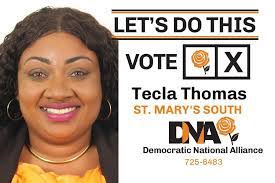
Looks like the Democratic National Alliance is experiencing some serious “resignation-itis” with yet walkout- the seventh in less than a year, and the third in just a few days.
Tecla Thomas, in her resignation letter to the Deputy General Secretary of the DNA, stated that the majority voting populace of Antigua & Barbuda doesn’t seem to be on board with the party’s vision and mission.
She also pointed out that the DNA’s lackluster performance in the last two General Elections is a clear indication that the party is unable to gain traction or significant support.
Thomas is not alone in her opinion – her colleague Antony Stuart has also called for the dissolution of the DNA.
Looks like the party needs to do some serious soul-searching to get back on track!
She said she was tendering her resignation with a heavy heart, careful consideration, and deep reflection
Thomas expressed his gratitude to Joanne Massiah, the party leader, for her guidance and support.

The Democratic National Alliance (DNA) party has recently experienced a series of resignations, including Chaneil Imhoff who vied for the St Peters constituency during the January 18 elections, and Avoy Knight, a candidate for All Saints East and St Luke.
Imhoff and Knight submitted their resignation letters on the 24th and 25th, respectively.
This marks the sixth departure from the party within a year, following the resignations of Kelton Dalso, who was scheduled to contest the St. George constituency, and DNA Secretary General and candidate for the St John’s City West constituency, Gatesworth James, in November 2022.
In addition, former President and DNA candidate for St John’s Rural West, Malaka Parker, and former DNA First Vice-President Bruce Goodwin, chose to step down in October 2022.
This story was first published by Antigua News on : antigua.news/2023/10/29/dna-suffers-another-resignation-with-further-calls-for-its-dissolution. © 2023 Antigua News. Republication without permission is not allowed.

About the author
The Editorial Staff refers to all reporters employed by Antigua.news. When an article is not an original creation of Antigua.news—such as when it is based on a press release, other media articles, letters to the editor, or court decisions—one of our staff members is responsible for overseeing its publication.
Read our editorial standards and corrections policy. Spotted an error? Contact the newsroom.
More from Antigua and Barbuda
View section
Fernandez Eyes Visitor Shows at New Performing Arts Centre
Charles Fernandez sees visitor performances at the National Performing Arts Centre as a way to showcase culture and support the venue’s upkeep.
By Shermain Bique-Charles

Antigua and Barbuda First in Eastern Caribbean to Sign UN Development Framework for 2027–2031
The agreement will guide cooperation on economic diversification, climate resilience, social protection and other development priorities.
By Shermain Bique-Charles

Parker Defends Call for Age of Consent at 18 in Response to ASPIRE
Senator calls for stronger protection against sexual exploitation alongside adolescent healthcare, education and safeguards for relationships between young people close in age.
By Shermain Bique-Charles

Greene Says CHOGM Could Open Doors for UWI Five Islands
Foreign minister identifies international student recruitment and academic connections as potential longer-term opportunities. Meta description: Greene says CHOGM could help UWI Five Islands promote its programmes and build connections with Commonwealth countries.
By Shermain Bique-Charles
Comments
Be the first to comment.