
West Indies go 2-0 up in T20 series with victory in Grenada

by Mick the Ram
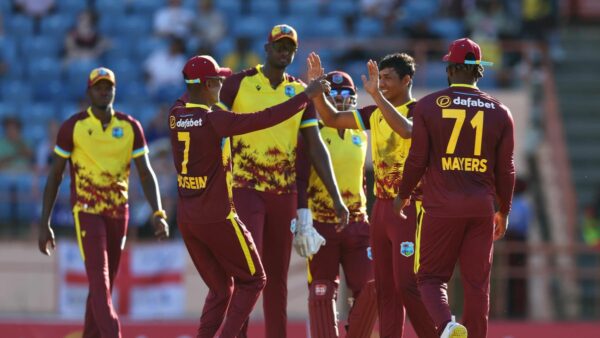
A brilliant unbeaten 82 from Brandon King helped West Indies to an above par score on a difficult pitch in Grenada, which proved too demanding for an England side still searching for a winning formula.
The opening batter, in partnership with captain Rovman Powell, wrestled back control after the home team had slipped to 54-4, with some outstanding bowling by Adil Rashid restricting the scoring in the middle overs.
A score of 176-7 looked to be a challenging one and England could never get up with the required rate and slipped to a 10 run defeat, meaning that they now need to win all three of the remaining games to snatch the series.
That looks a big ask against a side who are playing with supreme confidence and have match-winners throughout the team.
England could not contain the powerful hitting of their opponents which saw 14 sixes struck amongst 27 boundaries. Then when it was their turn to bat they regularly found a fielder in the deep, rather than clearing the ropes.
The sides meet again in the same stadium on Saturday 16 December, when the West Indies can wrap up the series with another victory.
England looking to bounce back
After a poor performance in the first match played in Barbados, England were hoping to bounce back in Grenada and had a good start to proceedings when Jos Buttler won the toss and put the West Indies in to bat.
Moheen Ali was recalled in place of Ben Duckett, who could consider himself a little unfortunate as others have seemed to struggle more than him, but the decision was made to play three front line spinners to try and counter the West Indies power hitting.
For the home team they too brought in a spinner in the shape of Gudakesh Motie, with Romario Shepherd dropping out.

Initiative taken
Ali actually opened the bowling and went for just three singles, and at the end of the power play the home team were a steady 48-1. The introduction of the two leg spinners then swung the initiative in England’s favour and at the half way stage the score was 63-4, with a lot resting on Brandon King, who was going along nicely, joined in the middle by skipper Rovman Powell.
Dramatic swing to the home side
The 100 came up at the end of over number 14 and Rashid completed his spell with excellent figures of 2-11 off his 4 overs. With 5 overs to go a score of 150 looked a long way off, but six balls later the picture had changed considerably.
Powell, having completed a 50-partnership with King, decided it was time to press the attack button and launched into Sam Curran. He hit four sixes in an over that cost 30 runs, to dramatically change perspective. He was sensationally caught on the boundary by Harry Brook looking for a fifth six in the over, but the momentum had swung back to the West Indies and King then took it on.
He took 17 from Rehan Ahmed’s final over and although Tymal Mills took two wickets with the final two balls of the innings, the score of 176-7 looked to be a very challenging one, on a pitch that seemed to be slow and sluggish.
Target too demanding
Straight from the off the timing seemed to be out for captain Jos Buttler and his opening partner Phil Salt and both had been dismissed by the end of the eighth over, with the score behind the required run rate at 55-2.
The recalled Motie was proving hard to get away, conceding just seven runs from his first three overs. Curran was promoted up the order to number four, but wickets continued to fall and at 105-4, England still needed 72 off the last six overs.
Curran had played a nice innings and went past 50 off just 31 balls to keep his side in with a shout, but became Alzarri Joseph’s third victim and with him gone so too were England’s chances.
Ali hit some lofty shots, but it wasn’t enough and they closed short of their target, to present the West Indies with a 10 run win.
This story was first published by Antigua News on : antigua.news/2023/12/16/west-indies-go-2-0-up-in-t20-series-with-victory-in-grenada. © 2023 Antigua News. Republication without permission is not allowed.

About the author
The Editorial Staff refers to all reporters employed by Antigua.news. When an article is not an original creation of Antigua.news—such as when it is based on a press release, other media articles, letters to the editor, or court decisions—one of our staff members is responsible for overseeing its publication.
Read our editorial standards and corrections policy. Spotted an error? Contact the newsroom.
More from Caribbean
View section
VIDEO: Doctors at Dominica China Friendship Hospital Stage Protest Outside Medical Facility
Healthcare professionals at the Dominica China Friendship Hospital gather outside the medical facility in an apparent protest, raising concerns over issues yet to be officially confirmed.
By Cory Wayland

St. Kitts DPP Seeks Antigua’s Help in Outstanding Case Involving Former Resort Clerk
By Shermain Bique-Charles

Royal Caribbean in Talks to Buy Half of Sandals in Reported $3 Billion Deal
By Shermain Bique-Charles

Four Killed in Latest US Military Strike on Suspected Drug Vessel in Caribbean
By Shermain Bique-Charles
Comments
Be the first to comment.