
Captain Andre Martin Rescues Drowning Woman at Devil’s Bridge

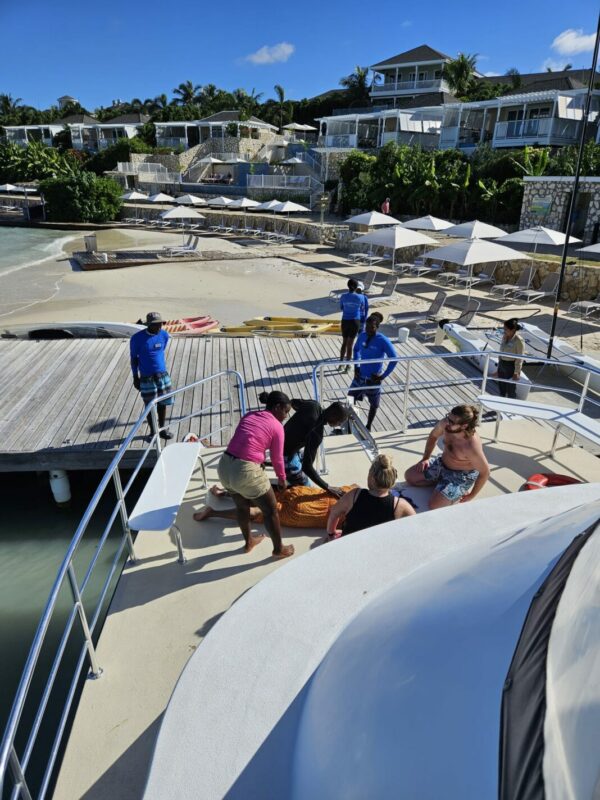
Captain Andre Martin displayed exceptional bravery and professionalism on a Wednesday morning when he and his crew rescued a woman who was struggling in the dangerous waters near Devil’s Bridge.
The incident occurred on December 20, 2023, and a video of the heroic rescue was recently shared with the media, resulting in widespread attention.
The woman in distress was a guest at a nearby hotel and found herself in a precarious situation in Devil’s Bridge’s rough waters.
Captain Andre Martin and his dedicated crew, including Gigi and Daniel, sprang into action without hesitation to prevent what could have been a tragic drowning.
Julia Lopez, a witness to the dramatic rescue, sent a heartfelt commendation to “our hero” Captain Andre Martin, expressing appreciation for the “experience of a lifetime” and praising the captain’s courage, strength, and professionalism.
The letter highlighted the crew’s seamless coordination in averting potential catastrophe and saving the woman’s life without causing additional injuries.
The commendation will be shared with everyone at The Verandah Antigua Resort and Monarc.ca to recognize Captain Andre Martin and his crew’s outstanding efforts. In response to the commendation, Captain Andre Martin expressed gratitude and humility.
He confirmed the woman’s rescue and expressed disbelief at recent events at Devil’s Bridge, saying that the woman was grateful and thankful to be alive.
The heroic rescue is a reminder of the significance of skilled and dedicated individuals like Captain Andre Martin and his crew in ensuring the safety of people enjoying the stunning waters surrounding Devil’s Bridge.
This story was first published by Antigua News on : antigua.news/2023/12/24/captain-andre-martin-rescues-drowning-woman-at-devils-bridge. © 2023 Antigua News. Republication without permission is not allowed.

About the author
The Editorial Staff refers to all reporters employed by Antigua.news. When an article is not an original creation of Antigua.news—such as when it is based on a press release, other media articles, letters to the editor, or court decisions—one of our staff members is responsible for overseeing its publication.
Read our editorial standards and corrections policy. Spotted an error? Contact the newsroom.
More from Antigua and Barbuda
View section
Browne Criticises Land Banking as Tourism Plots Remain Undeveloped
Prime Minister urges landowners to turn investment properties into income-generating accommodation.
By Shermain Bique-Charles

PM Browne Says CIP Suspension Likely by November 12 to Preserve Schengen Access
Cabinet is leaning towards suspension as years of European scrutiny place increasing pressure on citizenship by investment programmes across the Eastern Caribbean.
By Shermain Bique-Charles

Fernandez Eyes Visitor Shows at New Performing Arts Centre
Charles Fernandez sees visitor performances at the National Performing Arts Centre as a way to showcase culture and support the venue’s upkeep.
By Shermain Bique-Charles

Antigua and Barbuda First in Eastern Caribbean to Sign UN Development Framework for 2027–2031
The agreement will guide cooperation on economic diversification, climate resilience, social protection and other development priorities.
By Shermain Bique-Charles
Comments
Be the first to comment.