
APUA advises patience during power infrastructure upgrade.

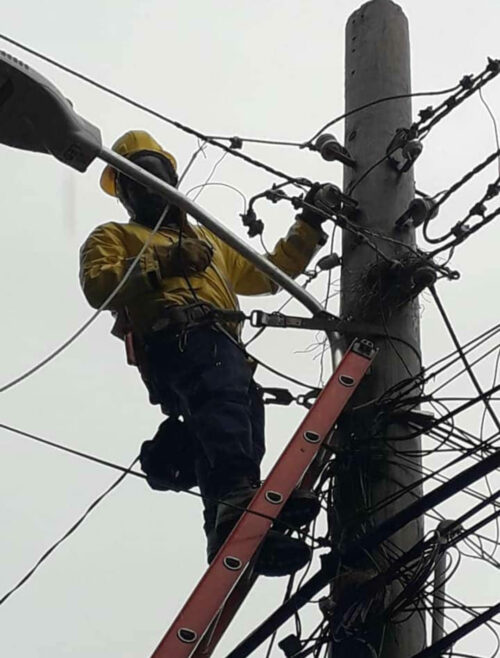
The Antigua Public Utilities Authority (APUA) is currently upgrading the power infrastructure along Friars Hill Road (FHR) to reduce storm-related power outages in the region.
The installation of cables along FHR to connect to the existing substation is progressing, and Lyndon Francis, APUA’s Transmission and Distribution Manager, confirmed this.
The project’s goal is to complete the upgrade by the end of March, but a smooth process is crucial.
Due to safety reasons, the substation that services the area will be temporarily de-energized, and approximately 20% of customers will be redirected to alternative substations. The aim is to minimize disruptions during this period.
As the transition unfolds, the public can expect brief switching intervals on specific days, lasting about 15 to 20 minutes.
These interruptions are necessary for the seamless integration of the new infrastructure, and Francis assured that efforts would be made to minimize traffic disruptions.
APUA aims to execute the transition with minimal impact on daily activities. The upcoming de-energization of the Friars Hill substation marks a critical phase in the project.

While traffic disruptions will be avoided, brief power interruptions during the switching process are inevitable.
Francis emphasized the significance of these interruptions and requested the public’s patience during the transition.
APUA acknowledges the patience required during this process as segments of the underground system become operational.
The authority emphasizes the long-term benefits of a more robust and resilient power infrastructure for Friars Hill Road.
This story was first published by Antigua News on : antigua.news/2024/01/08/apua-advises-patience-during-power-infrastructure-upgrade. © 2024 Antigua News. Republication without permission is not allowed.

About the author
The Editorial Staff refers to all reporters employed by Antigua.news. When an article is not an original creation of Antigua.news—such as when it is based on a press release, other media articles, letters to the editor, or court decisions—one of our staff members is responsible for overseeing its publication.
Read our editorial standards and corrections policy. Spotted an error? Contact the newsroom.
More from Antigua and Barbuda
View section
Freeland Challenges Qualifier Schedule as College Commitments Complicate Team Selection
Basketball president says the timing of another qualifying round created difficulties for overseas players and added financial pressure
By Shermain Bique-Charles

School League Referee Calls for Investigation Into Alleged Verbal Abuse by Grammar School Coach
Devon Ollivere is seeking a public apology and safeguards for match officials following an alleged confrontation with Chesley Browne at Radio Range Football Field.
By Editorial Staff

Janica Adams Earns Special Recognition at Regional Tourism Youth Congress
Antigua and Barbuda’s Junior Minister of Tourism impressed with a creative destination pitch highlighting culture, adventure and bun and cheese ice cream.
By Shermain Bique-Charles

Dr Benjamin Calls for Community-Based Mental Health Care to Replace Clarevue Model
The consultant psychiatrist says meaningful reform must include housing, family support and direct involvement from people living with mental health conditions
By Shermain Bique-Charles
Comments
Be the first to comment.