
CDB president sent on administrative leave; laptop and tablet confiscated

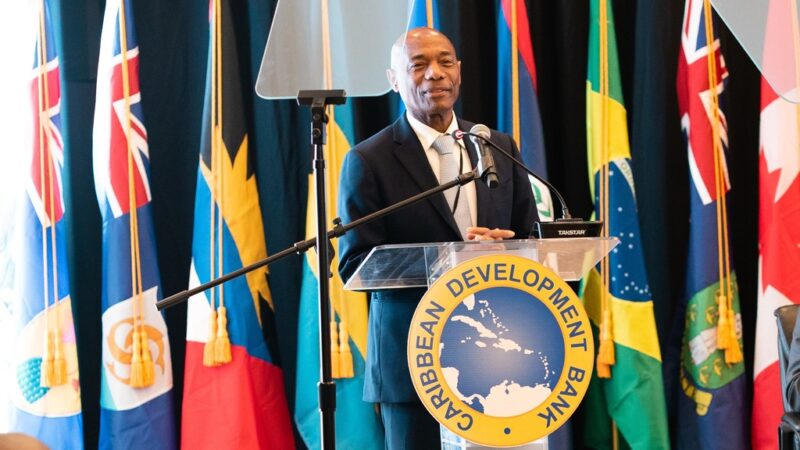
Hyginus ‘Gene’ Leon, President of the Caribbean Development Bank
Hyginus ‘Gene’ Leon, President of the Caribbean Development Bank (CDB), has been placed on administrative leave until April this year as part of an ongoing administrative process at the financial institution.
Reports suggests that Leon’s computer and tablet have been confiscated.
They are questioning how the Board of Directors could have taken such a decision against the bank’s president without the knowledge of the Board of Governors.
The president is the highest-ranking official in the bank, appointed by the Board of Governors, and they claim that they have not been informed of the situation at the bank.
The Board of Directors is responsible for the general policy and operation of the CDB. They are responsible for decisions about loans, guarantees and other investments, borrowing programs, technical assistance, and other bank operations.
It comprises 14 Directors representing regional members and five representing non-regional members.
The Board approves the administrative budget of the bank and submits accounts each financial year for approval by the Board of Governors.
It also appoints the Oversight and Assurance Committee, consisting of five members for a term of two years, with the option to renew for a further two years.
Leon became the sixth president of the CDB in May 2021, succeeding Dr. Warren Smith, who served as president for ten years.
The highly respected economist was born in St. Lucia and brings 35 years of experience in economics, financial policy development, and executive management to his role.
He spent over 20 years working with the International Monetary Fund (IMF).
Last week, Leon was in Guyana meeting with the Caribbean Community (CARICOM) Chairman, President Irfaan Ali of Guyana, and CARICOM Secretary-General Dr. Carla Barnett.

Guyana’s Vice President, Bharrat Jagdeo, said on Thursday that Georgetown would try to find out more about the announcement by the CDB that it is undertaking an ongoing administrative process involving its president.
The CDB has remained silent regarding reports that senior officials of the bank have been sent on administrative leave.
Jagdeo told reporters that Guyana has not been officially informed of the situation, but they will try to find out more from official sources.
He said he had been unsuccessful in getting information about the situation early on Thursday. He added that he did not have many details about it, and the media tends to report on leaks.
This story was first published by Antigua News on : antigua.news/2024/01/19/cdb-president-sent-on-administrative-leave-laptop-and-tablets-confiscated. © 2024 Antigua News. Republication without permission is not allowed.

About the author
The Editorial Staff refers to all reporters employed by Antigua.news. When an article is not an original creation of Antigua.news—such as when it is based on a press release, other media articles, letters to the editor, or court decisions—one of our staff members is responsible for overseeing its publication.
Read our editorial standards and corrections policy. Spotted an error? Contact the newsroom.
More from Caribbean
View section
BREAKING | Dominica Heads to the Polls on December 16
Nomination Day is November 30 as Prime Minister Roosevelt Skerrit seeks a fresh mandate for the Dominica Labour Party.
By Shermain Bique-Charles

DOMINICA: Relief as Three Missing Men Are Found Alive at Sea Near Aves Islands
Davel Baron, Ryan Royer and a third man were rescued by a cargo vessel after being found drifting at sea, bringing relief following days of uncertainty over their whereabouts.
By Cory Wayland

Two Men Vanish at Sea in Dominica, Sparking Growing Fears for Their Safety
Police issue missing-person alerts for Davel Baron and Ryan Royer as concerns grow over their whereabouts.
By Cory Wayland

Saint Lucia Makes Decision on Citizenship by Investment Programme Amid EU Pressure
Prime Minister Philip J. Pierre confirms his government has formally responded to the European Union but says the decision will remain confidential until Brussels acknowledges receipt of the correspondence.
By Cory Wayland
Comments
Be the first to comment.