
UPP stands with Barbuda to alert SIDS4 delegates to environmental threats to sister-island

PRESS STATEMENT
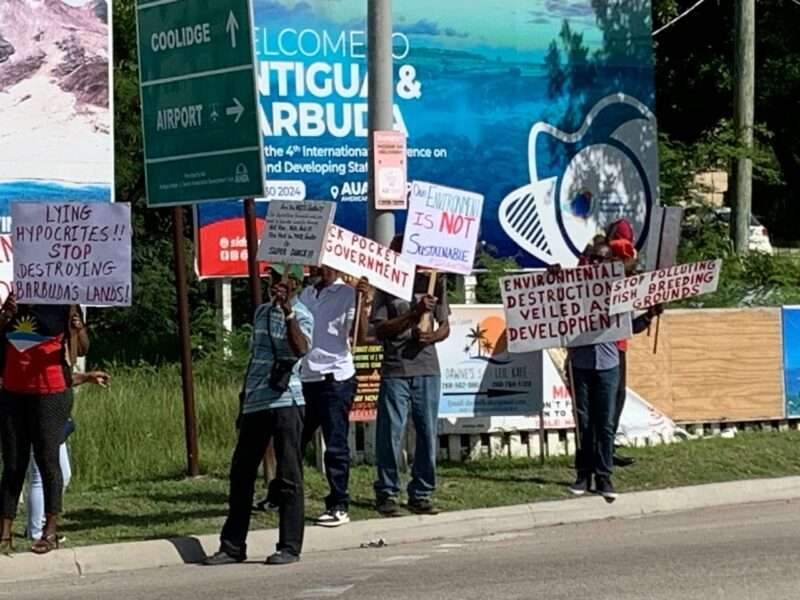
The United Progressive Party (UPP) stands proudly with our Barbudan brothers and sisters in protest of the wanton destruction of the environment and against the Browne Administration’s assault on their centuries-old land-tenure system.
In 2017, the Barbudans experienced the destructive force of Hurricane Irma, which would have wiped out everything on their island had it not been for its mangrove networks.
Since then, instead of being allowed to pick up the pieces of their lives, Barbudans have had to fight the Browne Administration’s efforts to impose on this ecologically fragile island a brand of “development” that threatens their livelihood and ways of life.
Further, the Administration has attempted to fool and induce Barbudans into giving up their land sovereignty – strictly for the financial gain of foreign investors.
Accordingly, the UPP agrees that environmental protection must extend beyond the flora and fauna to the protection of Barbudans’ right to have and hold the keys to their future.
Therefore, the UPP supports the picket at Coolidge/Powells now underway, and pledges to stand with our Barbudan brothers and sisters in defense of their land and human rights. We also condemn the exclusion of the Barbuda Council from the SIDS4 Conference and consider it the greatest contradiction in the execution of this event.
If the devastation of our sister-island is allowed to continue under the guise of foreign direct investment, the hosting of this Conference will have been in vain.
Barbuda’s people, lands, and culture are not for sale!

This story was first published by Antigua News on : antigua.news/2024/05/29/upp-stands-with-barbuda-to-alert-sids4-delegates-to-environmental-threats-to-sister-island. © 2024 Antigua News. Republication without permission is not allowed.

About the author
The Editorial Staff refers to all reporters employed by Antigua.news. When an article is not an original creation of Antigua.news—such as when it is based on a press release, other media articles, letters to the editor, or court decisions—one of our staff members is responsible for overseeing its publication.
Read our editorial standards and corrections policy. Spotted an error? Contact the newsroom.
More from Caribbean
View section
VIDEO: Doctors at Dominica China Friendship Hospital Stage Protest Outside Medical Facility
Healthcare professionals at the Dominica China Friendship Hospital gather outside the medical facility in an apparent protest, raising concerns over issues yet to be officially confirmed.
By Cory Wayland

St. Kitts DPP Seeks Antigua’s Help in Outstanding Case Involving Former Resort Clerk
By Shermain Bique-Charles

Royal Caribbean in Talks to Buy Half of Sandals in Reported $3 Billion Deal
By Shermain Bique-Charles

Four Killed in Latest US Military Strike on Suspected Drug Vessel in Caribbean
By Shermain Bique-Charles
Comments
Be the first to comment.