
PM Browne congratulates first female elected President of Mexico

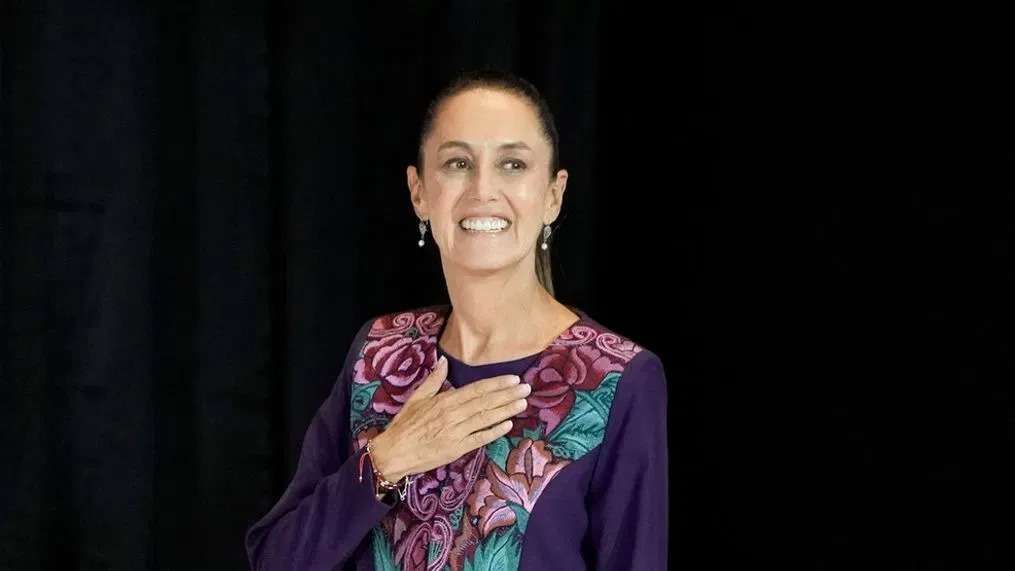
Prime Minister the Hon. Gaston Browne today congratulated the first female elected President of the United Mexican States, Her Excellency Claudia Sheinbaum.
In his letter to the new Mexican leader, Prime Minister Browne said that her election is a testament to her exceptional leadership and the trust the Mexican people have in her vision for their future.
Prime Minister Browne noted that Antigua and Barbuda values the strong and friendly relations sharded with Mexico, fostered through “our cooperation as member states of the Organization of American States and other international forums.”
We reproduce below the full text of Prime Minister Browne’s letter to President Elect Sheinbaum:

5th June 2024
Her Excellency Claudia Sheinbaum
President-Elect of the United Mexican States
Mexico City, Mexico
Dear President-Elect Sheinbaum,
On behalf of the Government and people of Antigua and Barbuda, I extend our warmest congratulations on your historic election as the President of the United Mexican States. Your achievement as the first female President of Mexico is a testament to your exceptional leadership and the trust the Mexican people have in your vision for their future.
Antigua and Barbuda values the strong and friendly relations we share with Mexico, fostered through our cooperation as member states of the Organization of American States and other international forums. Our nations have stood together in addressing critical regional issues such as trafficking in guns and drugs, organized crime, and the pursuit of democratic governance.
We welcome your declared dedication to tackling the shared challenges that confront our region, including poverty alleviation, promoting equity and inclusion in international decision-making, and advancing security, development, democracy, and human rights.
I look forward to working closely with your administration to build on our mutual interests and to further strengthen our bonds for the betterment of our peoples.
Please accept, Excellency, the assurances of my highest consideration and best wishes for your success as you prepare to assume your responsibilities as President on 1st October 2024.
Sincerely,
Gaston Browne
Prime Minister of Antigua and Barbuda
This story was first published by Antigua News on : antigua.news/2024/06/05/pm-browne-congratulates-first-female-elected-president-of-mexico. © 2024 Antigua News. Republication without permission is not allowed.

About the author
The Editorial Staff refers to all reporters employed by Antigua.news. When an article is not an original creation of Antigua.news—such as when it is based on a press release, other media articles, letters to the editor, or court decisions—one of our staff members is responsible for overseeing its publication.
Read our editorial standards and corrections policy. Spotted an error? Contact the newsroom.
More from World
View section
Kenyan Preacher Paul Mackenzie Convicted of Murdering 191 People in Shakahola Massacre
Former church leader found guilty alongside 28 others in a case involving the deaths of 190 children and one adult who were allegedly subjected to deadly religious fasting.
By Cory Wayland

Priest Speaks About Life and Death in Final Sermon Before Falling Crucifix Kills Him During Mass
Father Patricio Sánchez urged worshippers to cherish their time with God and loved ones before a large wooden crucifix fell and fatally struck him during a church service in Ecuador.
By Cory Wayland

Florida Attorney General James Uthmeier Announces Arrest Warrant for Former Cuban Leader Raúl Castro Over 1996 Aircraft Shootdown
James Uthmeier confirms murder conspiracy charge against the 95-year-old former president over the 1996 shootdown of two civilian aircraft that killed four men.
By Cory Wayland

France and Italy Count the Cost as Protests Turn Violent Across Europe
Burned public buildings and looted shops have overshadowed demands for better schools and relief from living costs, as unrest takes different forms across Europe.
By Editorial Staff
Comments
Be the first to comment.