Invest 96L: Potential Storm brewing in the eastern tropical Atlantic

Published
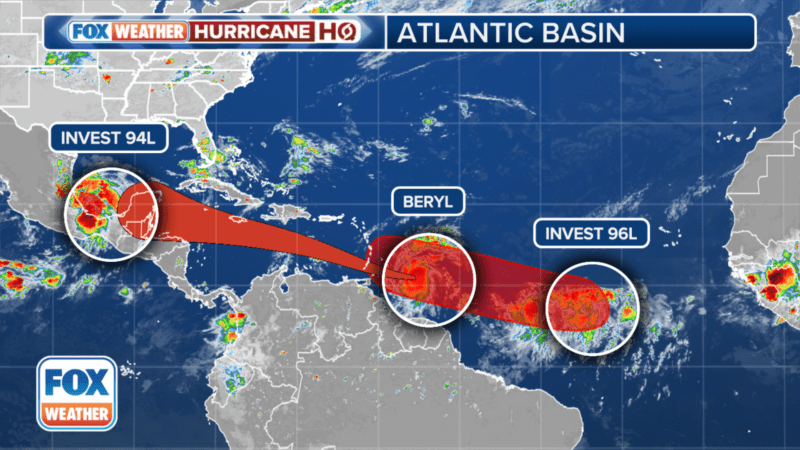
Invest 96 L trails Hurricane Beryl in the distance

As many focus on the intensification of Hurricane Beryl who is now a Category 4 Hurricane, the NHC has given Invest 96L, which is several hundred miles east of Hurricane Beryl, a high chance of development this week.

Forecasters say that if development trends continue, a tropical depression or tropical storm could form by midweek.

Antigua.News Whatsapp Channel

The disturbance is moving westward at 15 to 20 mph and is not an immediate threat to any landmasses.

The system could approach the eastern Caribbean by the middle of the week, but its size and strength remain uncertain.

“On the current schedule, potential Chris or whatever it is, would impact the eastern Caribbean islands about Wednesday,” FOX Weather Hurricane Specialist Bryan Norcross said. “Because the disturbance is still disorganized, the strength of the system at that time is unknowable.” (foxnews.com)

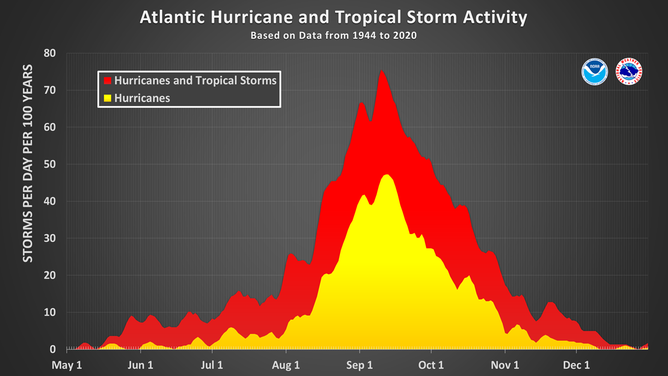
This chart shows the amount of tropical cyclone activity, in terms of named storms and hurricanes, that occurs in the Atlantic Basin on each calendar day between May 1 and Dec. 31. Specifically, it shows the number of hurricanes (yellow area) and the combined named storms and hurricanes (red area) that occur on each calendar day over a 100-year period. The chart is based on data from the 77-year period from 1944 to 2020 (starting at the beginning of the aircraft reconnaissance era) but normalized to 100 years. The official hurricane season for the Atlantic Basin is from June 1 to Nov. 30, but tropical cyclone activity sometimes occurs before and after these dates, respectively. The peak of the Atlantic hurricane season is Sept. 10, with most activity occurring between mid-August and mid-October. (National Hurricane Center / NOAA)

This story was first published by Antigua News on : antigua.news/2024/06/30/invest-96l-potential-storm-brewing-in-the-eastern-tropical-atlantic. © 2024 Antigua News. Republication without permission is not allowed.

Step 1

Add Antigua.news to your Home Screen

✕ antigua.news ⋯ Open in Safari Copy link Share…

First, open this page in Safari

You are reading inside another app (Instagram, Facebook…). Tap ⋯ at the top right and choose Open in Safari (or Open in browser).

No such option? Copy the link, open Safari and paste it in the address bar.

⚙️ Settings General › Software Update

Update your iPhone first

Alerts need iOS 16.4 or newer. Open Settings → General → Software Update and install the update. You can still add the icon now: tap Next.

‹ antigua.news ⋯

Tap the ⋯ button

It is at the bottom right of Safari, next to the address bar. Don't see the bar? Scroll up a little.

Share Add Bookmark New Tab Find on Page

Tap Share

It is the first option of the menu, with a square-and-arrow icon.

antigua.news ‹ › ▢ ⧉

Tap the Share button

The square with an arrow pointing up, in the middle of the bar at the bottom (on iPad: at the top right).

antigua.news

Tap the Share button

The square with an arrow, at the right of the address bar at the top. (Firefox: tap ☰ at the bottom, then Share.)

Copy Add to Reading List Add to Home Screen

Tap Add to Home Screen

Scroll down the list to find it (icon: a square with a +). Not there? Tap Edit Actions or View More at the bottom.

Cancel Add to Home Screen Add Antigua.news Open as Web App

Keep Open as Web App on, then tap Add

The switch must be green — without it, alerts can't work. Then tap Add at the top right.

Cancel Add to Home Screen Add Antigua.news An icon will be added to your Home Screen so you can quickly access this website.

Tap Add

At the top right. If you see an Open as Web App switch, leave it on (green).

Antigua.news

Close the browser and open Antigua.news from its new icon

Go to your Home Screen: the Antigua.news icon is there now (swipe left if you don't see it). Alerts only work when you open us from this icon.

“Antigua.news” Would Like to Send You Notifications Notifications may include alerts, sounds and icon badges. Don’t Allow Allow

Tap 🔔 Turn on alerts, then Allow

In the app you will see a red box asking to turn on alerts: choose your sections, tap the button, then tap Allow. That's it — breaking news will reach you even with the phone locked.

Editorial Staff

About the author

The Editorial Staff refers to all reporters employed by Antigua.news. When an article is not an original creation of Antigua.news—such as when it is based on a press release, other media articles, letters to the editor, or court decisions—one of our staff members is responsible for overseeing its publication.

Read our editorial standards and corrections policy. Spotted an error? Contact the newsroom.

Comments

Be the first to comment.

Submit a comment

More from Caribbean

View section