
Mandela Anyandjuh and Gabrielle Hamlet Crowned Mr. and Ms. Teenage

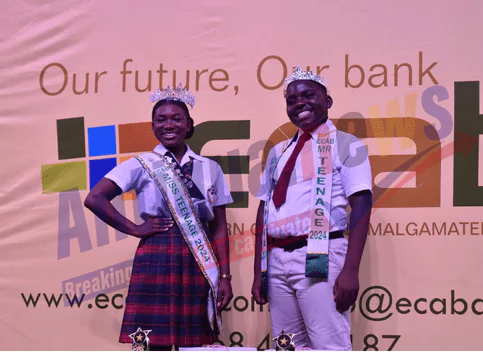
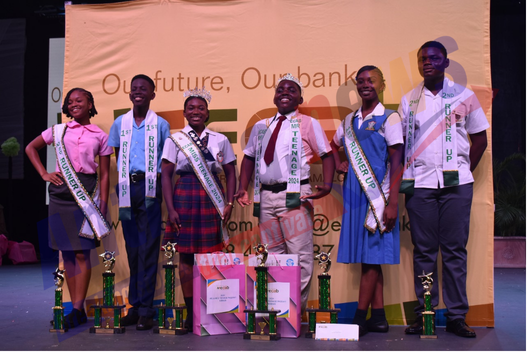
The Sir Novelle Richards Academy, the country’s newest secondary school, has secured its second consecutive title in the Mr. and Ms. Teenage Pageant.
Last night, Gabrielle Hamlet brought home the crown for her school in the female category, following in the footsteps of last year’s winner, Lutrell John, who was crowned Mr. Teenage from the same institution.

Hamlet’s performance was marked by her poise and elegance throughout the competition. She particularly stood out during the interview segment and impressed the judges with her exceptional talent presentation—a dance that raised awareness about child neglect.
In the male category, Mandela Anyandjuh from St. Joseph’s Academy claimed the title. His confident personality resonated throughout the event, and he maintained a consistent performance across all segments of the competition.

The competition was fierce, with all delegates delivering impressive performances. In the female category, Anya Hull secured the first runner-up position, while Aniah Laurent of Princess Margaret School (PMS) was named second runner-up. It’s worth noting that last year’s Ms. Teenage, Ajanae Bleau, also hailed from PMS.
For the male category, Ja’quan Christopher of Clarehall Secondary took the first runner-up spot, and Drayton Payne of Glanvilles Secondary School was awarded second runner-up.
This year’s pageant showcased the talents and personalities of 13 young individuals from various schools across the country, highlighting the depth of talent among the nation’s youth.
The event continues to be a platform for teenagers to demonstrate their skills, confidence, and awareness of social issues.

This story was first published by Antigua News on : antigua.news/2024/07/30/mandela-anyandjuh-and-gabrielle-hamlet-crowned-mr-and-ms-teenage. © 2024 Antigua News. Republication without permission is not allowed.

About the author
The Editorial Staff refers to all reporters employed by Antigua.news. When an article is not an original creation of Antigua.news—such as when it is based on a press release, other media articles, letters to the editor, or court decisions—one of our staff members is responsible for overseeing its publication.
Read our editorial standards and corrections policy. Spotted an error? Contact the newsroom.
More from Antigua and Barbuda
View section
Sir Ronald Sanders Receives Ukraine’s Order of Merit for Defence of Sovereignty
Antigua and Barbuda’s ambassador honoured for diplomatic leadership at the OAS and support for Ukraine’s territorial integrity.
By Shermain Bique-Charles

Scottish Bagpipers and Caribbean Steelpan Musicians to Unite for One Commonwealth Night
A unique musical collaboration featuring Scottish bagpipers, Caribbean steelpan performers and an orchestra will highlight cultural unity during the November 2 celebration in Antigua and Barbuda.
By Cory Wayland

Antigua and Barbuda and Panama Sign Air Services Agreement
New aviation agreement opens opportunities for expanded air travel, tourism and trade between Antigua and Barbuda, Panama and destinations across Central and South America.
By Shermain Bique-Charles

Antigua and Barbuda Records 12 Heatwaves in 2026 as Hotter and Drier Conditions Loom
Climatologist Orvin Paige warns that rising temperatures, prolonged heatwaves and persistent drought could worsen as El Niño conditions extend into 2027.
By Cory Wayland
Comments
Be the first to comment.