
STATEMENT FROM THE CCJ PRESIDENT ON THE PASSING OF SIR HENRY FORDE

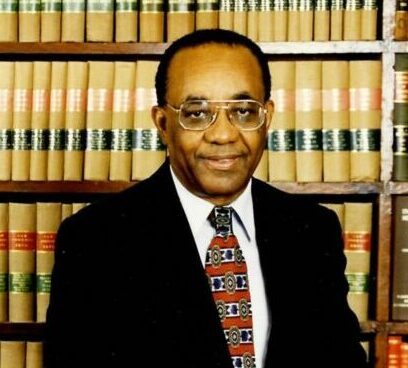
Port of Spain, Trinidad and Tobago. It is with deep sadness that the Caribbean Court of Justice (CCJ) notes the passing of Sir Henry Forde KC, LL.D. (h.c.), a towering figure in the Caribbean legal landscape and a distinguished jurist of Barbados.
Sir Henry had the distinction of being one of the attorneys to appear before the CCJ, as lead counsel in the first case to be heard by the CCJ – Barbados Rediffusion Service Ltd v Asha Mirchandani et al in 2005. His advocacy in this case was a testament to his legal acumen and set a high standard for those who would follow. This was certainly a fitting start for the Court as Sir Henry was a champion of the CCJ long before 2005, lending his voice and influence to the establishment and promotion of the Court across the region.
In his capacity as Attorney General of Barbados, Sir Henry oversaw the enactment of almost 300 laws, a feat that solidified his legacy as one of the most impactful lawmakers in the region. His commitment to public service and the rule of law transformed the legal framework of Barbados and advanced the country’s development in profound ways. Sir Henry was also a tireless advocate for the advancement of women’s rights. He established the National Commission on the Status of Women, which conducted research on issues relating to women and employment. The Commission’s work led to 212 recommendations, nearly all of which were passed into law, ensuring greater equality and opportunity for women in Barbados.
President of the CCJ, Justice Adrian Saunders states that, “on a personal note, Sir Henry was a mentor to me during my years as a junior lawyer in private practice. We tried a few cases together in Saint Vincent and the Grenadines, and I witnessed firsthand his brilliance and unwavering commitment to justice. He was a phenomenal lawyer and an inspiration to all who had the privilege of working with him.”
The Caribbean has lost one of its most venerable sons. His long life exemplified a, legacy of service, advocacy, and leadership, will continue to inspire generations to come. The CCJ extends its deepest condolences to Sir Henry’s family, friends, and the people of Barbados during this time of mourning.

This story was first published by Antigua News on : antigua.news/2024/10/22/statement-from-the-ccj-president-on-the-passing-of-sir-henry-forde. © 2024 Antigua News. Republication without permission is not allowed.

About the author
The Editorial Staff refers to all reporters employed by Antigua.news. When an article is not an original creation of Antigua.news—such as when it is based on a press release, other media articles, letters to the editor, or court decisions—one of our staff members is responsible for overseeing its publication.
Read our editorial standards and corrections policy. Spotted an error? Contact the newsroom.
More from Caribbean
View section
BREAKING | Dominica Heads to the Polls on December 16
Nomination Day is November 30 as Prime Minister Roosevelt Skerrit seeks a fresh mandate for the Dominica Labour Party.
By Shermain Bique-Charles

DOMINICA: Relief as Three Missing Men Are Found Alive at Sea Near Aves Islands
Davel Baron, Ryan Royer and a third man were rescued by a cargo vessel after being found drifting at sea, bringing relief following days of uncertainty over their whereabouts.
By Cory Wayland

Two Men Vanish at Sea in Dominica, Sparking Growing Fears for Their Safety
Police issue missing-person alerts for Davel Baron and Ryan Royer as concerns grow over their whereabouts.
By Cory Wayland

Saint Lucia Makes Decision on Citizenship by Investment Programme Amid EU Pressure
Prime Minister Philip J. Pierre confirms his government has formally responded to the European Union but says the decision will remain confidential until Brussels acknowledges receipt of the correspondence.
By Cory Wayland
Comments
Be the first to comment.