
Liverpool crowned 2024/25 champions of the Premier League

by Mick the Ram
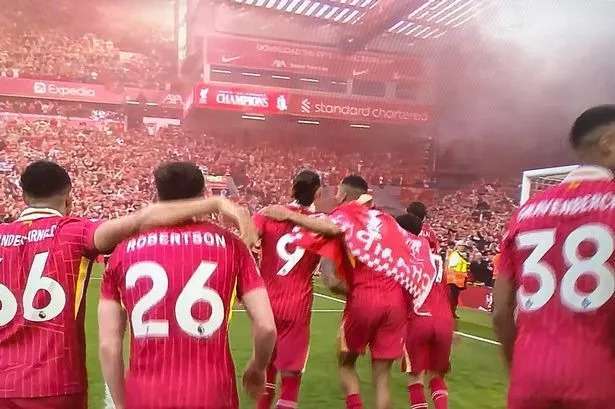
Liverpool have claimed the Premier League for the 2024/25 season, winning the title in a canter with four games still to play.
They were not expected to be serious challenges after losing long-term manager Jürgen Klopp at the end of last season, replacing him with Dutch coach Arne Slot.
However, they hit the ground running winning seven of their first eight and eleven of the first thirteen matches to establish a healthy lead, which they never surrendered.
Yesterday’s 5-1 annihilation of a sorry looking and totally submissive Tottenham Hotspur outfit was their 25th victory of the season, taking them past 80 point mark and 15 points above their closest challengers Arsenal.
The Merseyside team end Manchester City’s four seasons of dominance of the English game.
Red half of city descend on ground
Pre-match the whole area around Anfield was a sea of red from mid-morning onwards as tens of thousands of supporters waited in long lines to be among the first into the stadium.
Pubs were packed to the rafters and basically it seemed everyone of a red persuasion from the city of Liverpool had made the pilgrimage to be around the ground.
Tickets selling for thousands of pounds
Even the owner John W. Henry made one of his rare visits for what was effectively the team’s coronation, and so keen were supporters to be at the game for a “I was there” moment, tickets were reportedly changing hands for up to £3,000 on the black market.
Once that final whistle sounded Liverpool a deafening wall of noise exploded across the famous old ground, with fireworks leaving a fog of red smoke as emotions were released with tears in the stands and from the players on the pitch.
Covid spoiled previous title win
The fans had been waiting 35 years to join in a celebration of this kind on their home soil. They had of course won the title in the 2019/20 season, but it coincided with the outbreak of the COVID-19 pandemic, so that squad of players could only celebrate with invited family and friends at a deserted Anfield.
This time those supporters were going to lap up every precious moment this time, and for many it was their first time, because it was back in 1990 – under the stewardship of Sir Kenny Dalglish – that fans had last been able to experience such elation with their team.
The bigger picture saw the Reds equal Manchester United’s total of 20 top-flight titles.

Inevitable from very early on
Liverpool had given Manchester City a good run for their money in the early 2020’s, but they were significantly off the pace towards the end of last season, and following Klopp’s farewell, there was definitely an air of uncertainty when the season kicked off.
However, any anxieties were quickly dispelled and as the season wore on there became a feeling of inevitability, which is to the great credit of both the players and the new head coach.
New boss takes much of the credit
Skipper Virgil van Dijk afterwards praised his new boss: “To replace Jürgen is a big job and the manager did it in his own way and deserves a lot of credit; I don’t think anyone from the outside world thought we would be Premier League champions.”
The 46-year-old Slot has defied all expectations and he was a mixture of emotions at the finish: “Looking back I have enjoyed the whole day. You could see looking in their eyes how much it meant to them. It is unbelievable and from this moment now I am part of the history of this great football club.”
He becomes the first Dutch manager to win the Premier League and the fifth man to do so in their debut campaign after the successes of Jose Mourinho, Carlo Ancelotti, Manuel Pellegrini and Antonio Conte.
This story was first published by Antigua News on : antigua.news/2025/05/01/liverpool-crowned-2024-25-champions-of-the-premier-league. © 2025 Antigua News. Republication without permission is not allowed.

About the author
The Editorial Staff refers to all reporters employed by Antigua.news. When an article is not an original creation of Antigua.news—such as when it is based on a press release, other media articles, letters to the editor, or court decisions—one of our staff members is responsible for overseeing its publication.
Read our editorial standards and corrections policy. Spotted an error? Contact the newsroom.
More from World
View section
Pope Leo XIV to Undergo Surgery to Remove Lung Nodule
The 71-year-old pontiff announced the operation after Sunday’s Angelus. The nodule was found during recent medical checks and, he said, detected at an early stage.
By Dario Item

Afreximbank extends EUR 40-million revolving working capital facili-ty to support Cameroon’s Prometal SA
Afreximbank’s EUR 40-million revolving facility will support Prometal SA’s steel production expansion and strengthen manufacturing capacity in Cameroon.
By Editorial Staff

Passengers Subdue Co-Pilot Accused of Trying to Crash Israel-Bound Flight
The flydubai aircraft plunged thousands of feet during a violent cockpit incident before making an emergency landing in Saudi Arabia.
By Cory Wayland
Antigua and Barbuda, Octopus Energy to Explore Cheaper, Cleaner Power
By Shermain Bique-Charles
Comments
Be the first to comment.