
Sir Keir Starmer Resigns as UK Prime Minister

By Mick the Ram
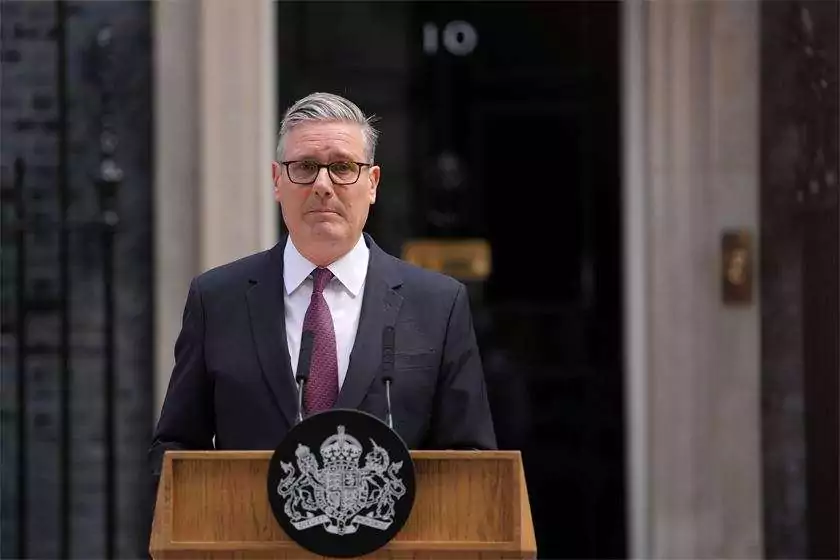
Sir Keir Starmer has confirmed he will resign as Prime Minister just two years after leading Labour to a landslide election victory. He announced his timetable of resignation outside Downing Street this morning. The resignation makes him the shortest serving Labour Prime Minister in history.
He entered Number 10 in July 2024 with a commanding parliamentary majority and a promise to restore stability after years of Conservative turmoil, but his decision to resign had become almost inevitable, shaped by a cascade of political crises and a revolt within his own party.
Labour’s disastrous performance in local elections proved to be the breaking point. The party lost around 1,500 council seats and more than 25 councils, haemorrhaging support to Nigel Farage’s Reform UK in traditional Labour heartlands and to the Greens in major cities. These results were widely interpreted as a public repudiation of Starmer’s leadership and direction.
The electoral fallout triggered a wave of resignations from government ministers and intensified calls from senior Labour MPs for Starmer to step aside. Even within his cabinet, confidence had eroded. By mid-June, the question was no longer if he would resign, but when.
Mr Starmer’s authority had been weakening for months. A series of self-inflicted controversies – most notably the appointment of Peter Mandelson as UK Ambassador to the United States despite his links to Jeffrey Epstein – damaged his credibility and alienated key figures within Labour. The backlash led to senior aides quitting and intensified scrutiny of Starmer’s judgement.
Foreign policy tensions also played a role. A public dispute with President Donald Trump over the UK’s stance on military operations against Iran painted Starmer as indecisive. Focus groups described him as “weak” and “reactive,” further eroding public confidence.
Domestically, disagreements over defence spending and welfare reform deepened rifts within the party. Senior ministers accused Starmer of failing to provide adequate funding for the armed forces, prompting further resignations and fuelling speculation about an imminent leadership challenge.
This morning (22 June) Sir Keir delivered an emotional statement outside No. 10 Downing Street in which he acknowledged that his party no longer believed he was the right person to lead them into the next general election, saying: “I have heard the answer of my parliamentary party… and I accept that answer with good grace.”
He added “walking up” Downing Street two years ago was “”the proudest moment” of his life, before saying: “Every decision I have taken has been about putting the country I love first.”
He also confirmed he had informed King Charles III of his intention to resign and asked Labour’s National Executive Committee to set out a leadership timetable, with nominations opening on 9 July and a new leader in place before Parliament returns in September.
Labour now faces a pivotal leadership contest. Andy Burnham is widely expected to take the helm, with Wes Streeting and Yvette Cooper also mentioned as potential contenders. Whoever wins will become the UK’s next Prime Minister – the seventh in just ten years – and inherit a party fractured by internal disputes and a country impatient for change.
Mr Farage has already demanded a general election, arguing that Labour cannot simply “shove another professional politician into No. 10.” Whether that pressure leads to an early national vote remains to be seen.
Despite stepping down, Mr Starmer will remain in office until the leadership contest concludes to ensure what he called an “orderly transition of power.”
This story was first published by Antigua News on : antigua.news/2026/06/22/sir-keir-starmer-resigns-as-uk-prime-minister. © 2026 Antigua News. Republication without permission is not allowed.

About the author
Mick Burrows is an independent freelance author based in the UK, boasting over 20 years of experience in the online writing landscape. His extensive background has enabled him to develop a diverse range of material, marked by a unique and distinct style. Recognized as a platinum-level expert author by leading e-zine publications, Mick excels in optimizing content for Search Engine Optimization (SEO) through effective keyword density and distribution. He has served as the lead reviewer for a travel enterprise and the senior previewer at a sports prediction company, melding his passions for sport—particularly football and cricket—with his love for travel, having explored more than 50 countries worldwide.
Read our editorial standards and corrections policy. Spotted an error? Contact the newsroom.
More from World
View section
Kenyan Preacher Paul Mackenzie Convicted of Murdering 191 People in Shakahola Massacre
Former church leader found guilty alongside 28 others in a case involving the deaths of 190 children and one adult who were allegedly subjected to deadly religious fasting.
By Cory Wayland

Priest Speaks About Life and Death in Final Sermon Before Falling Crucifix Kills Him During Mass
Father Patricio Sánchez urged worshippers to cherish their time with God and loved ones before a large wooden crucifix fell and fatally struck him during a church service in Ecuador.
By Cory Wayland

Florida Attorney General James Uthmeier Announces Arrest Warrant for Former Cuban Leader Raúl Castro Over 1996 Aircraft Shootdown
James Uthmeier confirms murder conspiracy charge against the 95-year-old former president over the 1996 shootdown of two civilian aircraft that killed four men.
By Cory Wayland

France and Italy Count the Cost as Protests Turn Violent Across Europe
Burned public buildings and looted shops have overshadowed demands for better schools and relief from living costs, as unrest takes different forms across Europe.
By Editorial Staff
Comments (1)
Apex Jones June 22, 2026, 9:21 PM