
Saharan Dust Lowers Air Quality Across Antigua and Barbuda Until Friday

By Cory Wayland
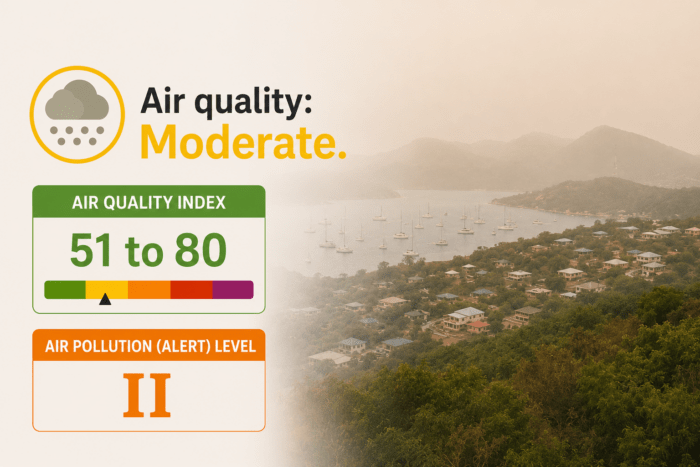
Residents across Antigua and Barbuda are being advised to take precautions as another surge of Saharan dust has reduced air quality to moderate levels, according to the Antigua and Barbuda Meteorological Service.
The bulletin, issued at 12:30 p.m. on Wednesday, says the decline in air quality is being caused by elevated concentrations of fine particulate matter (PM2.5 and PM10) associated with the 14th notable Saharan dust event to affect the country this year.
The Air Quality Index (AQI) is forecast to remain between 51 and 80, placing conditions in the Moderate category and triggering a Level II Air Pollution Alert through Friday.
While air quality remains acceptable for most people, the Meteorological Service warns that those who are unusually sensitive to air pollution could experience health effects. People with asthma and other respiratory illnesses, heart disease, older adults and young children are considered the most vulnerable.
The advisory recommends that active children and adults, as well as anyone with respiratory conditions, limit prolonged outdoor exertion while the dust lingers over the islands.
Although the overall health risk is considered low for the general population, the Met Office cautioned that some pollutants may pose moderate health concerns for a very small number of people who are especially sensitive to poor air quality.
Residents are encouraged to stay informed by following updates from the Antigua and Barbuda Meteorological Service through its website, social media platforms, and local radio and television stations.
Forecasters expect the Saharan dust plume to continue affecting Antigua and Barbuda until Friday before conditions begin to improve.
This story was first published by Antigua News on : antigua.news/2026/06/25/saharan-dust-lowers-air-quality-across-antigua-and-barbuda-until-friday. © 2026 Antigua News. Republication without permission is not allowed.

About the author
Cory Wayland is the Social Media Co-ordinator at Antigua.News, where he manages digital content strategy, audience engagement, and real-time news publications across social platforms. With a keen eye for trending topics and a commitment to factual storytelling, Cory plays a key role in shaping the online voice of Antigua.News.
Read our editorial standards and corrections policy. Spotted an error? Contact the newsroom.
More from Antigua and Barbuda
View section
Trade Winds Hotel Workers Meet With Union Representative
The visit was part of the Antigua and Barbuda Workers’ Union’s regular outreach to hotel employees.
By Cory Wayland

WISH to Host ‘Behind the Screen’ Workshop Addressing Digital Violence Against Women and Girls
WISH and regional partners will host a workshop in Antigua on December 5 to raise awareness of digital violence against women and girls and promote online safety.
By Editorial Staff

AIDS Secretariat Symposium Tackles HIV Stigma, Prevention and Sexual Health Awareness
Health professionals and community stakeholders gathered for an afternoon of discussions on HIV prevention, testing, treatment, sexual consent, mental health and healthy relationships ahead of World AIDS Day.
By Cory Wayland

Police Launch Operation Season Watch, Remove 12 Vehicles From Roads in Christmas Crackdown
Police stopped approximately 140 vehicles during coordinated patrols and checkpoints as Commissioner Everton Jeffers warns that intensified crime-fighting and traffic enforcement will continue into the new year.
By Cory Wayland
Comments (3)
Informed citizen June 25, 2026, 1:42 PM
Juju Bee June 25, 2026, 2:35 PM
Nicolie June 27, 2026, 6:48 AM