
Mostly Fair Weather Expected Across Antigua and Barbuda Through Monday

By Cory Wayland

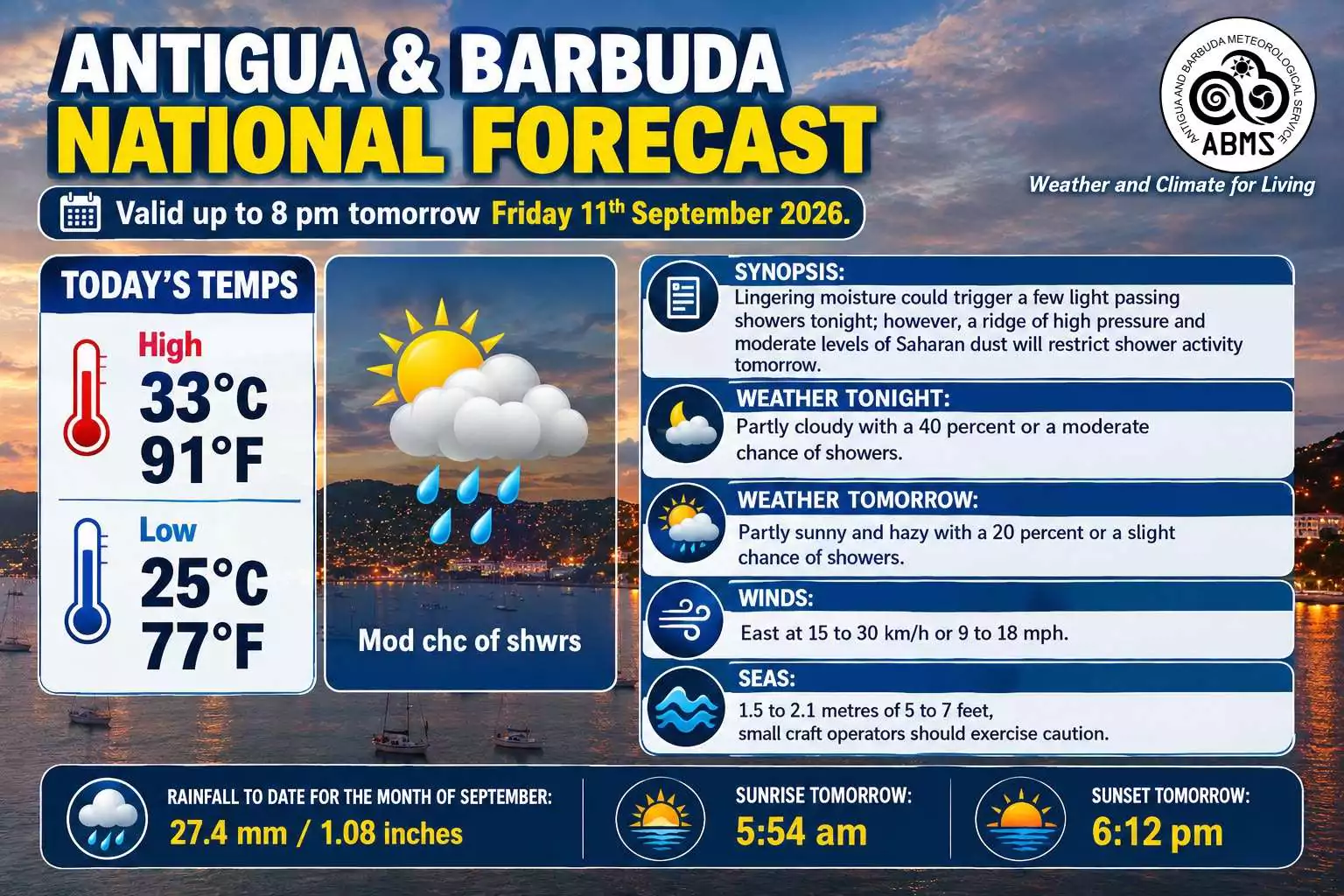
Antigua and Barbuda is heading into a mostly fair stretch of weather, with only brief showers expected over the next several days as Saharan dust helps keep rainfall activity under control.
The Antigua and Barbuda Meteorological Service says a ridge of high pressure, combined with moderate levels of Saharan dust, will maintain relatively stable conditions across the area.
Friday is expected to be partly sunny and hazy, with just a 20 per cent chance of showers. The temperature could climb to 34°C or 93°F during the day before falling to around 26°C or 79°F overnight.
There is a slightly better chance of getting some rain on Saturday, when the probability of showers increases to 40 per cent. However, forecasters are not expecting any prolonged or widespread rainfall.
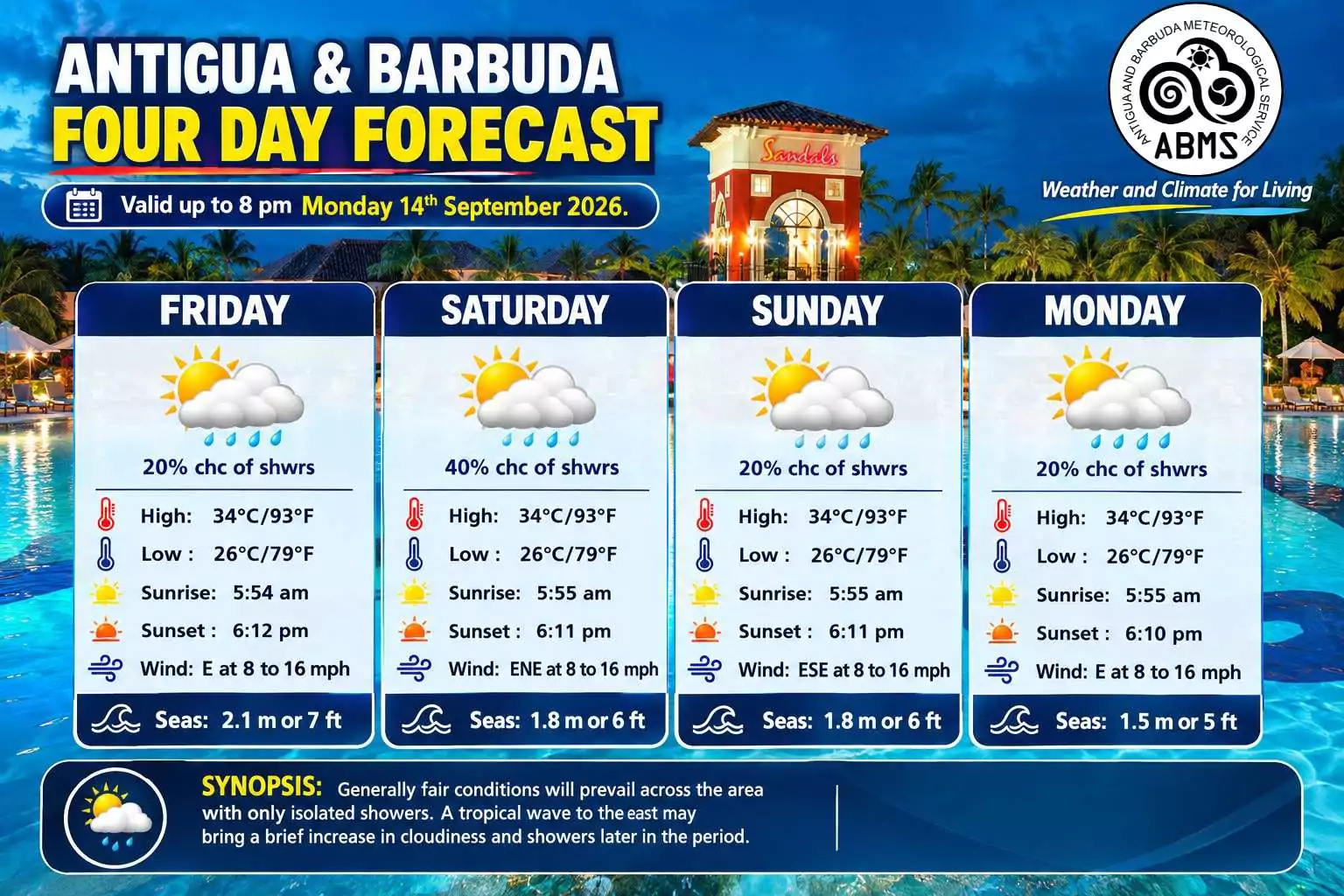
Conditions are forecast to become drier again on Sunday and Monday, with the chance of showers falling to 20 per cent on both days.
A tropical wave located east of the region could bring some additional cloudiness and showers later in the forecast period, but generally fair conditions are still expected to dominate.
Temperatures will remain warm throughout the weekend, with highs near 34°C each day and overnight lows around 26°C.
Residents can also expect easterly to east-northeasterly winds generally between 8 and 18 mph.
Sea conditions will be somewhat elevated heading into Friday, reaching as high as seven feet before gradually improving to around five feet by Monday. Small craft operators are being advised to exercise caution while the higher seas persist.
For Thursday night, forecasters expect partly cloudy conditions with a 40 per cent chance of passing showers.
The Meteorological Service is encouraging residents to continue monitoring its forecasts for any changes as the tropical wave approaches the region.
This story was first published by Antigua News on : antigua.news/2026/09/10/mostly-fair-weather-expected-across-antigua-and-barbuda-through-monday. © 2026 Antigua News. Republication without permission is not allowed.

About the author
Cory Wayland is the Social Media Co-ordinator at Antigua.News, where he manages digital content strategy, audience engagement, and real-time news publications across social platforms. With a keen eye for trending topics and a commitment to factual storytelling, Cory plays a key role in shaping the online voice of Antigua.News.
Read our editorial standards and corrections policy. Spotted an error? Contact the newsroom.
More from Antigua and Barbuda
View section
Young Fencer Zuri Alfred Ventures Into Technology, Fashion and Entrepreneurship
After earning international recognition in fencing, the young athlete is turning her attention to innovative projects aimed at making the sport more accessible while exploring opportunities in business.
By Cory Wayland

Solid Waste Authority Warns Coconut Vendor of Possible Penalties Over Improper Waste Disposal
The National Solid Waste Management Authority says business operators must take responsibility for their commercial waste following a viral video in which a coconut vendor called for the Authority to clean up his business location.
By Cory Wayland

Michael Joseph Selected to Lead CARICOM Climate Finance and Science Negotiations at COP31
Antigua and Barbuda's Environment Minister will take on two major negotiating responsibilities as Caribbean countries push for stronger climate financing, scientific action and protection of the 1.5°C temperature goal.
By Cory Wayland

Arry Simon to Champion Caribbean Climate Science Priorities at COP31 in Türkiye
Antigua and Barbuda’s AOSIS Lead Negotiator for Science is pushing for stronger scientific evidence, protection of the 1.5°C temperature limit and greater climate action ahead of the international summit.
By Cory Wayland
Comments (1)
Apex Jones September 11, 2026, 5:32 PM