
Police Hunt for Individuals Flaunting Firearms on Social Media

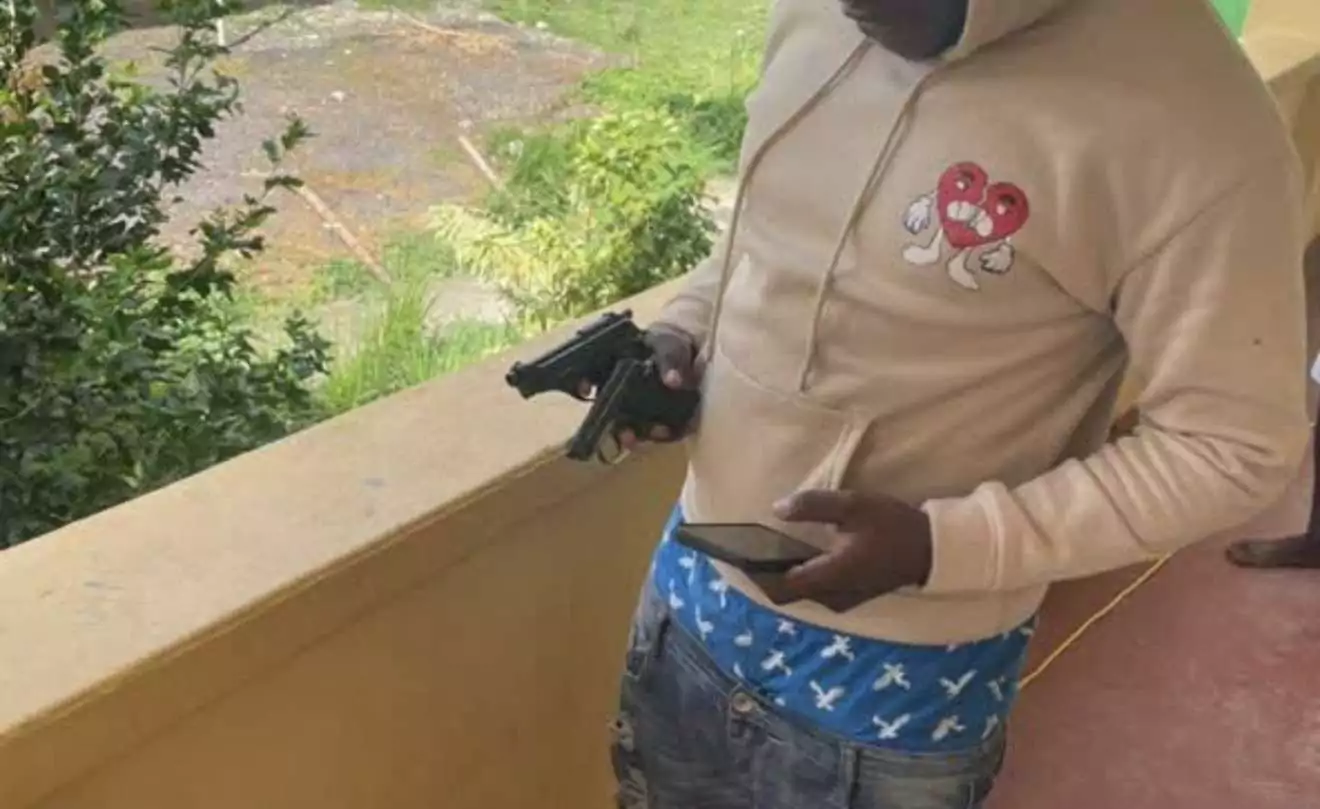
The Royal Police Force of Antigua and Barbuda has launched a crackdown on the growing number of social media posts showing young people openly displaying what appear to be firearms and ammunition.
Police said officers are actively reviewing photographs, videos and other material circulating online in an effort to identify those involved and recover any illegal weapons.
The Police Administration condemned the trend as “lawless and deviant behaviour,” warning that the public display and glorification of firearms will not be treated lightly.
Commissioner of Police Everton Jeffers said guns should never be portrayed as symbols of status, power or social acceptance.
“The unlawful possession and public display of firearms should never be viewed as a symbol of status, power, or acceptance,” Jeffers said. “This behaviour places lives at risk and contributes to a culture of violence that has no place in our society.”
He said the police would use every lawful measure available to identify the individuals involved, recover illegal firearms and bring offenders before the courts where sufficient evidence exists.
The force is also urging parents, guardians, educators and community leaders to openly condemn the behaviour and steer young people away from criminal activity and associations that could destroy their lives and harm their families and communities.
Members of the public are being encouraged to report photographs, videos, messages or other information that may reveal the possession, movement, concealment or use of illegal firearms.
Anyone with information may contact the Criminal Investigations Department at 462-3913 or 462-3914, Crime Stoppers anonymously at 800-TIPS (8477), or the nearest police station.
This story was first published by Antigua News on : antigua.news/2026/09/14/police-hunt-for-individuals-flaunting-firearms-on-social-media. © 2026 Antigua News. Republication without permission is not allowed.

About the author
The Editorial Staff refers to all reporters employed by Antigua.news. When an article is not an original creation of Antigua.news—such as when it is based on a press release, other media articles, letters to the editor, or court decisions—one of our staff members is responsible for overseeing its publication.
Read our editorial standards and corrections policy. Spotted an error? Contact the newsroom.
More from Antigua and Barbuda
View section
Antigua and Barbuda’s Garth Simon Shares COP31 Negotiation Insights with Youth Fellows
The Department of Environment representative discussed climate finance and how small island states can make their priorities heard in global climate talks.
By Shermain Bique-Charles

Education Minister Daryll Matthew Pushes Back Against Teachers’ Union Over Proposed School Hours
The Education Minister insists no decision has been made to change secondary school operating hours and criticises the union’s response, maintaining that consultations will begin in January 2027.
By Cory Wayland

PM Browne Says Government Has Commitments for Beach Parks in Antigua and Barbuda
Browne named Jolly Beach and Pearns Point in Antigua and said commitments had also come from Murbee and PLH in Barbuda.
By Shermain Bique-Charles

Accident Investigation reports critical safety risks not understood by crew on striken yacht that claimed life of Antiguan citizen
UK investigators found that the Bayesian’s crew were unaware of the yacht’s vulnerability to extreme winds before it capsized off Sicily, killing seven people, including Antiguan chef Recaldo Thomas.
By Mick the Ram
Comments (6)
Ratid September 14, 2026, 1:42 PM
Whatever September 14, 2026, 2:05 PM
Informed citizen September 14, 2026, 2:03 PM
Apex Jones September 14, 2026, 2:23 PM
Kerwan September 14, 2026, 2:27 PM
Pitch September 15, 2026, 7:24 AM