
Fire Outbreak in Chinese hospital kills 29, injures several others
By Tata
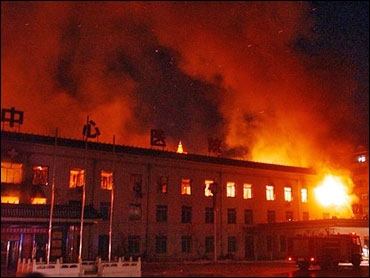
At least 29 people have died after a fire broke out in a hospital in the Chinese capital of Beijing. The incident happened in Changfeng Hospital in the Fengtai district of the capital city on Tuesday night.
“As of 6 pm local, 21 people have unfortunately died,” Chinese state media, CCTV, said. The death toll would later increase to 29.
Li Zongrong, the deputy head of the district said at least 39 people were injured in the incident, with three in severe condition. Those that died in the accident include 26 patients, two hospital workers and a family member. Most of the patients affected were critically ill when the fire broke out because the hospital wing was housing patients that were critically ill.
Lizrong told reporters that the oldest victim was 88 years while the youngest was 40 years. 13 of them were men, while 16 were women.
Fortunately, several persons were able to escape the blaze by using the windows. Others tied hospital bedsheets together to climb down. About 142 escaped the fire. While injured patients have been moved to other hospitals for intensive care, unaffected patients in the hospital unit have been transferred to other buildings.
The cause of the fire
Officials are currently investigating the cause of one of China’s deadliest fire outbreaks in years. However, since construction is currently going on in some parts of the hospital, there are suggestions that the fire emanated from an avoidable welding spark from the inpatient segment. Antigua News could not independently verify this claim at the time of this report.
The leadership of Changfeng, a private hospital, was arrested by the authorities as part of the investigation process. So far, a total of 12 people are in detention, including the hospital’s head and her deputy. The head of the construction crew was also arrested.

This story was first published by Antigua News on : antigua.news/2023/04/19/fire-outbreak-in-chinese-hospital-kills-29-injures-several-others. © 2023 Antigua News. Republication without permission is not allowed.
Read our editorial standards and corrections policy. Spotted an error? Contact the newsroom.
More from World
View section
Powerful Earthquake Strikes China Leaving 16 Dead And Hundreds Of Homes Destroyed
Rescue teams race against time in Tibet after a magnitude 7 earthquake leaves dozens injured, displaces thousands and triggers widespread destruction.
By Cory Wayland

Kenyan Preacher Paul Mackenzie Convicted of Murdering 191 People in Shakahola Massacre
Former church leader found guilty alongside 28 others in a case involving the deaths of 190 children and one adult who were allegedly subjected to deadly religious fasting.
By Cory Wayland

Priest Speaks About Life and Death in Final Sermon Before Falling Crucifix Kills Him During Mass
Father Patricio Sánchez urged worshippers to cherish their time with God and loved ones before a large wooden crucifix fell and fatally struck him during a church service in Ecuador.
By Cory Wayland

Florida Attorney General James Uthmeier Announces Arrest Warrant for Former Cuban Leader Raúl Castro Over 1996 Aircraft Shootdown
James Uthmeier confirms murder conspiracy charge against the 95-year-old former president over the 1996 shootdown of two civilian aircraft that killed four men.
By Cory Wayland
Comments
Be the first to comment.