
Antigua and Barbuda’s landscape now accessible through World Travel in 360.

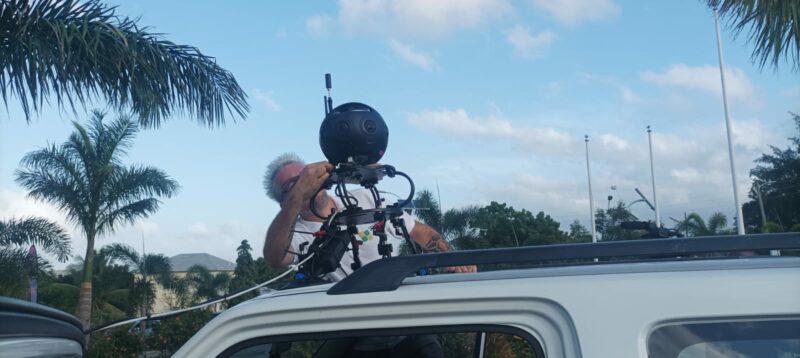
Antigua and Barbuda’s picturesque landscapes are now more accessible than ever, thanks to a new project called World Travel in 360.
This international company specializes in creating Google Street View coverage for countries worldwide.
The company’s trained digital photographers have captured footage that offers an interactive virtual experience accessed through Google Maps. This technology allows users to explore streets, neighborhoods, and landmarks from their homes.
In addition to providing users with a more in-depth view of the island’s stunning scenery, the Google Street View software also features information on specific landmarks, hotels, hospitals, and other amenities.
This makes it easier for users to navigate and find areas on the island they are not familiar with. The addition of this technology is a significant boost to the island’s marketing, offering a sneak peek into the beauty and uniqueness that Antigua and Barbuda has to offer.
A press conference was held on February 6 at the John E. St. Luce Conference Centre, where the CEO of World Travel in 360, Dimitar Kunev and Federico Debetto, shared details about how the data would be collected.

They also encouraged businesses, hotels, restaurants, and excursion groups to join this initiative.
World Travel in 360’s transformative project is set to revolutionize how people explore Antigua and Barbuda.
“Local businesses need to start utilizing the Google Business profiles or the services of World Travel 360. We will count all those in. When you search these things, people can see all the information about your business or hotel, and potential customers will come to your page,” Kunev said.
Late last year, an agreement was signed between Prime Minister Gaston Browne, Tourism Minister Charles ‘Max’ Fernandez, Antigua and Barbuda’s Ambassador to the Kingdom of Spain, the Principality of Monaco, the Principality of Liechtenstein and to the UNWTO, Dr. Dario Item, and Kunev and Debetto.
The agreement paved the way for the launch of a Street View coverage project in Antigua and Barbuda, which is expected to begin in February 2024.
The first parts of the Street View coverage will be available online less than a month after the mapping project begins.
The last update to the country’s images was in 2017 when it was mapped.
This story was first published by Antigua News on : antigua.news/2024/02/07/antigua-and-barbudas-landscape-now-accessible-through-world-travel-in-360. © 2024 Antigua News. Republication without permission is not allowed.

About the author
The Editorial Staff refers to all reporters employed by Antigua.news. When an article is not an original creation of Antigua.news—such as when it is based on a press release, other media articles, letters to the editor, or court decisions—one of our staff members is responsible for overseeing its publication.
Read our editorial standards and corrections policy. Spotted an error? Contact the newsroom.
More from Antigua and Barbuda
View section
Freeland Challenges Qualifier Schedule as College Commitments Complicate Team Selection
Basketball president says the timing of another qualifying round created difficulties for overseas players and added financial pressure
By Shermain Bique-Charles

School League Referee Calls for Investigation Into Alleged Verbal Abuse by Grammar School Coach
Devon Ollivere is seeking a public apology and safeguards for match officials following an alleged confrontation with Chesley Browne at Radio Range Football Field.
By Editorial Staff

Janica Adams Earns Special Recognition at Regional Tourism Youth Congress
Antigua and Barbuda’s Junior Minister of Tourism impressed with a creative destination pitch highlighting culture, adventure and bun and cheese ice cream.
By Shermain Bique-Charles

Dr Benjamin Calls for Community-Based Mental Health Care to Replace Clarevue Model
The consultant psychiatrist says meaningful reform must include housing, family support and direct involvement from people living with mental health conditions
By Shermain Bique-Charles
Comments
Be the first to comment.