
National Emergency Team established ahead of SIDS4

Antigua is gearing up to host the 4th International Conference on Small Island Developing States SIDS4, which is expected to draw thousands of delegates from across the globe.
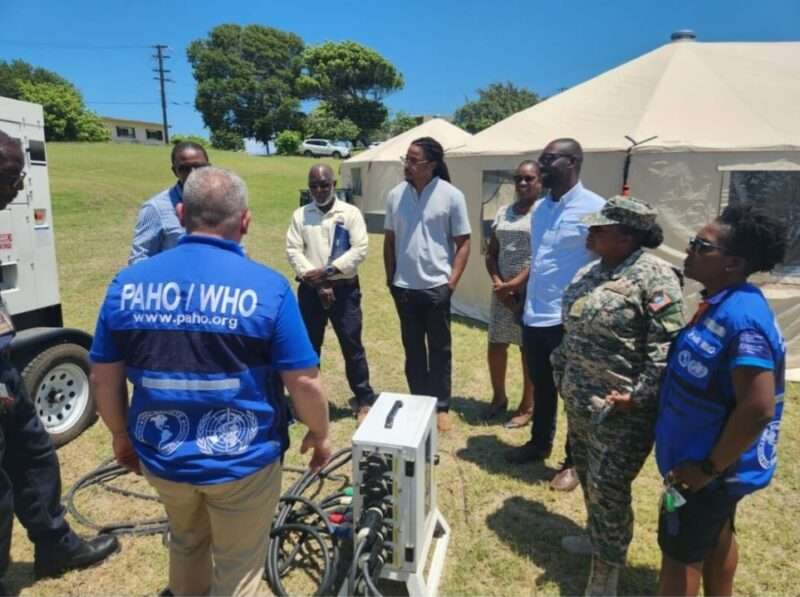
As part of the preparations for the conference, a team from the Pan American Health Organization (PAHO) has arrived on the island to support efforts related to health and safety.
The team, led by Luis de la Fuente and Andres Sanz, is working to ensure a seamless deployment and mobilization of all phases of preparation for a National Emergency Medical Team (N-EMT).
This team is an initiative introduced by the World Health Organization and piloted by PAHO in the Western Hemisphere.
Given the anticipated influx of conference attendees, health officials believe that this is the perfect opportunity to put the resources of the N-EMT to good use by deploying a Medical Post at the conference venue, the American University of Antigua (AUA).
With the help of this dedicated team, conference organizers hope to ensure the safety and well-being of all attendees throughout the duration of the event.

The SIDS4 Local Organising Committee has allocated a designated area on the AUA campus for the Medical Post during the upcoming conference.
The preparations are in full swing to ensure that the requirements for a conference of this magnitude are met.
PAHO is committed to providing technical support for this pivotal endeavor by ensuring that an emergency medical response system is fully available to all those who may require its services during the SIDS Conference, the Cricket World Cup matches, and beyond.
To achieve this, PAHO is facilitating a technical workshop throughout the week, aiming to enable Antigua and Barbuda to deploy its Type 1 EMT efficiently and safely during the SIDS4 Conference.
The one-week session will also aim to gather input for the self-sustainable development of a fixed Type 1 EMT for health contingencies in Antigua and Barbuda.
This story was first published by Antigua News on : antigua.news/2024/04/10/national-emergency-team-established-ahead-of-sids4. © 2024 Antigua News. Republication without permission is not allowed.

About the author
The Editorial Staff refers to all reporters employed by Antigua.news. When an article is not an original creation of Antigua.news—such as when it is based on a press release, other media articles, letters to the editor, or court decisions—one of our staff members is responsible for overseeing its publication.
Read our editorial standards and corrections policy. Spotted an error? Contact the newsroom.
More from Antigua and Barbuda
View section
Antigua and Barbuda Honours War Dead at National Remembrance Service
National leaders, veterans and uniformed organisations gather at the War Memorial for wreath-laying, military honours and two minutes of silence.
By Shermain Bique-Charles

Five Islands Feeder Fault Causes Power Outage in Several Communities
APUA dispatches technicians to address the fault affecting Bolans, Valley Church, Christian Valley and surrounding areas.
By Shermain Bique-Charles

APUA Reports Unplanned Power Outage Affecting Several Communities
Technicians dispatched following an issue with the Cassada Gardens #3/#9 Feeder.
By Shermain Bique-Charles

“Let’s Talk, Richard”: Browne Leaves Door Open for Lewis to Join ABLP
Prime Minister renews his invitation for Richard Lewis to join the ABLP, with no indication the former UPP MP intends to accept.
By Shermain Bique-Charles
Comments
Be the first to comment.