
Julian Assange freed after plea deal with US

by Mick the Ram
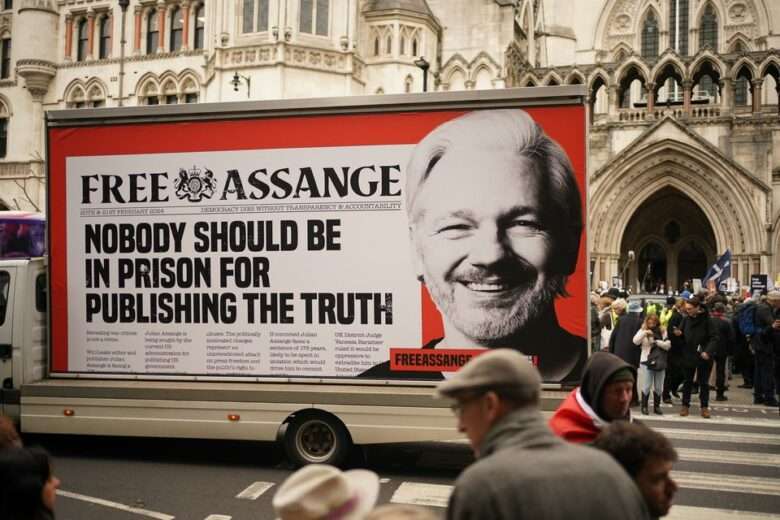
Wikileaks founder Julian Assange has been released from prison in the UK after a plea deal was sealed with the US government authorities.
This brings an end to a five-year legal saga where Assange faced prosecution in the US over an alleged conspiracy to disclose national defence information, following the publication of hundreds of thousands of leaked documents relating to the Afghanistan and Iraq wars, obtained from Army Intelligence Analyst Chelsea Manning, on his website back in 2010.
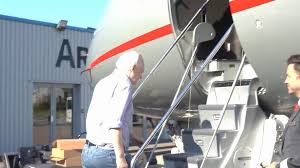
The 52-year-old left high security Belmarsh jail on Monday 24 June where he had been locked away for the past five years (1,901 days) fighting extradition. He headed to Stansted Airport where he boarded a private charter plane.
It is understood that the Australian national has agreed to plead guilty to a single criminal charge of conspiring to obtain and disclose classified US national defence documents and in return he will walk free and return to his home country, after years in self-exile. The deal is expected to be finalised in a court in the remote Pacific Northern Mariana Islands on Wednesday, 26 June.

According to a letter from the Justice Department, Assange will spend no time in US custody and will receive credit for the time spent incarcerated in the UK.
Assange and his lawyers had long claimed that the case against him was politically motivated and in April this year, US President Joe Biden said that he was considering a request from Australia to drop the prosecution.
In a victory the following month, the UK High Court ruled that Assange could bring a new appeal against extradition to the US, allowing him to challenge US assurances over how his prospective trial would be conducted and whether his right to free speech would be infringed.
His wife, Stella Assange, tweeted thanks to his supporters “who have all mobilised for years and years to make this come true”.
This story was first published by Antigua News on June 25, 2024: antigua.news/2024/06/25/julian-assange-freed-after-plea-deal-with-us. © 2024 Antigua News. Republication without permission is not allowed.

About the author
The Editorial Staff refers to all reporters employed by Antigua.news. When an article is not an original creation of Antigua.news—such as when it is based on a press release, other media articles, letters to the editor, or court decisions—one of our staff members is responsible for overseeing its publication.
Read our editorial standards and corrections policy. Spotted an error? Contact the newsroom.
More from World
View section
Afreximbank extends EUR 40-million revolving working capital facili-ty to support Cameroon’s Prometal SA
Afreximbank’s EUR 40-million revolving facility will support Prometal SA’s steel production expansion and strengthen manufacturing capacity in Cameroon.
By Editorial Staff

Passengers Subdue Co-Pilot Accused of Trying to Crash Israel-Bound Flight
The flydubai aircraft plunged thousands of feet during a violent cockpit incident before making an emergency landing in Saudi Arabia.
By Cory Wayland
Antigua and Barbuda, Octopus Energy to Explore Cheaper, Cleaner Power
By Shermain Bique-Charles
Afreximbank issues a $29 million guarantee to scale EAC Customs Bond, easing movement of goods across East Africa
By Editorial Staff
Comments
Be the first to comment.