
NODS Managing Quantity of Relief to Affected Countries

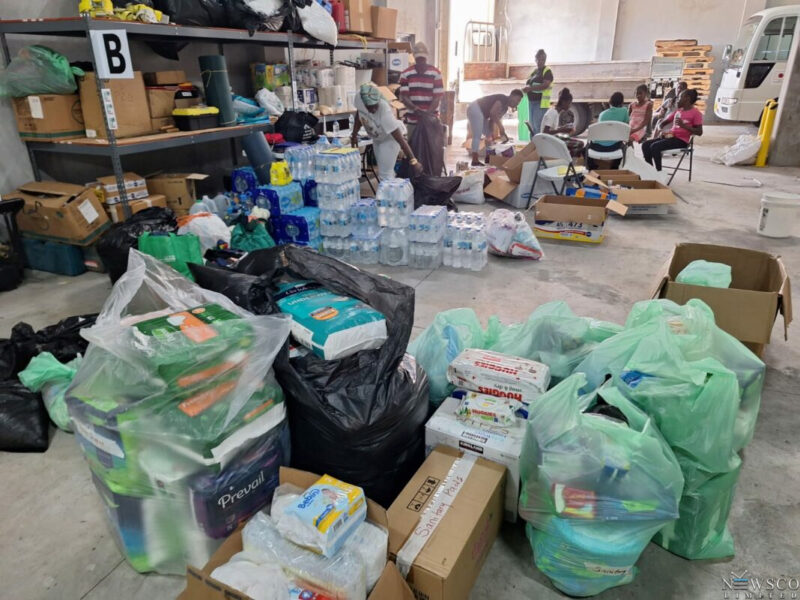
Efforts are underway to manage the quantity of relief supplies being sent to St. Vincent and the Grenadines (SVG) and Grenada as local and regional disaster officials continue to oversee relief coordination.
Damage caused by Hurricane Beryl earlier this week affected these two territories, as well as several Grenadine islands such as Canouan, Union Island, Mayreau in SVG, and Carriacou and Petit Martinique in Grenada.
The coordination of assistance to the affected states involves the National Office of Disaster Services (NODS), which can be contacted by individuals and groups willing to contribute to the relief efforts.
A virtual meeting held on Thursday by the CDEMA heads and national disaster coordinators emphasized the necessity to avoid overwhelming the impacted territories with relief supplies that are not listed as required by the affected states.
Therefore, a list of required relief items has been made available on NODS’ Facebook and Instagram pages, which will be updated regularly as assessments and response operations progress.
The listed items include non-perishable food, water, toiletries, baby and adult diapers, wipes, baby formula, cots, sleeping blankets, pillows, and chain saws, among others.
The government of Grenada has announced that it will not be accepting personal relief items until July 31.
Those interested in providing assistance can make cash donations to the disaster relief fund for St. Vincent and the Grenadines and Grenada, or through CDEMA, which has also established an account for this purpose.
CDEMA has been called upon to offer support in operations, rapid needs assessment, debris management, and water and sanitation.
This story was first published by Antigua News on : antigua.news/2024/07/07/nods-managing-quantity-of-relief-to-affected-countries. © 2024 Antigua News. Republication without permission is not allowed.

About the author
The Editorial Staff refers to all reporters employed by Antigua.news. When an article is not an original creation of Antigua.news—such as when it is based on a press release, other media articles, letters to the editor, or court decisions—one of our staff members is responsible for overseeing its publication.
Read our editorial standards and corrections policy. Spotted an error? Contact the newsroom.
More from Antigua and Barbuda
View section
Emergency Response Teams to Stage Mass Casualty Drill at Scotts Hill Ahead of CHOGM
Emergency personnel will simulate a serious vehicle crash to test hospital readiness, while a separate evacuation exercise is planned for the CHOGM opening ceremony venue.
By Cory Wayland

Karim Edwards’ Trial Over Fatal Friars Hill Road Crash Postponed Until December
More than four years after the collision that claimed the life of medical student Kenneth Mathew and left Priyanjana Das with life-altering injuries, the accused driver is still awaiting trial.
By Cory Wayland

Jury Rejects Self-Defence Claim And Finds Kareem Simon Guilty Of Dennis Edwards’ Murder
Jury rejects Simon’s self-defence claim after video footage reveals details of the fatal confrontation on Lower All Saints Road.
By Cory Wayland

Tourism Ministry and ABTA Working with Bert Kirchner on Proposed Louis Tomlinson Campaign
Minister Michael Freeland has held talks on the project, which aims to turn international exposure into visitor interest and bookings.
By Shermain Bique-Charles
Comments
Be the first to comment.