
42 Lightning Strikes Detected in 45 Minutes

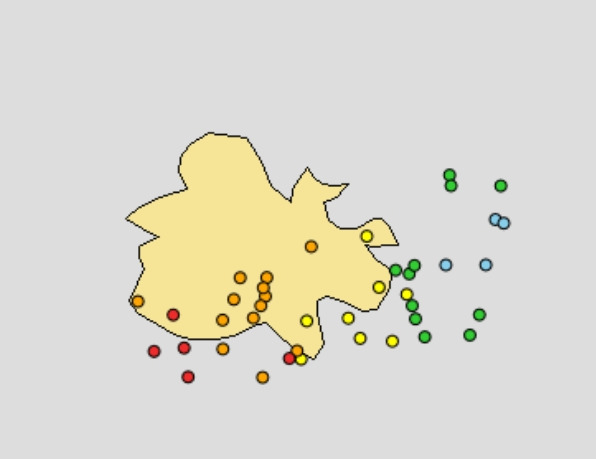
Meteorologist Dale Destin has issued a warning following a surge of lightning strikes, noting that 42 strikes have occurred over or near Antigua in just the last 45 minutes.
He emphasized the importance of distinguishing between different types of lightning, urging residents to hope that the strikes were mainly cloud-to-cloud or intra-cloud, as these pose less risk than the potentially deadly cloud-to-ground lightning.
Destin cautioned, “When thunder roars, go indoors and don’t return until at least 30 minutes after the last thunder was heard.”
He highlighted that 20-30% of all lightning strikes are the more dangerous cloud-to-ground variety, which can cause significant harm to both people and property.
The meteorologist shared that the frequency of lightning activity can be monitored through real-time updates, indicating that “the redder that dot, the more recent the lightning strike.”
Residents should stay alert and take safety precautions as storms develop rapidly.

This story was first published by Antigua News on September 25, 2024: antigua.news/2024/09/25/42-lightning-strikes-detected-in-45-minutes. © 2024 Antigua News. Republication without permission is not allowed.

About the author
The Editorial Staff refers to all reporters employed by Antigua.news. When an article is not an original creation of Antigua.news—such as when it is based on a press release, other media articles, letters to the editor, or court decisions—one of our staff members is responsible for overseeing its publication.
Read our editorial standards and corrections policy. Spotted an error? Contact the newsroom.
More from Antigua and Barbuda
View section
BREAKING:Fernandez Elected CTO Chairman as Antigua and Barbuda Returns to Regional Tourism Leadership
Antigua and Barbuda takes the chairmanship for the first time in more than 15 years, with connectivity, climate resilience and leadership opportunities among Fernandez’s priorities
By Shermain Bique-Charles

Hundreds Join CIBC Walk for the Cure as Participation Hits Record High
The 15th annual event brought together cancer survivors, families and supporters to raise awareness and funds for cancer care.
By Shermain Bique-Charles

Antigua and Barbuda Airport Authority Secures Seat on Regional Aviation Board
The 2026–2027 appointment gives the authority a stronger voice in regional discussions on airport development, safety and connectivity.
By Shermain Bique-Charles

PM Warns Roadside Vendors to Improve Structures and Orderliness
Browne says vending standards must rise while acknowledging the importance of livelihoods.
By Shermain Bique-Charles
Comments
Be the first to comment.