
Cuban Nationals Removed from Belize

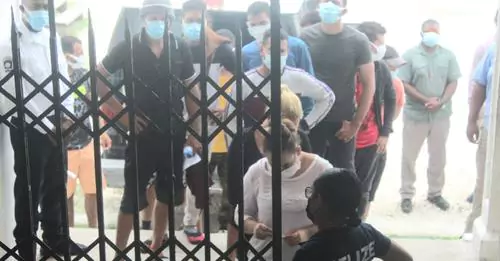
About sixteen Cuban nationals have been thrown out of Belize after it was believed that they were illegal migrants.
On Tuesday, the Chief Magistrate in Belize Sharon Fraser issued removal orders for the Cubans, who entered without passports.
They reportedly told the court that they were, seeking asylum in the Cayman Islands but accidentally ended up in Belize when their boat ran out of gas and drifted ashore after experiencing bad weather.
But, the Chief Magistrate questioned how these Cubans could travel from their homes to another country without any passports or proper traveling documentation.
“Attorney Orson “OJ” Elrington, who represented nine of the Cubans, asked the magistrate to use her discretion and not impose a prison term against them, arguing that there was not enough evidence to prove that they came to Belize intentionally,” a statement from Belize media said.
According to reports, two men among them pleaded guilty, while the remaining seven said that they were not sure how to plea. One Cuban informed Magistrate Frazer that while they did not come to Belize with any passports they also did not want to come to Belize.
It was also reported, however, that one of the Cubans, a woman, changed her story and claimed that they were seeking asylum in Belize, while two others claimed that their documents were left in the Cayman Islands after they were denied asylum.
“The second set of Cubans was unrepresented. After the Immigration Department told the court they were not seeking a fine against the Cubans, Chief Magistrate Fraser used her discretion and did not find them,” the report states.
The Magistrate, however, ordered that they be sent back home. One defendant asked the Chief Magistrate if he could pay a fine and continue his journey, but she told them that a removal order means they must return back home to their country of origin.
This story was first published by Antigua News on : antigua.news/2022/09/07/cuban-nationals-removed-from-belize. © 2022 Antigua News. Republication without permission is not allowed.

About the author
Shermain Bique-Charles is an accomplished journalist with over 24 years of dynamic experience in the industry. Renowned for her exceptional storytelling and investigative skills, she has garnered numerous awards that highlight her commitment to journalistic integrity and excellence. Her work not only informs but also inspires, making her a respected voice in the field.
Read our editorial standards and corrections policy. Spotted an error? Contact the newsroom.
More from Caribbean
View section
VIDEO: Doctors at Dominica China Friendship Hospital Stage Protest Outside Medical Facility
Healthcare professionals at the Dominica China Friendship Hospital gather outside the medical facility in an apparent protest, raising concerns over issues yet to be officially confirmed.
By Cory Wayland

St. Kitts DPP Seeks Antigua’s Help in Outstanding Case Involving Former Resort Clerk
By Shermain Bique-Charles

Royal Caribbean in Talks to Buy Half of Sandals in Reported $3 Billion Deal
By Shermain Bique-Charles

Four Killed in Latest US Military Strike on Suspected Drug Vessel in Caribbean
By Shermain Bique-Charles
Comments
Be the first to comment.