
SpaceX Starship explodes in midair in its first launch attempt, but it was a ‘success’
By Tata
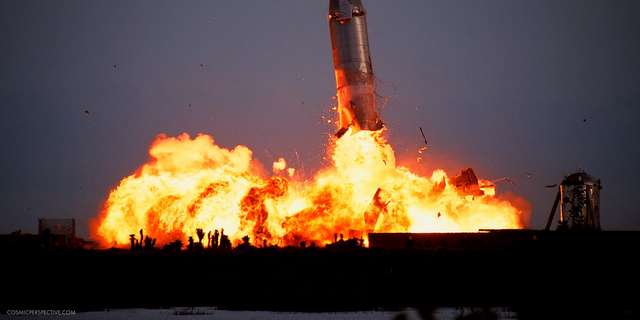
The much-anticipated launch of the world’s most powerful rocket happened on Thursday but it exploded in midair after the booster failed to separate from the ship as programmed.
After about 2 ½ minutes of takeoff, the gigantic rocket booster was expected to have exhausted most of its fuel, which would compel it to separate from the Starship. The booster would then fall into the ocean and the Starship would propel itself for six minutes until it nears the orbital speeds.
Before the explosion, SpaceX Starship was already 39 kilometres (24.2 miles) above ground. It spent about four minutes in the air before blowing off.
“The vehicle experienced multiple engines out during the flight test, lost altitude, and began to tumble. The flight termination system was commanded on both the booster and ship,” SpaceX said in a statement.
“With a test like this, success comes from what we learn, and we learned a tremendous amount about the vehicle and ground systems today that will help us improve on future flights of Starship,” the statement added.
The American Federal Aviation Administration (FAA) said although the ship was lost and damaged, there were no injuries or damage to public properties.
The Starship is the most powerful rocket ever built by man. The goal of the makers is to transport man and cargo to space and take humans to the moon once again. But Elon Musk’s ultimate goal is to take people to Mars.
On Monday, SpaceX postponed an initial launch over fueling issues. But Elon Musk, the CEO of the tech company, lowered people’s expectations, saying success does not necessarily mean having a successful test at the first attempt.
“If we do launch, I would consider anything that does not result in the destruction of the launch pad itself to be a win,” Musk stated. “If we get far enough away from the launch pad before something goes wrong, then I think I would consider that to be a success.”
Following Thursday’s failed launch attempt, Elon Musk was satisfied with the outcome and congratulated his team for “an exciting test launch of Starship.”
“Learned a lot for next test launch in a few months,” Musk tweeted.
NASA administrator Bill Nelson also congratulated SpaceX for the launch, even though it could not reach its destination.
“Congrats to SpaceX on Starship’s first integrated flight test! Every great achievement throughout history has demanded some level of calculated risk because with great risk comes great reward. Looking forward to all that SpaceX learns, to the next flight test—and beyond,” Nelson tweeted.
What Next for Starship?
The next stage for the SpaceX starship is in Elon Musk’s tweet. The team would be already identifying areas where it did not get it right and would be back in a few months for another launch.
In 2025, the SpaceX Starship is expected to take astronauts to the moon. The company would need to prove to NASA that the ship could perform this daunting task in the coming months. A lot depends on what happens at the next launch.

This story was first published by Antigua News on : antigua.news/2023/04/22/spacex-starship-explodes-in-midair-in-its-first-launch-attempt-but-it-was-a-success. © 2023 Antigua News. Republication without permission is not allowed.
Read our editorial standards and corrections policy. Spotted an error? Contact the newsroom.
More from Culture, Science and Tech
View section
VIDEO: As School Reopens, Simon Bolivar Pre-School’s Garden serves as a Model for teaching Agriculture in Early Childhood
By Editorial Staff

CUB Hells Gate Crowned 2026 Panorama Champions After Electrifying Carnival Showdown
By Cory Wayland

Five Female Chefs Wow Diners With Multi-Course Dinner at Hodges Bay Resort
By Shermain Bique-Charles

North Europe and the Arctic 2026: The Race for Power, Resources and New Trade Routes
By Dario Item
Comments
Be the first to comment.