
Family of Shaquille Seeks Urgent Support For Medical Treatment After Devastating Car Accident

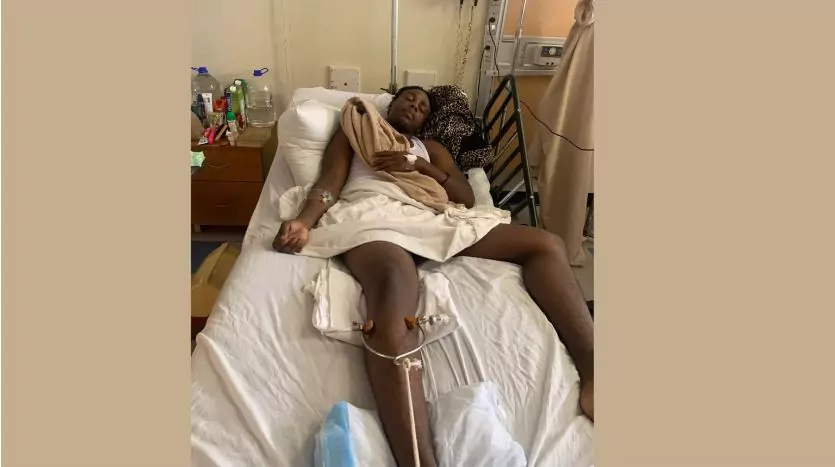
The family of Chevan “Shaquille” Jones, a twenty-one-year-old resident of All Saints Village, is reaching out to the community for assistance in securing vital medical treatment following a devastating car accident on May 13, 2023. Chevan sustained severe injuries, including a fractured hip and a broken nose, which require immediate attention that is unavailable locally.
Norean Bailey-King, Chevan’s aunt, spoke with Observer, emphasizing the urgency of the situation. She explained that due to the complexity of his hip fractures, the necessary medical equipment and expertise for hip replacement surgery are not available in Antigua and Barbuda. To access the essential treatment, Chevan must be transported to Santo Domingo.
In their heartfelt plea, Chevan’s family is appealing to the public for support in any way possible. Financial donations are desperately needed to cover the substantial costs associated with the surgery, travel expenses, and accommodation, which are estimated to be around US$23,000. The family also requests emotional support through prayers during this challenging time. Despite the difficulties they have faced in the past week, they remain hopeful, drawing strength from their faith.
If you are able to contribute financially, any amount would be greatly appreciated. Donations can be made to Alverine Bailey’s deposit account at the St John’s Cooperative Credit Union Bank. For further inquiries or assistance, please contact Alverine Bailey directly at 725-4258.
Your support and generosity will make a significant difference in Chevan’s journey towards recovery. Let us come together as a compassionate community, extending a helping hand to this young man in need. Together, we can bring hope and healing to his life.
GOFUND ME PAGE: https://gofund.me/509a039b
This story was first published by Antigua News on : antigua.news/2023/05/20/family-of-shaquille-seeks-urgent-support-for-medical-treatment-after-devastating-car-accident. © 2023 Antigua News. Republication without permission is not allowed.

About the author
The Editorial Staff refers to all reporters employed by Antigua.news. When an article is not an original creation of Antigua.news—such as when it is based on a press release, other media articles, letters to the editor, or court decisions—one of our staff members is responsible for overseeing its publication.
Read our editorial standards and corrections policy. Spotted an error? Contact the newsroom.
More from Antigua and Barbuda
View section
Governor General Urges Integrity as 20 Members Take Oaths for Public Bodies
Government House ceremonies see members sworn in to bodies overseeing midwifery, utilities, policing and public health.
By Shermain Bique-Charles

Pelican Court Housing Development Officially Opens Today
The Chinese-funded development provides 150 two-bedroom homes as part of the redevelopment of Booby Alley.
By Shermain Bique-Charles

VIDEO: Victory Centre Pleads for Public Help as Thieves Target Special Needs School Again
Just hours after celebrating the handover of a hydroponics project, Victory Centre was dealt another setback when an individual was captured on camera uprooting lettuce grown by students.
By Cory Wayland

Victory Centre and Cedar Grove Primary Mark Handover of Hydroponics System and Nursery
School gardening project brings students and teachers together to develop practical agricultural skills following a journey that began in 2024.
By Shermain Bique-Charles
Comments
Be the first to comment.