
APUA Electricity Business Unit Works Tirelessly to Restore Power After Tropical Storm Philippe

By Abigayle McIntosh
The Antigua Public Utilities Authority’s Electricity Business Unit is requesting patience from the public as they work hard to restore services that were disrupted during tropical storm Philippe.
Power has already been restored to Barbuda, and 18 out of 28 feeders, or 65% of the distribution system, have been successfully restored on mainland Antigua. The restoration process will continue in other areas throughout the day on Wednesday.
Manager of the Electricity Business Unit, Andre Mathias, explained that the company took a different approach to restoration in Antigua.
Usually, all the electricity feeders are assessed before restoration begins. However, the damage from the storm wasn’t as severe, so they decided to assess and restore simultaneously.

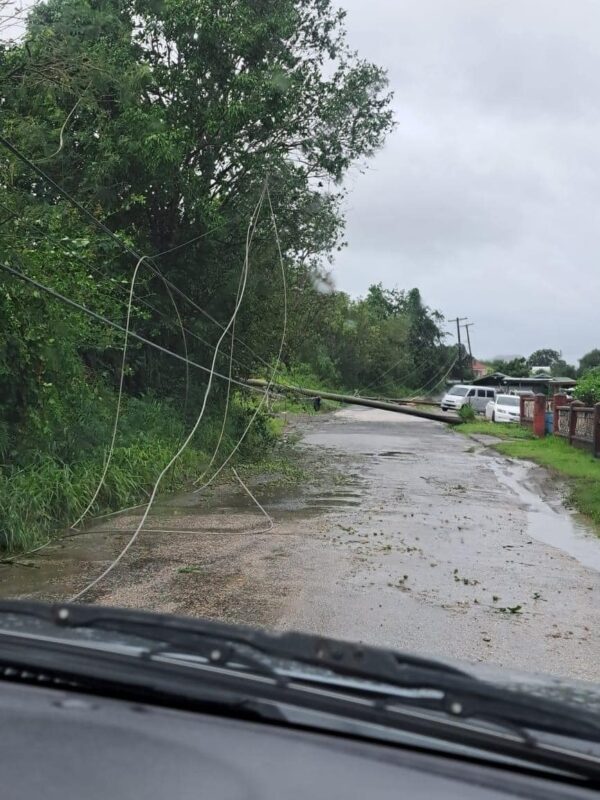
Mathias also noted that the storm presented challenges in three different areas: rain, wind, and lightning.
“We have never seen lighting like this in Antigua before, I have not seen it for sure. Sometimes what you have with the wet conditions it is easier for the polls to lean and fall.
“Our system has been quite robust so we were able to stay up, the system only collapsed just after 1 a.m. Tuesday. The team ought to be commended for the work we have been doing to maintain the system,” the GM said.
According to the electricity company, they were aiming to finish the repair work by late Tuesday.
However, there were some challenges in certain areas like Liberta, where the damages were more severe.
The company assures that by Wednesday, the situation will be under control.
This story was first published by Antigua News on : antigua.news/2023/10/04/apua-electricity-business-unit-works-tirelessly-to-restore-power-after-tropical-storm-philippe. © 2023 Antigua News. Republication without permission is not allowed.

About the author
The Editorial Staff refers to all reporters employed by Antigua.news. When an article is not an original creation of Antigua.news—such as when it is based on a press release, other media articles, letters to the editor, or court decisions—one of our staff members is responsible for overseeing its publication.
Read our editorial standards and corrections policy. Spotted an error? Contact the newsroom.
More from Antigua and Barbuda
View section
Cleo Lemonious and Latoya Pilliner Charged Over Alleged EC$4,405 Clothing Theft
The accused are expected before the St. John’s Magistrate’s Court on Monday following alleged thefts at a store on Market and Redcliffe Streets.
By Shermain Bique-Charles

Jeffers: Employers Must Give Workers Reasons to Be Loyal
The management consultant says job security, fair treatment and investment in employees are essential to building lasting workplace commitment.
By Shermain Bique-Charles

Browne Celebrates Sister’s Graduation: ‘She Has Corrected That Now’
Prime minister says Blondell Browne’s achievement reflects the opportunities now available to adults who once ended their education at secondary school.
By Shermain Bique-Charles

PM Browne Sees 5,000 Students at Five Islands as Major Expansion Advances
Prime minister says campus construction could begin by early 2027 and predicts the development will attract students from across the region.
By Shermain Bique-Charles
Comments
Be the first to comment.