
Home of Nigel Bascus gutted by Fire

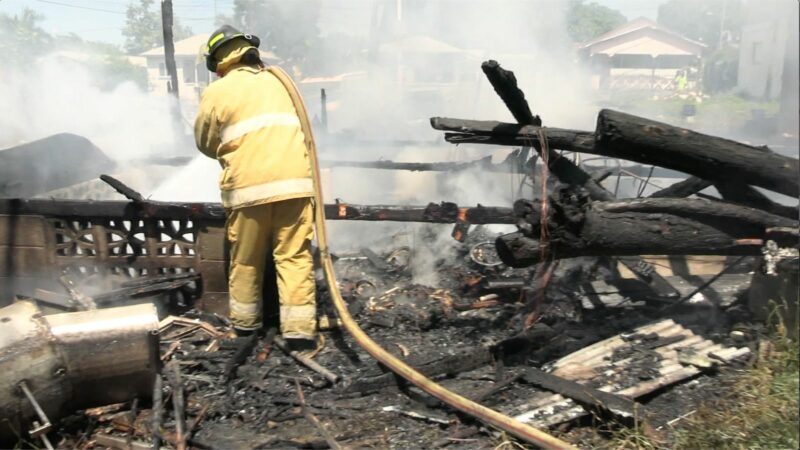
Early on Tuesday, the 4-bedroom home of political candidate Nigel ‘Missing Link’ Bascus was completely destroyed by fire.
Bascus, a fisherman, lost everything he owned in the blaze, including his GPS system and fishing gear, as well as his vehicle.
Firefighters arrived at the scene quickly and disconnected the electricity before extinguishing the flames, but the structure was already burned to the ground.
Bascus, who had failed in his bid to be nominated for election in the St. Mary’s South constituency the day before, had left his home 20 minutes before the fire broke out.
He said on nomination day that unnamed persons were trying to sabotage his political career..
He was heard on the radio saying that those who had intended to accompany him to get nominated backed out at the last minute because they were “afraid”
He stated that the house was uninsured.
This story was first published by Antigua News on : antigua.news/2023/10/11/home-of-nigel-bascus-gutted-by-fire. © 2023 Antigua News. Republication without permission is not allowed.

About the author
The Editorial Staff refers to all reporters employed by Antigua.news. When an article is not an original creation of Antigua.news—such as when it is based on a press release, other media articles, letters to the editor, or court decisions—one of our staff members is responsible for overseeing its publication.
Read our editorial standards and corrections policy. Spotted an error? Contact the newsroom.
More from Antigua and Barbuda
View section
Jeffers: Employers Must Give Workers Reasons to Be Loyal
The management consultant says job security, fair treatment and investment in employees are essential to building lasting workplace commitment.
By Shermain Bique-Charles

Browne Celebrates Sister’s Graduation: ‘She Has Corrected That Now’
Prime minister says Blondell Browne’s achievement reflects the opportunities now available to adults who once ended their education at secondary school.
By Shermain Bique-Charles

PM Browne Sees 5,000 Students at Five Islands as Major Expansion Advances
Prime minister says campus construction could begin by early 2027 and predicts the development will attract students from across the region.
By Shermain Bique-Charles

Five Islands Valedictorian Says Adaptability and Service Must Guide Graduates
UWI Five Islands valedictorian Kathalia Valentine urges graduates to embrace change, support others and lead with integrity.
By Shermain Bique-Charles
Comments
Be the first to comment.