
Caribbean airports faced bomb threats leading to temporary disruptions

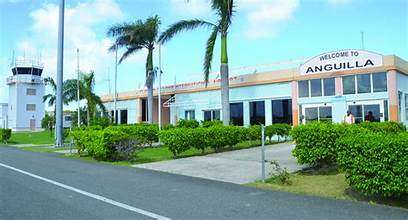
A series of bomb scares were reported at several airports in the Caribbean between last week and today, causing temporary disruptions to the tranquility of the regions.
The affected airports were located in Bermuda, Anguilla, the British Virgin Islands, and the Turks and Caicos Islands.
The latest incident happened this morning when the Government of Anguilla received a bomb threat via the Royal Anguilla Police Force, which led to the temporary suspension of operations at the Clayton J. Lloyd International Airport.
After a thorough search of the Terminal Building and an extensive sweep of the Security Restricted Area, police gave the ‘all-clear’ around 1:20 pm.
Meanwhile, on Sunday, Bermuda police were notified of a bomb threat via e-mail threatening the terminal and British Airways flight 158, which was due to depart for London Heathrow.

The airport building and its environs were thoroughly searched, and the all-clear was given later.
Similarly, the Royal Virgin Islands Police Force received an email via Advance Marketing & Professional Services on Sunday, May 5, alerting them of a potential bomb threat claiming the presence of a bomb on an aircraft and at the Terminal Building at the Terrence B. International Airport.
RVIPF and Airport Security evacuated the premises and conducted a thorough search of all areas, but no devices were discovered, indicating the messages were likely intended to create chaos and disrupt airport operations.
After two and a half hours, the all-clear was issued, and normal operations resumed. Similar threats targeting the International Airports of Turks and Caicos and Bermuda have also been reported.
The RVIPF is collaborating with these jurisdictions to identify the offenders behind these threats.
Between April 26 and April 29, four bomb threats were issued to the JAGS McCartney International Airport and Howard Hamilton International Airport in the Turks and Caicos.
Operations at the facilities were suspended as police searched for explosives after the Turks and Caicos Islands Civil Aviation Authority received emails about a bomb on the compound.
After hours of searching, no explosives were found, leading police to label the incident as a hoax.
This story was first published by Antigua News on : antigua.news/2024/05/06/caribbean-airports-faced-bomb-threats-leading-to-temporary-disruptions. © 2024 Antigua News. Republication without permission is not allowed.

About the author
The Editorial Staff refers to all reporters employed by Antigua.news. When an article is not an original creation of Antigua.news—such as when it is based on a press release, other media articles, letters to the editor, or court decisions—one of our staff members is responsible for overseeing its publication.
Read our editorial standards and corrections policy. Spotted an error? Contact the newsroom.
More from Caribbean
View section
BREAKING | Dominica Heads to the Polls on December 16
Nomination Day is November 30 as Prime Minister Roosevelt Skerrit seeks a fresh mandate for the Dominica Labour Party.
By Shermain Bique-Charles

DOMINICA: Relief as Three Missing Men Are Found Alive at Sea Near Aves Islands
Davel Baron, Ryan Royer and a third man were rescued by a cargo vessel after being found drifting at sea, bringing relief following days of uncertainty over their whereabouts.
By Cory Wayland

Two Men Vanish at Sea in Dominica, Sparking Growing Fears for Their Safety
Police issue missing-person alerts for Davel Baron and Ryan Royer as concerns grow over their whereabouts.
By Cory Wayland

Saint Lucia Makes Decision on Citizenship by Investment Programme Amid EU Pressure
Prime Minister Philip J. Pierre confirms his government has formally responded to the European Union but says the decision will remain confidential until Brussels acknowledges receipt of the correspondence.
By Cory Wayland
Comments
Be the first to comment.