
STATEMENT: Attempted Robbery at Central Housing and Planning Authority Headquarters

PRESS STATEMENT
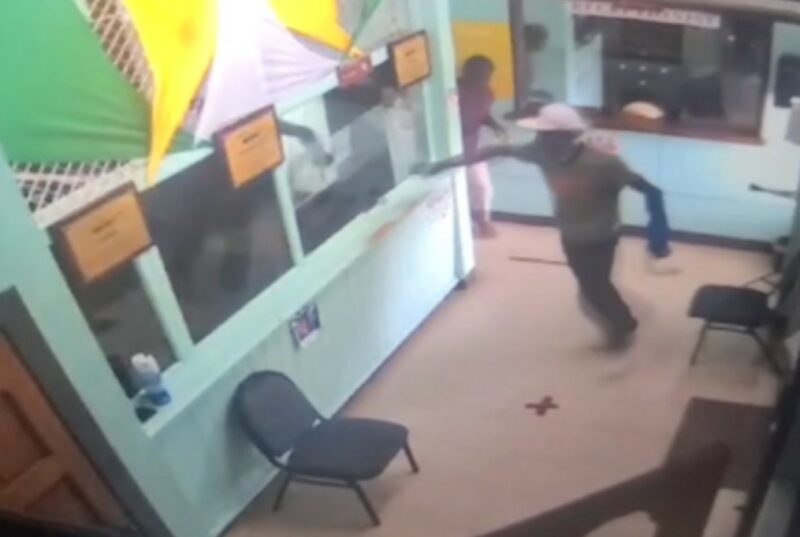
At approximately 12:50 PM Yesterday, the 4th of July 2024, there was an attempted armed robbery at the Central Housing and Planning Authority (CHAPA) headquarters located on Lower All Saints Road.
First and foremost, we are profoundly grateful to report that, by the mercy of God, none of our staff members or customers were seriously hurt during this incident.
The swift response and bravery demonstrated by our staff, coupled with our existing security measures, played a crucial role in averting the robbery.
We want to assure all our employees that the management and board of directors are fully committed to supporting them in the aftermath of this event.
We will provide any necessary counseling and support services to help them cope with the emotional impact of this ordeal.
In tight of yesterday’s events, we are taking immediate steps to enhance our security protocols to ensure the continued safety of our employees and customers.
We will not take for granted yesterday’s fortunate outcome and are determined to reinforce our defenses against any future threats.
This incident serves as a stark reminder of the importance of vigilance and the preservation of life above all else.
We urge everyone to remain aware of their surroundings and to report any suspicious activities. Let us continue to be each other’s keepers, fostering a safe and supportive environment for all.
We extend our deepest gratitude to our staff for their quick thinking and courage, and to the Police who were on scene within minutes and Minister Maria Browne and her staff for their prompt response and support for the Central Housing and Planning Authority.
This story was first published by Antigua News on July 5, 2024: antigua.news/2024/07/05/statement-attempted-robbery-at-central-housing-and-planning-authority-headquarters. © 2024 Antigua News. Republication without permission is not allowed.

About the author
The Editorial Staff refers to all reporters employed by Antigua.news. When an article is not an original creation of Antigua.news—such as when it is based on a press release, other media articles, letters to the editor, or court decisions—one of our staff members is responsible for overseeing its publication.
Read our editorial standards and corrections policy. Spotted an error? Contact the newsroom.
More from Antigua and Barbuda
View section
Hundreds Caught In Miles-Long Gas Lines As Dealers Protest Increased Margins
Motorists are scrambling for fuel as leading service stations shut their pumps for the second time in weeks, while WIOC’s Friars Hill station reportedly remains the only WIOC location still dispensing gasoline.
By Cory Wayland

Four-Country CARICOM Free Movement Scheme Reports 939 Processed as Antigua Maintains Separate Conditions for TCN Transfers
Antigua and Barbuda remains outside the four-country scheme, while proposing strict limits and safeguards for temporary transfers of third-country nationals from the US.
By Shermain Bique-Charles

Elderly Man Found Dead Inside Ovals Home
Police are investigating after an elderly man was discovered unresponsive at his home in Ovals on Wednesday morning, with no indication of foul play at this stage.
By Cory Wayland

WATCH: Taxi Operators Call for Proper Policing as Minister Freeland Reviews Concerns in St. John’s
Taxi association representatives say vehicles occupying designated spaces and soliciting cruise passengers are affecting operations around Heritage Quay.
By Shermain Bique-Charles
Comments
Be the first to comment.